Was macht die Komponente?
Ein Dialog ist ein Overlay, das den Hauptinhalt der Seite überlagert und eine fokussierte Interaktion oder wichtige Information präsentiert, bis Nutzende die Aktion abgeschlossen oder den Dialog geschlossen haben.
Wann soll die Komponente eingesetzt werden?
- Um wichtige Informationen oder Bestätigungen an Nutzende zu übermitteln.
- Um Nutzende zu einer Handlung aufzufordern, bevor er mit dem Hauptinhalt der Seite fortfährt.
- Um komplexe Formulare oder Inhalte anzuzeigen, die nicht in die Hauptseite integriert werden sollen.
Regeln
- Ein Dialog soll so weit wie möglich reduziert sein und sich auf eine einzige Aufgabe/Information oder ein einziges Formular konzentrieren.
- Der Dialog soll leicht zu schliessen sein, entweder durch eine Schliessen-Schaltfläche oder durch Klicken ausserhalb des Dialogs.
- Wenn kein Actions im Dialog-Footer definiert werden, müssen Nutzende den Dialog immer schliessen können.
- Dialoge lassen sich auch immer mit der ESC-Taste schliessen.
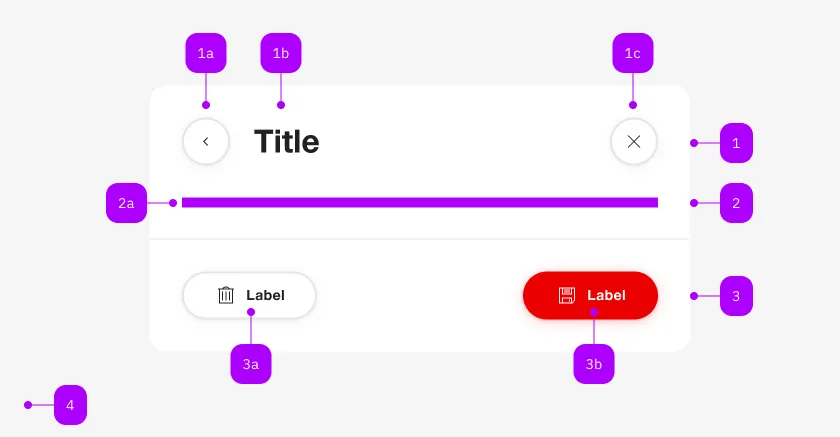
| Nummer | Typ | Beschreibung | Optional | Hinweis |
|---|---|---|---|---|
| 1 | Komponente | sbb-dialog-title | Nein | |
| 2 | Komponente | sbb-dialog-close-button | Ja | Close-Action |
| 2 | Slot | Beliebiger Inhalt erlaubt | Nein | |
| 4 | Komponente | sbb-dialog-actions | Ja | |
| 4a | Komponente | sbb-secondary-button | Ja | Auch Block-Links sind erlaubt |
| 4b | Komponente | sbb-button | Ja | Auch Block-Links sind erlaubt |
Spielwiese
Dialog content
Dialog content
Dialog content
The <sbb-dialog> component provides a way to present content on top of the app's content mainly to
interact with the user.
The component creates a backdrop to prevent interaction with content behind the modal, disables page
scrolling while open, manages focus by setting it to the first focusable element, and automatically
adds the appropriate ARIA roles.
The dialog should always consist of a title and content. Optionally, a close button and actions can
be provided.
<sbb-dialog>
  <sbb-dialog-title>Title</sbb-dialog-title>
  <sbb-dialog-content>Dialog content.</sbb-dialog-content>
</sbb-dialog>
The component supports slotting the <sbb-dialog-title>, <sbb-dialog-close-button>, <sbb-dialog-content>
and an <sbb-dialog-actions> elements for structuring the content of a dialog.
<sbb-dialog>
  <sbb-dialog-title>Title</sbb-dialog-title>
  <sbb-dialog-close-button></sbb-dialog-close-button>
  <sbb-dialog-content>Dialog content.</sbb-dialog-content>
  <sbb-dialog-actions>
    <sbb-secondary-button sbb-dialog-close>Cancel</sbb-secondary-button>
    <sbb-button sbb-dialog-close sbb-focus-initial>Confirm</sbb-button>
  </sbb-dialog-actions>
</sbb-dialog>
Title
The <sbb-dialog-title> component extends the sbb-title component.
It should be used as a title for a dialog.
<sbb-dialog>
  <sbb-dialog-title>A describing title of the dialog</sbb-dialog-title>
</sbb-dialog>
States
The title can have a negative state which is automatically synchronized with the negative state of the dialog.
Style
In scenarios where the visual representation needs to be different from the semantic meaning of the title level,
it is possible to use the visualLevel property (default value: 4).
Actions
The <sbb-dialog-actions> component extends the sbb-action-group
component. Use it to display a footer with an action group.
<sbb-dialog>
  <sbb-dialog-actions>
    <sbb-block-link sbb-dialog-close>Link</sbb-block-link>
    <sbb-secondary-button sbb-dialog-close>Cancel</sbb-secondary-button>
    <sbb-button sbb-dialog-close sbb-focus-initial>Confirm</sbb-button>
  </sbb-dialog-actions>
</sbb-dialog>
Interactions
To display the dialog, a trigger can be connected via the trigger property,
or the open() method on the <sbb-dialog> component can be called.
<sbb-button id="dialog-trigger">Open dialog</sbb-button>

<sbb-dialog trigger="dialog-trigger">
  <sbb-dialog-title>Title</sbb-dialog-title>
  <sbb-dialog-content>Dialog content.</sbb-dialog-content>
  <sbb-dialog-actions><sbb-button sbb-dialog-close>Close</sbb-button></sbb-dialog-actions>
</sbb-dialog>
Closing the dialog
The dialog can be closed in several ways:
-
Close button: Add an
<sbb-dialog-close-button>component to provide a dedicated close button.
This is recommended for dialogs with complex content.<sbb-dialog> <sbb-dialog-title>Title</sbb-dialog-title> <sbb-dialog-close-button></sbb-dialog-close-button> <sbb-dialog-content>Dialog content.</sbb-dialog-content> </sbb-dialog>The
<sbb-dialog-close-button>component extends the
sbb-secondary-button component.
An aria-label is automatically set. It is however possible to override it, if necessary. -
sbb-dialog-close attribute: Add the
sbb-dialog-closeattribute to any element within the dialog
(typically buttons in the actions section) to close the dialog when clicked. You can optionally provide a result value:<sbb-dialog> <sbb-dialog-title>Title</sbb-dialog-title> <sbb-dialog-content>Dialog content.</sbb-dialog-content> <sbb-dialog-actions> <sbb-secondary-button sbb-dialog-close="cancel">Cancel</sbb-secondary-button> <sbb-button sbb-dialog-close="confirm">Confirm</sbb-button> </sbb-dialog-actions> </sbb-dialog>Alternatively, you can use the
assignDialogResult()helper to programmatically assign a complex result to an element:import { assignDialogResult } from '@sbb-esta/lyne-elements/dialog.js'; const confirmButton = document.querySelector('sbb-button'); assignDialogResult(confirmButton, { action: 'confirm', otherProp: 'any value' }); -
Backdrop click: By default, clicking on the backdrop will close the dialog.
This behavior can be disabled by settingbackdrop-action="none". -
Escape key: Pressing the
Esckey will close the dialog. -
Programmatically: Call the
close(result?: any)method on the<sbb-dialog>element.
This method closes the dialog and emitsbeforecloseandcloseevents with the provided result as a payload.const dialog = document.querySelector('sbb-dialog'); dialog.close({ confirmed: true });
Handling close events
When the dialog closes, it emits two events:
beforeclose: Emitted before the closing transition begins. This event is cancelable by callingevent.preventDefault().close: Emitted after the dialog has fully closed.
Both events are of type SbbDialogCloseEvent and provide access to:
result: The result value passed toclose(), assigned viaassignDialogResult(), or the value of thesbb-dialog-closeattributecloseTarget: The element that triggered the close action (e.g., the clicked button), ornullif closed programmatically or via Escape key
dialog.addEventListener('close', (event) => {
  console.log('Result:', event.result);
  console.log('Close target:', event.closeTarget);
});
Style
It's possible to display the component in negative variant using the self-named property.
<sbb-dialog negative>
  <sbb-dialog-title>Title</sbb-dialog-title>
  <sbb-dialog-content>Dialog content.</sbb-dialog-content>
</sbb-dialog>
Accessibility
We recommend to place at maximum two actions in the <sbb-dialog-actions> component.
More elements can potentially confuse users.
If there is more complex content than just a simple text / question, we recommend to slot the <sbb-dialog-close-button>.
This either provides an initial focus at the dialog start and also provides as a second exit possibility.
Controlling initial focus
The first element with the attribute sbb-focus-initial will receive focus on opening.
If the attribute is not used, the first focusable element receives focus.
In case there is no <sbb-dialog-close-button> and complex content,
there should be a focusable element at the dialog start, e.g. the title itself.
This prevents screen reader users having to navigate backwards from the dialog actions.
Focus restoration
When closed, the dialog restores focus to the element that previously held focus when the
dialog opened by default. However, focus restoration can be disabled
by setting the skipFocusRestoration property to true.
As this is an accessibility feature, it is recommended to focus
an alternative element by listening to the didClose event.
API Documentation
class: SbbDialogActionsElement, sbb-dialog-actions
Properties
| Name | Attribute | Privacy | Type | Default | Description |
|---|---|---|---|---|---|
alignGroup | align-group | public | 'start' | 'center' | 'stretch' | 'end' | 'start' | Set the slotted <sbb-action-group> children's alignment. |
buttonSize | button-size | public | SbbButtonSize | 'm' / 's' (lean) | Size of the nested sbb-button instances. This will overwrite the size attribute of nested sbb-button instances. |
horizontalFrom | horizontal-from | public | SbbHorizontalFrom | 'large' | Overrides the behavior of orientation property. |
linkSize | link-size | public | SbbLinkSize | 's' / 'xs' (lean) | Size of the nested sbb-block-link instances. This will overwrite the size attribute of nested sbb-block-link instances. |
orientation | orientation | public | SbbOrientation | 'horizontal' | Indicates the orientation of the components inside the <sbb-action-group>. |
Slots
| Name | Description |
|---|---|
Use the unnamed slot to add sbb-block-link or sbb-button elements to the sbb-dialog-actions. |
class: SbbDialogCloseButtonElement, sbb-dialog-close-button
Properties
| Name | Attribute | Privacy | Type | Default | Description |
|---|---|---|---|---|---|
disabled | disabled | public | boolean | false | Whether the component is disabled. |
disabledInteractive | disabled-interactive | public | boolean | false | Whether the button should be aria-disabled but stay interactive. |
form | form | public | HTMLFormElement | null | The <form> element to associate the button with. | |
iconName | icon-name | public | string | '' | The icon name we want to use, choose from the small icon variants from the ui-icons category from here https://icons.app.sbb.ch. |
loading | loading | public | boolean | false | Whether the button indicates a loading state. The animation kicks in after a delay of 300ms, configurable with --sbb-button-loading-delay CSS variable. |
name | name | public | string | Name of the form element. Will be read from name attribute. | |
negative | negative | public | boolean | false | Negative coloring variant flag. |
size | size | public | SbbButtonSize | 's' | Size variant, either l, m or s. |
type | type | public | SbbButtonType | 'button' | The type attribute to use for the button. |
validationMessage | - | public | string | Returns the current error message, if available, which corresponds to the current validation state. Please note that only one message is returned at a time (e.g. if multiple validity states are invalid, only the chronologically first one is returned until it is fixed, at which point the next message might be returned, if it is still applicable). Also, a custom validity message (see below) has precedence over native validation messages. | |
validity | - | public | ValidityState | Returns the ValidityState object for this element. | |
value | value | public | string | '' | Value of the form element. |
willValidate | - | public | boolean | Returns true if this element will be validated when the form is submitted; false otherwise. |
Methods
| Name | Privacy | Description | Parameters | Return | Inherited From |
|---|---|---|---|---|---|
checkValidity | public | Returns true if this element has no validity problems; false otherwise. Fires an invalid event at the element in the latter case. | boolean | SbbFormAssociatedMixin | |
reportValidity | public | Returns true if this element has no validity problems; otherwise, returns false, fires an invalid event at the element, and (if the event isn't canceled) reports the problem to the user. | boolean | SbbFormAssociatedMixin | |
setCustomValidity | public | Sets the custom validity message for this element. Use the empty string to indicate that the element does not have a custom validity error. | message: string | void | SbbFormAssociatedMixin |
CSS Properties
| Name | Default | Description |
|---|---|---|
--sbb-button-loading-delay | 300ms | The delay before the loading animation starts, when setting the button into loading state. |
Slots
| Name | Description |
|---|---|
| Use the unnamed slot to add content to the dialog-close-button. Not intended to be used in this context. | |
icon | Slot used to display the icon, if one is set. Not intended to be used in this context. |
class: SbbDialogContentElement, sbb-dialog-content
Slots
| Name | Description |
|---|---|
| Use the unnamed slot to provide a dialog content. |
class: SbbDialogElement, sbb-dialog
Properties
| Name | Attribute | Privacy | Type | Default | Description |
|---|---|---|---|---|---|
accessibilityLabel | accessibility-label | public | string | '' | This will be forwarded as aria-label to the relevant nested element to describe the purpose of the overlay. |
backdrop | backdrop | public | 'opaque' | 'translucent' | 'opaque' | Backdrop density. |
backdropAction | backdrop-action | public | 'close' | 'none' | 'close' | Backdrop click action. |
isOpen | - | public | boolean | Whether the element is open. | |
negative | negative | public | boolean | false | Negative coloring variant flag. |
skipFocusRestoration | skipFocusRestoration | public | boolean | false | Whether to skip restoring focus to the previously-focused element when the overlay is closed. Note that automatic focus restoration is an accessibility feature, and it is recommended that you provide your own equivalent, if you decide to turn it off. |
trigger | trigger | public | HTMLElement | null | null | The element that will trigger the menu overlay. For attribute usage, provide an id reference. |
Methods
| Name | Privacy | Description | Parameters | Return | Inherited From |
|---|---|---|---|---|---|
announceTitle | public | Announce the accessibility label or dialog title for screen readers. | void | ||
close | public | Closes the component. | result: any | void | SbbOpenCloseBaseElement |
escapeStrategy | public | The method which is called on escape key press. Defaults to calling close() | void | SbbOpenCloseBaseElement | |
open | public | Opens the component. | void | SbbOpenCloseBaseElement |
Events
| Name | Type | Description | Inherited From |
|---|---|---|---|
beforeclose | SbbDialogCloseEvent | Emits whenever the component begins the closing transition. Can be canceled. | SbbOpenCloseBaseElement |
beforeopen | Event | Emits whenever the component starts the opening transition. Can be canceled. | SbbOpenCloseBaseElement |
close | SbbDialogCloseEvent | Emits whenever the component is closed. | SbbOpenCloseBaseElement |
open | Event | Emits whenever the component is opened. | SbbOpenCloseBaseElement |
CSS Properties
| Name | Default | Description |
|---|---|---|
--sbb-dialog-z-index | var(--sbb-overlay-default-z-index) | To specify a custom stack order, the z-index can be overridden by defining this CSS variable. The default z-index of the component is set to var(--sbb-overlay-default-z-index) with a value of 1000. |
Slots
| Name | Description |
|---|---|
Use the unnamed slot to provide a sbb-dialog-title, sbb-dialog-content and an optional sbb-dialog-actions. |
class: SbbDialogTitleElement, sbb-dialog-title
Properties
| Name | Attribute | Privacy | Type | Default | Description |
|---|---|---|---|---|---|
level | level | public | SbbTitleLevel | '2' | Title level |
negative | negative | public | boolean | false | Negative coloring variant flag. |
visualLevel | visual-level | public | SbbTitleLevel | null | '4' | Visual level for the title. |
Slots
| Name | Description |
|---|---|
| Use the unnamed slot for the content of the dialog-title. |