Was macht die Komponente?
Die Tooltip-Komponente zeigt zusätzliche Informationen kontextuell und nicht-dominant an, ohne den Benutzerfluss zu unterbrechen.
Wann soll die Komponente eingesetzt werden?
Die Tooltip-Komponente wird verwendet, wenn zusätzliche Hinweise, Erklärungen oder Hilfestellungen zu einem Element benötigt werden. Tooltips eignen sich besonders gut für:
- Die Erklärung von Icons, Abkürzungen oder Fachbegriffen
- Ergänzende Informationen zu Bedienelementen
Regeln
- Die Informationen im Tooltip sollen kurz, präzise und verständlich sein.
- Keine interaktiven Elemente (wie Buttons oder Links) innerhalb eines Tooltips verwenden – Nur Text ist erlaubt.
- Der Tooltip-Text darf keine wesentlichen Inhalte oder Pflichtinformationen enthalten.
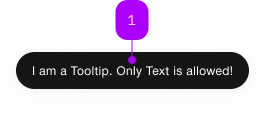
| Nummer | Typ | Beschreibung | Optional | Hinweis |
|---|---|---|---|---|
| 1 | Slot | Nur Text ist erlaubt | Nein |
Spielwiese
The <sbb-tooltip> component displays contextual information related to an element.
The standard way to use it is through the trigger property, referencing the element which activate the tooltip.
<sbb-button id="tooltip-trigger">Button</sbb-button>
<sbb-tooltip trigger="tooltip-trigger">Tooltip message</sbb-tooltip>
Attribute usage
It's also possible to use the component by setting the sbb-tooltip attribute on the trigger element.
The attribute's value is the tooltip's rendered message
(Note: it does not work if used in a Shadow DOM).
<sbb-button sbb-tooltip="Tooltip message">Button</sbb-button>
If the component is used this way, it's also possible to set the open and close delays
using the sbb-tooltip-open-delay and the sbb-tooltip-close-delay attributes.
<sbb-button sbb-tooltip="Tooltip message" sbb-tooltip-open-delay="250" sbb-tooltip-close-delay="250"
  >Button</sbb-button
>
Interactions
The tooltip opens when the user hovers the trigger element and closes on mouse leave. A delay can be optionally set, both on open and close actions.
On touch devices, the tooltip opens on long press and closes automatically after a longPressCloseDelay (default: 1500 ms).
Positioning
The tooltip uses the CSS anchor positioning to anchor itself to the trigger element.
Specifically, it uses the "position-area"
and "position-try-fallbacks" CSS properties to define where the tooltip should be positioned.
You can control the positioning of the tooltip by overriding the --sbb-overlay-position-area and --sbb-overlay-position-try-fallbacks CSS variables.
By default, it appears above the trigger element and, if there is insufficient space, it automatically chooses the best available position.
// Primary position
--sbb-overlay-position-area: block-start;

// Fallback positions. The first one that fits will be used.
--sbb-overlay-position-try-fallbacks:
  block-start span-inline-end, block-start span-inline-start, block-end, block-end span-inline-end,
  block-end span-inline-start;
ⓘ The CSS anchor positioning feature is not yet fully supported by all browsers.
Therefore, a polyfill is used which limits the available positions to the following:
| Logical positions | Physical positions |
| ------------------------------- | ------------------- |
| block-start | top |
| block-end | bottom |
| inline-start | left |
| inline-end | right |
| block-start span-inline-start | top span-left |
| block-start span-inline-end | top span-right |
| block-end span-inline-start | bottom span-left |
| block-end span-inline-end | bottom span-right |
| inline-start span-block-start | left span-top |
| inline-start span-block-end | left span-bottom |
| inline-end span-block-start | right span-top |
| inline-end span-block-end | right span-bottom |
Attribute usage
When using the sbb-tooltip attribute, you can configure the position by setting the sbb-tooltip-position attribute.
The value of the attribute is a comma-separated list of positions.
<sbb-button sbb-tooltip="Tooltip message" sbb-tooltip-position="block-end, block-start, inline-end"
  >Button</sbb-button
>
Configuration
The open and close delays can be configured via global configuration. These values will be used as default, unless explicitly set on the element.
import { mergeConfig } from '@sbb-esta/lyne-elements/core/config.js';

mergeConfig({
  tooltip: {
    openDelay: 0, // Delay before the tooltip opens (in ms)
    closeDelay: 0, // Delay before the tooltip closes (in ms)
    longPressCloseDelay: 1500, // Duration before the tooltip auto-closes after a long press (in ms)
  },
});
Accessibility
The <sbb-tooltip> adds an ariaDescribedby reference to an element containing the tooltip's message.
Avoid interactions that exclusively show a tooltip with pointer events like click and mouseenter.
Always ensure that keyboard users can perform the same set of actions available to mouse and touch users.
API Documentation
class: SbbTooltipElement, sbb-tooltip
Properties
| Name | Attribute | Privacy | Type | Default | Description |
|---|---|---|---|---|---|
closeDelay | close-delay | public | number | null | Close the tooltip after a given delay in milliseconds. Global configuration is used as default, if not set. |
disabled | disabled | public | boolean | false | Whether the component is disabled. |
isOpen | - | public | boolean | Whether the element is open. | |
longPressCloseDelay | long-press-close-delay | public | number | 1500 | Automatically close the tooltip after it has been open by long press. Global configuration is used as default, if not set. |
openDelay | open-delay | public | number | null | Open the tooltip after a given delay in milliseconds. Global configuration is used as default, if not set. |
trigger | trigger | public | HTMLElement | null | null | The element that will trigger the tooltip overlay. For attribute usage, provide an id reference. |
Methods
| Name | Privacy | Description | Parameters | Return | Inherited From |
|---|---|---|---|---|---|
close | public | Closes the component. | void | SbbOpenCloseBaseElement | |
escapeStrategy | public | The method which is called on escape key press. Defaults to calling close() | void | SbbOpenCloseBaseElement | |
open | public | Opens the component. | void | SbbOpenCloseBaseElement |
Events
| Name | Type | Description | Inherited From |
|---|---|---|---|
beforeclose | Event | Emits whenever the component begins the closing transition. Can be canceled. | SbbOpenCloseBaseElement |
beforeopen | Event | Emits whenever the component starts the opening transition. Can be canceled. | SbbOpenCloseBaseElement |
close | Event | Emits whenever the component is closed. | SbbOpenCloseBaseElement |
open | Event | Emits whenever the component is opened. | SbbOpenCloseBaseElement |
CSS Properties
| Name | Default | Description |
|---|---|---|
--sbb-overlay-position-area | block-end | The primary position for the tooltip. |
--sbb-overlay-position-try-fallbacks | block-end span-inline-end, block-end span-inline-start, block-start, block-start span-inline-end, block-start span-inline-start | The list of fallback positions, separated by ',', for the tooltip |
--sbb-tooltip-z-index | var(--sbb-overlay-default-z-index) | To specify a custom stack order, the z-index can be overridden by defining this CSS variable. The default z-index of the component is set to var(--sbb-overlay-default-z-index) with a value of 1000. |
Slots
| Name | Description |
|---|---|
| Use the unnamed slot to add the text into the tooltip. |