Was macht die Komponente?
Ein Select ermöglicht es Nutzenden, eine Auswahl aus einer Liste mit mehreren Optionen zu treffen.
Wann soll die Komponente eingesetzt werden?
- Wenn Nutzende eine Auswahl aus einer umfangreichen Liste von Optionen treffen sollen.
- Um Platz auf der Benutzeroberfläche zu sparen, indem die Optionen in einem Dropdown-Menü verborgen werden.
- Wenn die Anzahl der Auswahlmöglichkeiten zu gross für Radio-Buttons oder Checkboxen ist.
Regeln
- Die Optionen im Select-Menü sollen eindeutig beschriftet und leicht verständlich sein.
- Verwende eine sinnvolle Standardauswahl, falls dies für den Anwendungsfall relevant ist.
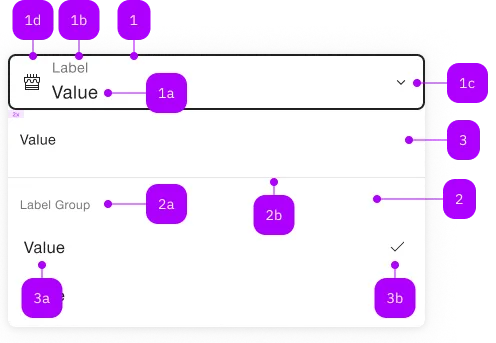
| Nummer | Typ | Beschreibung | Optional | Hinweis |
|---|---|---|---|---|
| 1 | Komponente | sbb-form-field | Nein | |
| 1a | Standard-HTML | input | Nein | |
| 1b | Standard-HTML | label | Nein | |
| 1c | Komponente | sbb-icon | Nein | Zeigt Zustand an. |
| 1d | Komponente | sbb-icon | Ja | Prefix |
| 2 | Komponente | sbb-optgroup | Ja | |
| 2a | Text | Label | Nein | |
| 2b | Komponente | sbb-divider | - | Erscheint bei einer optgroup |
| 3 | Komponente | sbb-option | Nein | |
| 3a | Text | Value | Nein | |
| 3b | Komponente | sbb-icon | Ja | Zeigt angewählte Option an. |
Spielwiese
The <sbb-select> is a component which provides a list of selectable options in an overlay panel,
emulating the behavior of a native <select>.
In <sbb-form-field>
If the component is used within a <sbb-form-field>, it will automatically display the option panel above or below it;
otherwise, the panel takes the component's parent element as origin.
Options or groups of options (see sbb-option /
sbb-option-group components)
can be provided via an unnamed slot.
<sbb-form-field>
  <label>Train types</label>
  <sbb-select>
    <sbb-option value="Astoro" selected>Astoro</sbb-option>
    <sbb-option value="Flirt">Flirt</sbb-option>
    <sbb-option value="Domino">Domino</sbb-option>
  </sbb-select>
</sbb-form-field>
The component has a value property, which can be a string or a string array (when multiple is set to true).
If no value has been set, it is possible to display a placeholder using the placeholder property.
Also note that if the value is set on the <sbb-select>, it will override all the selected attributes on the internal <sbb-option>s,
so setting a default value should be done using the value attribute on the <sbb-select> and not by setting the
selected attribute on the internal <sbb-option>s.
States
It is possible to display the component in disabled or readonly state by using the self-named properties. The component
has a required property, which can be useful for setting a custom <sbb-error> message within a <sbb-form-field>.
<sbb-form-field>
  <label>Pick one:</label>
  <sbb-select placeholder="1st gen starters">
    <sbb-option value="Bulbasaur">Bulbasaur</sbb-option>
    <sbb-option value="Charmander">Charmander</sbb-option>
    <sbb-option value="Squirtle">Squirtle</sbb-option>
  </sbb-select>
  <sbb-error>You must pick one!</sbb-error>
</sbb-form-field>
Multiple
If the multiple property is set to false, only one option can be selected:
in this case the placeholder will be replaced by the chosen value and a check mark will appear
on the right of the selected option in the panel.
If the multiple attribute is set to true, a visual checkbox will appear on the left of any option in the panel, and
the selected values will be displayed in selection order, separated by a comma.
<sbb-form-field>
  <label>Cities</label>
  <sbb-select multiple>
    <sbb-optgroup label="Switzerland">
      <sbb-option value="Zurich">Zurich</sbb-option>
      <sbb-option value="Bern">Bern</sbb-option>
      <sbb-option value="Lugano">Lugano</sbb-option>
    </sbb-optgroup>
    <sbb-optgroup label="Italy">
      <sbb-option value="Rome">Rome</sbb-option>
      <sbb-option value="Milan">Milan</sbb-option>
    </sbb-optgroup>
  </sbb-select>
</sbb-form-field>
Style
The component has no size property but, when slotted in a <sbb-form-field>, it adapts to the parent size.
<sbb-form-field size="s">
  <label>Train types</label>
  <sbb-select>...</sbb-select>
</sbb-form-field>
Events
Consumers can listen to the native change/input event on the <sbb-select> component to intercept the selection's change;
the current value can be read from event.target.value.
Additionally <sbb-option> will emit optionSelected when selected via user interaction.
Accessibility
The select follows the combobox pattern. As a technical difficulty, we have to copy the combobox element into the light DOM.
As a consequence, linking labels is not fully supported. While aria-label, aria-labelledby and aria-describedby on the <sbb-select> work,
using <label> together with <sbb-select> is only partially supported.
As workaround, we copy the text into the aria-label of the combobox element, but this remains not synchronized.
Whenever a <label> gets a change, we won't be able to detect it, and we won't be able to update the aria-label.
The only two exceptions are when connectedCallback() gets called and when the document language changes.
Fully supported:
<sbb-select aria-label="Select train type">...</sbb-select>
Changes to the <label>-text might not be reflected after initialization:
<sbb-form-field size="s">
  <label>Train types</label>
  <sbb-select>...</sbb-select>
</sbb-form-field>
Keyboard interaction
Closed panel, <sbb-select> has focus:
| Keyboard | Action |
|---|---|
| Down Arrow or Up Arrow | If the <sbb-select> is neither disabled or readonly, opens the panel. |
| Enter or Spacebar | If the <sbb-select> is neither disabled or readonly, opens the panel. |
| Any char or number | If exists, select the first non-disabled matching option after the selected value, without opening the panel. |
Opened panel:
| Keyboard | Action |
|---|---|
| Esc or Tab | Closes the panel. |
| Down Arrow | Select the next non-disabled option. If the bottom of the list has been reached, restart from the top. If multiple, move without selecting. |
| Up Arrow | Select the previous non-disabled option. If the top of the list has been reached, restart from the bottom. If multiple, move without selecting. |
| Home or Page Up | Select the first non-disabled option. If multiple, move without selecting. |
| End or Page Down | Select the last non-disabled option. If multiple, move without selecting. |
| Enter or Spacebar | Select the current option and close panel. If multiple, toggle selection (panel stays open). |
| Shift+Down Arrow | If multiple, moves to the next non-disabled option and toggle its selection. |
| ShiftUp Arrow | If multiple, moves to the next non-disabled option and toggle its selection. |
| Any char or number | If exists, select the first non-disabled matching option after the selected value. |
Complex Values
This component supports any types of values, including complex objects.
The type can be specified using the generic type parameter T of SbbSelect<T>.
const values = [
  { value: 'value 1', name: 'Option 1' },
  { value: 'value 2', name: 'Option 2' },
];
For types other than string, the value must be set via property.
<sbb-select .value="${values[0]}" name="name">
  <sbb-option .value="${values[0]}">Option 1</sbb-option>
  <sbb-option .value="${values[1]}">Option 2</sbb-option>
</sbb-select>
API Documentation
class: SbbSelectElement, sbb-select
Properties
| Name | Attribute | Privacy | Type | Default | Description |
|---|---|---|---|---|---|
disabled | disabled | public | boolean | false | Whether the component is disabled. |
form | - | public | HTMLFormElement | null | Returns the form owner of this element. | |
isOpen | - | public | boolean | Whether the element is open. | |
multiple | multiple | public | boolean | false | Whether the select allows for multiple selection. |
name | name | public | string | Name of the form element. Will be read from name attribute. | |
negative | negative | public | boolean | false | Negative coloring variant flag. |
options | - | public | SbbOptionElement<T>[] | Returns all SbbOptionElements from this sbb-select instance. | |
placeholder | placeholder | public | string | '' | The placeholder used if no value has been selected. |
readOnly | readonly | public | boolean | false | Whether the component is readonly. |
required | required | public | boolean | false | Whether the component is required. |
size | size | public | 'm' | 's' | 'm' / 's' (lean) | Size variant, either m or s. |
type | - | public | string | 'select-one / select-multiple' | Form type of element. |
validationMessage | - | public | string | Returns the current error message, if available, which corresponds to the current validation state. Please note that only one message is returned at a time (e.g. if multiple validity states are invalid, only the chronologically first one is returned until it is fixed, at which point the next message might be returned, if it is still applicable). Also, a custom validity message (see below) has precedence over native validation messages. | |
validity | - | public | ValidityState | Returns the ValidityState object for this element. | |
value | value | public | (T = string | string[]) | null | null | Value of the form element. |
willValidate | - | public | boolean | Returns true if this element will be validated when the form is submitted; false otherwise. |
Methods
| Name | Privacy | Description | Parameters | Return | Inherited From |
|---|---|---|---|---|---|
checkValidity | public | Returns true if this element has no validity problems; false otherwise. Fires an invalid event at the element in the latter case. | boolean | SbbFormAssociatedMixin | |
close | public | Closes the selection panel. | void | SbbOpenCloseBaseElement | |
escapeStrategy | public | The method which is called on escape key press. Defaults to calling close() | void | SbbOpenCloseBaseElement | |
getDisplayValue | public | Gets the current displayed value. | string | ||
open | public | Opens the selection panel. | void | SbbOpenCloseBaseElement | |
reportValidity | public | Returns true if this element has no validity problems; otherwise, returns false, fires an invalid event at the element, and (if the event isn't canceled) reports the problem to the user. | boolean | SbbFormAssociatedMixin | |
setCustomValidity | public | Sets the custom validity message for this element. Use the empty string to indicate that the element does not have a custom validity error. | message: string | void | SbbFormAssociatedMixin |
Events
| Name | Type | Description | Inherited From |
|---|---|---|---|
beforeclose | Event | Emits whenever the component begins the closing transition. Can be canceled. | SbbOpenCloseBaseElement |
beforeopen | Event | Emits whenever the component starts the opening transition. Can be canceled. | SbbOpenCloseBaseElement |
change | Event | The change event is fired when the user modifies the element's value. Unlike the input event, the change event is not necessarily fired for each alteration to an element's value. | |
close | Event | Emits whenever the component is closed. | SbbOpenCloseBaseElement |
input | InputEvent | The input event fires when the value has been changed as a direct result of a user action. | |
open | Event | Emits whenever the component is opened. | SbbOpenCloseBaseElement |
CSS Properties
| Name | Default | Description |
|---|---|---|
--sbb-options-panel-max-height | Maximum height of the options panel. If the calculated remaining space is smaller, the value gets ignored. | |
--sbb-select-z-index | var(--sbb-overlay-default-z-index) | To specify a custom stack order, the z-index can be overridden by defining this CSS variable. The default z-index of the component is set to var(--sbb-overlay-default-z-index) with a value of 1000. |
Slots
| Name | Description |
|---|---|
| Use the unnamed slot to add options. |