Was macht die Komponente?
Eine Link-Liste ist eine Sammlung von Links, die zusammengefasst und strukturiert präsentiert werden, um Nutzenden den Zugang zu verwandten Inhalten oder wichtigen Bereichen einer Webseite zu erleichtern.
Wann soll die Komponente eingesetzt werden?
- Um eine Übersicht von verwandten oder thematisch geordneten Links bereitzustellen.
- Um wichtige Navigationspunkte oder Ressourcensammlungen strukturiert anzuzeigen.
- Um Nutzenden schnellen Zugang zu häufig verwendeten Links oder Inhalten zu bieten.
Regeln
- Verwende beschreibende und aussagekräftige Link-Texte, um den Zielinhalt verständlich zu machen.
- Achte darauf, dass die Links in der Liste logisch gruppiert und thematisch geordnet sind.
- Verwende konsistente Stile und Verhaltensweisen für Links innerhalb der Link-Liste.
- Vermeide es, zu viele Links in einer Liste zu platzieren, um Überladenheit zu vermeiden und die Übersichtlichkeit zu gewährleisten.
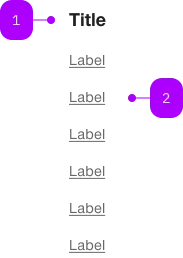
| Nummer | Typ | Beschreibung | Optional | Hinweis |
|---|---|---|---|---|
| 1 | Komponente | sbb-title | Ja | |
| 1 | Komponente | sbb-block-link | Nein |
Spielwiese
The <sbb-link-list> is a component that can be used to collect and display sbb-block-link.
<sbb-link-list>
  <sbb-block-link
    href="https://www.sbb.ch/en/help-and-contact/refunds-compensation/ticket-refunds.html"
    >Refunds</sbb-block-link
  >
  <sbb-block-link
    href="https://www.sbb.ch/en/help-and-contact/lost-found-office/submit-loss-report.html"
    >Loss Report</sbb-block-link
  >
  ...
</sbb-link-list>
Slots
The component can display an optional title,
which is visually shown as a level-5 sbb-title
and is used as the aria-labelledby attribute of the ul element.
The title can be set using the titleContent property or, alternatively, can be projected using the title slot.
<sbb-link-list title-content="Help & Contact"> ... </sbb-link-list>
Style
The component will accept only <sbb-block-link> or <sbb-block-link-button> instances,
and it will sync its size and negative property with the inner links.
<sbb-link-list size="s" negative>
  <sbb-block-link
    href="https://www.sbb.ch/en/help-and-contact/refunds-compensation/ticket-refunds.html"
    >Refunds</sbb-block-link
  >
  <sbb-block-link
    href="https://www.sbb.ch/en/help-and-contact/lost-found-office/submit-loss-report.html"
    >Loss Report</sbb-block-link
  >
  ...
</sbb-link-list>
Orientation
The orientation property is used to set links' orientation; possible values are horizontal and vertical (default).
The optional property horizontalFrom can be used in combination with orientation='vertical'
to indicate the minimum breakpoint from which the orientation changes to horizontal.
The title will not be displayed in the horizontal orientation.
<sbb-link-list horizontal-from="large">
  <sbb-block-link
    href="https://www.sbb.ch/en/help-and-contact/refunds-compensation/ticket-refunds.html"
    >Refunds</sbb-block-link
  >
  <sbb-block-link
    href="https://www.sbb.ch/en/help-and-contact/lost-found-office/submit-loss-report.html"
    >Loss Report</sbb-block-link
  >
  ...
</sbb-link-list>
API Documentation
class: SbbLinkListElement, sbb-link-list
Properties
| Name | Attribute | Privacy | Type | Default | Description |
|---|---|---|---|---|---|
horizontalFrom | horizontal-from | public | SbbHorizontalFrom | null | null | Selected breakpoint from which the list is rendered horizontally. |
negative | negative | public | boolean | false | Negative coloring variant flag. |
orientation | orientation | public | SbbOrientation | 'vertical' | The orientation in which the list will be shown vertical or horizontal. |
size | size | public | SbbLinkSize | 's' / 'xs' (lean) | Text size of the nested sbb-block-link instances. This will overwrite the size attribute of nested sbb-block-link instances. |
titleContent | title-content | public | string | '' | The title text we want to show before the list. |
titleLevel | title-level | public | SbbTitleLevel | '2' | The semantic level of the title, e.g. 2 = h2. |
Slots
| Name | Description |
|---|---|
Use the unnamed slot to add one or more sbb-block-link. | |
title | Use this slot to provide a title. |