Was macht die Komponente?
Sie ist Teil der Flip-Card-Komponente.
Wann soll die Komponente eingesetzt werden?
- Nur innerhalb der Flip-Card-Komponente.
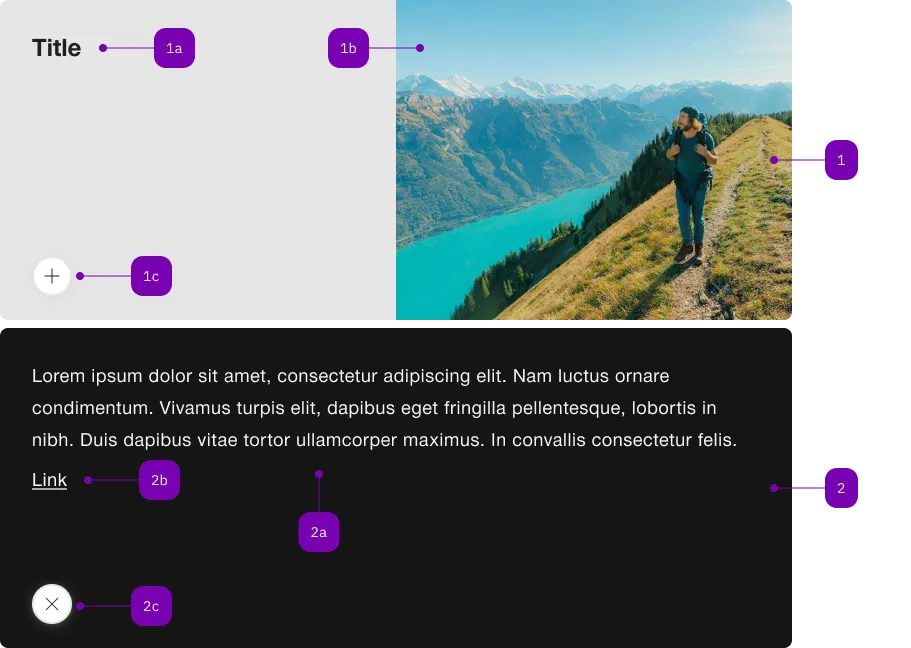
| Nummer | Typ | Beschreibung | Optional | Hinweis |
|---|---|---|---|---|
| 1 | Komponente | sbb-flip-card-summary | Nein | |
| 1a | Komponente | sbb-title | Nein | |
| 1b | Komponente | sbb-image | Nein | |
| 1c | Komponente | sbb-secondary-button | Nein | Open-Action |
| 2 | Komponente | sbb-flip-card-details | Nein | |
| 2a | Text | Slot | Nein | |
| 2b | Komponente | sbb-link | Ja | |
| 2c | Komponente | sbb-secondary-button | Nein | Close-Action |
The sbb-flip-card-summary, when used inside a sbb-flip-card, shows its contents when the card is not flipped.
The component's slot is implicitly set to "summary".
<sbb-flip-card>
  <sbb-flip-card-summary>
    <sbb-title> Card Title </sbb-title>
    <sbb-image slot="image" image-src="..." alt="..."></sbb-image>
  </sbb-flip-card-summary>
</sbb-flip-card>
Slots
Use the unnamed slot to provide a title and the image slot to provide an image (via either sbb-image or img).
Optionally, you can add an overlapping sbb-chip-label by wrapping the sbb-image in a figure tag (see sbb-image doc).
<sbb-flip-card>
  <sbb-flip-card-summary>
    ...
    <figure class="sbb-figure" slot="image">
      <sbb-image
        image-src="https://cdn.img.sbb.ch/content/dam/internet/externe-assets/lyne/Bahnhof-Luzern.jpg"
        alt="Station of Lucerne from outside"
      ></sbb-image>
      <sbb-chip-label class="sbb-figure-overlap-start-start">...</sbb-chip-label>
    </figure>
  </sbb-flip-card-summary>
</sbb-flip-card>
Properties
| Name | Attribute | Privacy | Type | Default | Description |
|---|---|---|---|---|---|
imageAlignment | image-alignment | public | SbbFlipCardImageAlignment | 'after' | The position where to render the image. |
Slots
| Name | Description |
|---|---|
Use the unnamed slot to provide a title for the sbb-flip-card-summary. | |
image | Use this slot to provide an image for the sbb-flip-card-summary. |