Was macht die Komponente?
Eine Card ist ein flexibles Container-Element, das verschiedene Arten von Inhalten und Aktionen in einem einheitlichen Block zusammenfasst.
Wann soll die Komponente eingesetzt werden?
- Um zusammengehörige Informationen kompakt darzustellen.
- Um visuelle Hierarchien und Struktur in eine Seite zu bringen.
- Um Inhalte wie Texte und Aktionen zusammen darzustellen.
Regeln
- Die Inhalte innerhalb einer Card sollen logisch zusammenhängen und gut strukturiert sein. Der Inhalt sollte so knapp wie möglich formuliert werden.
- Hat eine Card mehrere Interaktive Elemente, so liegen die Klick-Targets auf den eingesetzten interaktiven Elementen. Hat die Card nur ein interaktives Element, so dient die ganze Card als Klick-Target.
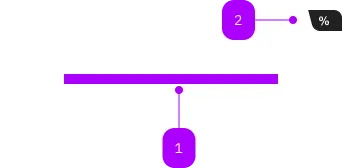
| Nummer | Typ | Beschreibung | Optional | Hinweis |
|---|---|---|---|---|
| 1 | Slot | Beliebiger Inhalt erlaubt | Nein | |
| 2 | Komponente | sbb-card-badge | Ja |
Spielwiese
Default
With Card-Link
The <sbb-card> component is a generic content container; its task is to present content related to a single subject.
<sbb-card>Card content</sbb-card>
It is possible to use the component together with the <sbb-card-badge>
and the <sbb-card-button>/<sbb-card-link>.
With <sbb-card-badge>
The <sbb-card-badge> component can be used to display a badge in the upper right corner.
It can display information like prices or discounts.
To achieve the correct spacing between elements inside the card badge, we recommend to use span-elements.
All content parts are presented with a predefined gap in between.
Note: Additionally to using it in a card, the card badge can also be used
in the sbb-selection-expansion-panel component.
<sbb-card color="white">
  <sbb-card-badge aria-label="Super saver sales ticket price starts at CHF 19.99">
    <span>%</span>
    <span>from CHF</span>
    <span>19.99</span>
  </sbb-card-badge>
  Card content
</sbb-card>
With <sbb-card-button>/<sbb-card-link>
To add an action to a card, add a <sbb-card-button> or a <sbb-card-link> to the card.
With these components the card area becomes clickable.
Also consult the accessibility section down below on what to consider
for these elements, as their content is only visible to screen readers.
<sbb-card>
  <sbb-card-link href="https://www.sbb.ch">Check all the wonderful trips available.</sbb-card-link>
  Buy trips
</sbb-card>

<sbb-card>
  <sbb-card-button type="submit" form="buy" value="trip">Buy this trip.</sbb-card-button>
</sbb-card>
The <sbb-card-link> is internally rendered as a link,
accepting its associated properties (href, target, rel and download).
The <sbb-card-button> is equivalent to a native button,
accepting its associated properties (type, name, value and form).
Style
Generally, the padding of the <sbb-card> can be set directly on the host. However, it's possible to choose among
different preset spacing classes.
<sbb-card class="sbb-card-spacing-3x-xxs">Card content</sbb-card>
<sbb-card class="sbb-card-spacing-xxxs-xxs">Card content</sbb-card>
<sbb-card class="sbb-card-spacing-xxxs-s">Card content</sbb-card>
<sbb-card class="sbb-card-spacing-4x-xxs">Card content</sbb-card>
<sbb-card class="sbb-card-spacing-xxs">Card content</sbb-card>
<sbb-card class="sbb-card-spacing-s">Card content</sbb-card>
<sbb-card class="sbb-card-spacing-l">Card content</sbb-card>
The component has four different values to choose from for the color property; default is white.
<sbb-card color="milk">Card content</sbb-card>
<sbb-card color="transparent-bordered">Card content</sbb-card>
<sbb-card color="transparent-bordered-dashed">Card content</sbb-card>
Accessibility
Normally, a <sbb-card> should be a single action, however, it's possible to place other interactive elements
in the card content. Interactive content will automatically be detected and made accessible to click / focus.
In cases where there should be only a visual button or link inside the card content without a different action, the
static component should be used (e.g. <sbb-button-static></sbb-button-static>).
For the <sbb-card-badge> it is recommended to place an aria-label on
<sbb-card-badge> to describe the displayed information in a full sentence,
as in the example above.
For the <sbb-card-link> and the <sbb-card-button> it is important
that a descriptive message is being added as content
as it is used for search engines and screen-reader users.
<sbb-card-link href="https://www.sbb.ch">Buy a half-fare ticket now</sbb-card-link>
<sbb-card-button>Buy a half-fare ticket now</sbb-card-button>
Windows High Contrast Notes
In high contrast mode, all the content of a link or a button receives a specific color which overrides every other color.
However, as the content of the card is not directly inside the button or link,
this does not happen when the slotted content has a specific color set.
To improve coloring, it's needed to manually define styles for Window high contrast mode (setting LinkText or ButtonText).
API Documentation
class: SbbCardBadgeElement, sbb-card-badge
Properties
| Name | Attribute | Privacy | Type | Default | Description |
|---|---|---|---|---|---|
color | color | public | 'charcoal' | 'white' | 'charcoal' | Color of the card badge. |
Slots
| Name | Description |
|---|---|
Use the unnamed slot to add content to the badge. Content parts should be wrapped in <span> tags to achieve correct spacings. |
class: SbbCardButtonElement, sbb-card-button
Properties
| Name | Attribute | Privacy | Type | Default | Description |
|---|---|---|---|---|---|
active | active | public | boolean | false | Whether the card is active. |
form | form | public | HTMLFormElement | null | The <form> element to associate the button with. | |
name | name | public | string | Name of the form element. Will be read from name attribute. | |
type | type | public | SbbButtonType | 'button' | The type attribute to use for the button. |
validationMessage | - | public | string | Returns the current error message, if available, which corresponds to the current validation state. Please note that only one message is returned at a time (e.g. if multiple validity states are invalid, only the chronologically first one is returned until it is fixed, at which point the next message might be returned, if it is still applicable). Also, a custom validity message (see below) has precedence over native validation messages. | |
validity | - | public | ValidityState | Returns the ValidityState object for this element. | |
value | value | public | string | '' | Value of the form element. |
willValidate | - | public | boolean | Returns true if this element will be validated when the form is submitted; false otherwise. |
Methods
| Name | Privacy | Description | Parameters | Return | Inherited From |
|---|---|---|---|---|---|
checkValidity | public | Returns true if this element has no validity problems; false otherwise. Fires an invalid event at the element in the latter case. | boolean | SbbFormAssociatedMixin | |
reportValidity | public | Returns true if this element has no validity problems; otherwise, returns false, fires an invalid event at the element, and (if the event isn't canceled) reports the problem to the user. | boolean | SbbFormAssociatedMixin | |
setCustomValidity | public | Sets the custom validity message for this element. Use the empty string to indicate that the element does not have a custom validity error. | message: string | void | SbbFormAssociatedMixin |
Slots
| Name | Description |
|---|---|
| Use the unnamed slot to add a descriptive label / title of the button (important!). This is relevant for SEO and screen readers. |
class: SbbCardElement, sbb-card
Properties
| Name | Attribute | Privacy | Type | Default | Description |
|---|---|---|---|---|---|
color | color | public | 'white' | 'milk' | 'transparent-bordered' | 'transparent-bordered-dashed' | 'white' | Option to set the component's background color. |
Slots
| Name | Description |
|---|---|
| Use the unnamed slot to add content to the card. | |
action | Use this slot to render a sbb-card-button or a sbb-card-link component. |
badge | Use this slot to render a sbb-card-badge component. |
class: SbbCardLinkElement, sbb-card-link
Properties
| Name | Attribute | Privacy | Type | Default | Description |
|---|---|---|---|---|---|
accessibilityCurrent | accessibility-current | public | string | '' | This will be forwarded as aria-current to the inner anchor element. |
accessibilityLabel | accessibility-label | public | string | '' | This will be forwarded as aria-label to the inner anchor element. |
active | active | public | boolean | false | Whether the card is active. |
download | download | public | boolean | false | Whether the browser will show the download dialog on click. |
href | href | public | string | '' | The href value you want to link to. |
rel | rel | public | string | '' | The relationship of the linked URL as space-separated link types. |
target | target | public | LinkTargetType | string | '' | Where to display the linked URL. |
Slots
| Name | Description |
|---|---|
| Use the unnamed slot to add a descriptive label / title of the link (important!). This is relevant for SEO and screen readers. |