Was macht die Komponente?
Ein Button ist ein interaktives Element, das eine Aktion auslöst, wenn er angeklickt wird.
Wann soll die Komponente eingesetzt werden?
- Um eine primäre oder sekundäre Aktion auf einer Seite auszuführen.
- Um das Absenden von Formularen zu ermöglichen.
- Um Interaktionen, wie das Öffnen von Dialogen oder das Navigieren zu einer anderen Seite, zu ermöglichen.
Regeln
- Ein Button soll klar beschriftet sein und eine eindeutige Aktion beschreiben.
- Vermeide es, mehrere primäre Buttons auf einer Seite zu verwenden; stattdessen sollten sekundäre Buttons oder Links genutzt werden.
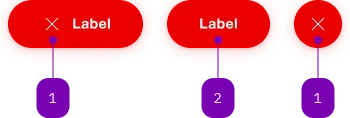
| Nummer | Typ | Beschreibung | Optional | Hinweis |
|---|---|---|---|---|
| 1 | Komponente | sbb-icon | Ja | Ein Icon oder ein Label ist zu setzen. |
| 2 | Text | Label | Ja | Ein Icon oder ein Label ist zu setzen. |
Spielwiese
The sbb-button-static component mimics the look of the <sbb-button>,
and it's meant to be used whenever is required to nest one button inside another without breaking the HTML functionality.
<sbb-button-static>Fake button</sbb-button-static>
Slots
The button text is provided via an unnamed slot; the component can optionally display a sbb-icon
at the component start using the iconName property or via custom content using the icon slot.
At least one is mandatory, so you can have a sbb-button-static with icon only, text only, or with both.
<sbb-button-static icon-name="info"> Button text </sbb-button-static>

<sbb-button-static>
  <sbb-icon slot="icon" name="info"></sbb-icon>
  Button text
</sbb-button-static>

<sbb-button-static icon-name="info" aria-label="Click for more information."></sbb-button-static>
Style
The component has a negative variant which can be set using the negative property.
There are two different sizes (m and l, which is the default) that can be set using the size property.
The component can be displayed in disabled state using the self-named property.
<sbb-button-static negative>Button</sbb-button-static>

<sbb-button-static size="m">Button</sbb-button-static>

<sbb-button-static disabled>Button</sbb-button-static>
Loading state
The component can be set into a loading state using the loading property.
This should be done by listening to the click event on the button and setting
the loading property to true e.g. when waiting for a response from the server.
After receiving the response, the property should be set back to false.
The loading state will be animated after a delay of 300ms, which can be configured with the
--sbb-button-loading-delay CSS variable.
<sbb-button-static
  @click="${(e: PointerEvent) =>
  {
    const button = e.currentTarget as SbbButtonStaticElement;
    button.loading = true;
    setTimeout(() => (button.loading = false), 4000);
  }}"
>
  Button
</sbb-button-static>
Focus outline
Please make sure that the focus outline appears in the correct color if the component is used on a dark background.
You can set it by re-defining the CSS var on sbb-button-static or any parent element:
sbb-button-static {
  --sbb-focus-outline-color: var(--sbb-focus-outline-color-dark);
}
Accessibility
Use the accessibility properties in case of an icon-only button to describe the purpose of the sbb-button-static for screen-reader users.
Properties
| Name | Attribute | Privacy | Type | Default | Description |
|---|---|---|---|---|---|
disabled | disabled | public | boolean | false | Whether the component is disabled. |
iconName | icon-name | public | string | '' | The icon name we want to use, choose from the small icon variants from the ui-icons category from here https://icons.app.sbb.ch. |
loading | loading | public | boolean | false | Whether the button indicates a loading state. The animation kicks in after a delay of 300ms, configurable with --sbb-button-loading-delay CSS variable. |
negative | negative | public | boolean | false | Negative coloring variant flag. |
size | size | public | SbbButtonSize | 'l' / 's' (lean) | Size variant, either l, m or s. |
CSS Properties
| Name | Default | Description |
|---|---|---|
--sbb-button-loading-delay | 300ms | The delay before the loading animation starts, when setting the button into loading state. |
Slots
| Name | Description |
|---|---|
| Use the unnamed slot to add content to the button-static. | |
icon | Slot used to display the icon, if one is set. |