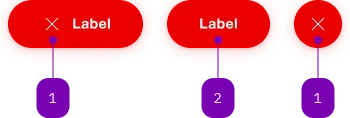
The button components from Lyne provide the same functionality as a native <button> element
enhanced with SBB Design, accepting its associated properties (type, name, value and form).
Note: In contrast with other modules, each button component has its own entry point
(e.g. @sbb-esta/lyne-elements/button/button.js). This is due to the amount of button variants.
<sbb-button>Button text</sbb-button>
<sbb-secondary-button>Button text</sbb-secondary-button>
<sbb-accent-button>Button text</sbb-accent-button>
<sbb-transparent-button>Button text</sbb-transparent-button>
For every variant there is also a link version, equivalent to a native anchor (a) element.
<sbb-button-link>Button text</sbb-button-link>
<sbb-secondary-button-link>Button text</sbb-secondary-button-link>
<sbb-accent-button-link>Button text</sbb-accent-button-link>
<sbb-transparent-button-link>Button text</sbb-transparent-button-link>
Additionally for every variant there is a static version that can be used inside another
interactive element (e.g. an anchor (a)).
<sbb-button-static>Button text</sbb-button-static>
<sbb-secondary-button-static>Button text</sbb-secondary-button-static>
<sbb-accent-button-static>Button text</sbb-accent-button-static>
<sbb-transparent-button-static>Button text</sbb-transparent-button-static>
There is also a mini button variant, which can be used for specific contexts, such as inside
a <sbb-form-field>.
<sbb-mini-button>Button text</sbb-mini-button>
<sbb-mini-button-link>Button text</sbb-mini-button-link>
Each button component can optionally display an <sbb-icon> at the component start
using the iconName property or via custom content using the icon slot.
All button usages must either provide text content, an icon (for icon only) or both.
<!-- Buttons with both icon and text -->
<sbb-button icon-name="info">Button text</sbb-button>

<sbb-button>
  <sbb-icon slot="icon" name="info"></sbb-icon>
  Button text
</sbb-button>

<!-- Buttons with only an icon -->
<sbb-button icon-name="info" aria-label="Click for more information."></sbb-button>
Style
The component has a negative variant which can be set using the negative property.
There are different sizes (except for the mini-button), s, m and l,
that can be set using the size property.
The component can be displayed in disabled state using the corresponding property.
<sbb-button negative>Button</sbb-button>

<sbb-button size="m">Button</sbb-button>

<sbb-button disabled>Button</sbb-button>
Loading state
The button components (except for the mini-button) can be configured into a
loading state using the loading property.
This should be done by listening to the click event on the button and setting
the loading property to true e.g. when waiting for a response from the server.
After receiving the response, the property should be set back to false.
The loading state will be animated after a delay of 300ms, which can be configured with the
--sbb-button-loading-delay CSS variable.
<sbb-button
  @click="${(e: PointerEvent) =>
  {
    const button = e.currentTarget as SbbButtonElement;
    button.loading = true;
    setTimeout(() => (button.loading = false), 4000);
  }}"
>
  Button
</sbb-button>
Focus outline
Please make sure that the focus outline appears in the correct color if the component is used on a dark background.
You can set it by re-defining the CSS var on <sbb-button> or any parent element:
sbb-button {
  --sbb-focus-outline-color: var(--sbb-focus-outline-color-dark);
}
Accessibility
Use the accessibility properties in case of an icon-only button to describe the purpose of the <sbb-button> for screen-reader users.
Native disabled elements cannot receive focus and do not dispatch any events. This can
be problematic in some cases because it can prevent the app from telling the user why the button is
disabled. Consumers can use the disabledInteractive property to style the button as disabled but allow for
it to receive focus and dispatch events. The button will have aria-disabled="true" for assistive
technology. It is the consumers responsibility to provide a reason for the element being disabled.
This can be achieved by adding an aria-label, aria-labelledby or aria-describedby attribute.
Note: Using the disabledInteractive property can result in buttons that previously prevented
actions to no longer do so, for example a submit button in a form. When using this input, you should
guard against such cases in your component.
The <sbb-mini-button-group> component displays a set of <sbb-mini-button>
optionally separated by a sbb-divider.
<sbb-mini-button-group accessibility-label="My group">
  <sbb-mini-button icon-name="..." aria-label="..."></sbb-mini-button>
  <sbb-mini-button icon-name="..." aria-label="..."></sbb-mini-button>
  <sbb-divider orientation="vertical"></sbb-divider>
  <sbb-mini-button icon-name="..." aria-label="..."></sbb-mini-button>
</sbb-mini-button-group>
Style
The component has a negative variant which can be set using the negative property.
There are four available sizes: s, m (default), l and xl.
<sbb-mini-button-group negative size="l"> ... </sbb-mini-button-group>
Accessibility
Use the accessibility-label property to describe the purpose of the <sbb-mini-button-group> for screen-reader users.
If <sbb-divider> components are used as separators, their aria-hidden property is automatically set to true
to ensure that the button list is read by screen readers with the correct size.
API Documentation
Properties
| Name | Attribute | Privacy | Type | Default | Description |
disabled | disabled | public | boolean | false | Whether the component is disabled. |
disabledInteractive | disabled-interactive | public | boolean | false | Whether the button should be aria-disabled but stay interactive. |
form | form | public | HTMLFormElement | null | | The <form> element to associate the button with. |
iconName | icon-name | public | string | '' | The icon name we want to use, choose from the small icon variants from the ui-icons category from here https://icons.app.sbb.ch. |
loading | loading | public | boolean | false | Whether the button indicates a loading state. The animation kicks in after a delay of 300ms, configurable with --sbb-button-loading-delay CSS variable. |
name | name | public | string | | Name of the form element. Will be read from name attribute. |
negative | negative | public | boolean | false | Negative coloring variant flag. |
size | size | public | SbbButtonSize | 'l' / 's' (lean) | Size variant, either l, m or s. |
type | type | public | SbbButtonType | 'button' | The type attribute to use for the button. |
validationMessage | - | public | string | | Returns the current error message, if available, which corresponds to the current validation state. Please note that only one message is returned at a time (e.g. if multiple validity states are invalid, only the chronologically first one is returned until it is fixed, at which point the next message might be returned, if it is still applicable). Also, a custom validity message (see below) has precedence over native validation messages. |
validity | - | public | ValidityState | | Returns the ValidityState object for this element. |
value | value | public | string | '' | Value of the form element. |
willValidate | - | public | boolean | | Returns true if this element will be validated when the form is submitted; false otherwise. |
Methods
| Name | Privacy | Description | Parameters | Return | Inherited From |
checkValidity | public | Returns true if this element has no validity problems; false otherwise. Fires an invalid event at the element in the latter case. | | boolean | SbbFormAssociatedMixin |
reportValidity | public | Returns true if this element has no validity problems; otherwise, returns false, fires an invalid event at the element, and (if the event isn't canceled) reports the problem to the user. | | boolean | SbbFormAssociatedMixin |
setCustomValidity | public | Sets the custom validity message for this element. Use the empty string to indicate that the element does not have a custom validity error. | message: string | void | SbbFormAssociatedMixin |
CSS Properties
| Name | Default | Description |
--sbb-button-loading-delay | 300ms | The delay before the loading animation starts, when setting the button into loading state. |
Slots
| Name | Description |
| Use the unnamed slot to add content to the accent-button. |
icon | Slot used to display the icon, if one is set. |
Properties
| Name | Attribute | Privacy | Type | Default | Description |
accessibilityCurrent | accessibility-current | public | string | '' | This will be forwarded as aria-current to the inner anchor element. |
accessibilityLabel | accessibility-label | public | string | '' | This will be forwarded as aria-label to the inner anchor element. |
disabled | disabled | public | boolean | false | Whether the component is disabled. |
disabledInteractive | disabled-interactive | public | boolean | false | Whether the button should be aria-disabled but stay interactive. |
download | download | public | boolean | false | Whether the browser will show the download dialog on click. |
href | href | public | string | '' | The href value you want to link to. |
iconName | icon-name | public | string | '' | The icon name we want to use, choose from the small icon variants from the ui-icons category from here https://icons.app.sbb.ch. |
loading | loading | public | boolean | false | Whether the button indicates a loading state. The animation kicks in after a delay of 300ms, configurable with --sbb-button-loading-delay CSS variable. |
negative | negative | public | boolean | false | Negative coloring variant flag. |
rel | rel | public | string | '' | The relationship of the linked URL as space-separated link types. |
size | size | public | SbbButtonSize | 'l' / 's' (lean) | Size variant, either l, m or s. |
target | target | public | LinkTargetType | string | '' | Where to display the linked URL. |
CSS Properties
| Name | Default | Description |
--sbb-button-loading-delay | 300ms | The delay before the loading animation starts, when setting the button into loading state. |
Slots
| Name | Description |
| Use the unnamed slot to add content to the accent-button-link. |
icon | Slot used to display the icon, if one is set. |
Properties
| Name | Attribute | Privacy | Type | Default | Description |
disabled | disabled | public | boolean | false | Whether the component is disabled. |
iconName | icon-name | public | string | '' | The icon name we want to use, choose from the small icon variants from the ui-icons category from here https://icons.app.sbb.ch. |
loading | loading | public | boolean | false | Whether the button indicates a loading state. The animation kicks in after a delay of 300ms, configurable with --sbb-button-loading-delay CSS variable. |
negative | negative | public | boolean | false | Negative coloring variant flag. |
size | size | public | SbbButtonSize | 'l' / 's' (lean) | Size variant, either l, m or s. |
CSS Properties
| Name | Default | Description |
--sbb-button-loading-delay | 300ms | The delay before the loading animation starts, when setting the button into loading state. |
Slots
| Name | Description |
| Use the unnamed slot to add content to the accent-button-static. |
icon | Slot used to display the icon, if one is set. |
Properties
| Name | Attribute | Privacy | Type | Default | Description |
disabled | disabled | public | boolean | false | Whether the component is disabled. |
disabledInteractive | disabled-interactive | public | boolean | false | Whether the button should be aria-disabled but stay interactive. |
form | form | public | HTMLFormElement | null | | The <form> element to associate the button with. |
iconName | icon-name | public | string | '' | The icon name we want to use, choose from the small icon variants from the ui-icons category from here https://icons.app.sbb.ch. |
loading | loading | public | boolean | false | Whether the button indicates a loading state. The animation kicks in after a delay of 300ms, configurable with --sbb-button-loading-delay CSS variable. |
name | name | public | string | | Name of the form element. Will be read from name attribute. |
negative | negative | public | boolean | false | Negative coloring variant flag. |
size | size | public | SbbButtonSize | 'l' / 's' (lean) | Size variant, either l, m or s. |
type | type | public | SbbButtonType | 'button' | The type attribute to use for the button. |
validationMessage | - | public | string | | Returns the current error message, if available, which corresponds to the current validation state. Please note that only one message is returned at a time (e.g. if multiple validity states are invalid, only the chronologically first one is returned until it is fixed, at which point the next message might be returned, if it is still applicable). Also, a custom validity message (see below) has precedence over native validation messages. |
validity | - | public | ValidityState | | Returns the ValidityState object for this element. |
value | value | public | string | '' | Value of the form element. |
willValidate | - | public | boolean | | Returns true if this element will be validated when the form is submitted; false otherwise. |
Methods
| Name | Privacy | Description | Parameters | Return | Inherited From |
checkValidity | public | Returns true if this element has no validity problems; false otherwise. Fires an invalid event at the element in the latter case. | | boolean | SbbFormAssociatedMixin |
reportValidity | public | Returns true if this element has no validity problems; otherwise, returns false, fires an invalid event at the element, and (if the event isn't canceled) reports the problem to the user. | | boolean | SbbFormAssociatedMixin |
setCustomValidity | public | Sets the custom validity message for this element. Use the empty string to indicate that the element does not have a custom validity error. | message: string | void | SbbFormAssociatedMixin |
CSS Properties
| Name | Default | Description |
--sbb-button-loading-delay | 300ms | The delay before the loading animation starts, when setting the button into loading state. |
Slots
| Name | Description |
| Use the unnamed slot to add content to the button. |
icon | Slot used to display the icon, if one is set. |
Properties
| Name | Attribute | Privacy | Type | Default | Description |
accessibilityCurrent | accessibility-current | public | string | '' | This will be forwarded as aria-current to the inner anchor element. |
accessibilityLabel | accessibility-label | public | string | '' | This will be forwarded as aria-label to the inner anchor element. |
disabled | disabled | public | boolean | false | Whether the component is disabled. |
disabledInteractive | disabled-interactive | public | boolean | false | Whether the button should be aria-disabled but stay interactive. |
download | download | public | boolean | false | Whether the browser will show the download dialog on click. |
href | href | public | string | '' | The href value you want to link to. |
iconName | icon-name | public | string | '' | The icon name we want to use, choose from the small icon variants from the ui-icons category from here https://icons.app.sbb.ch. |
loading | loading | public | boolean | false | Whether the button indicates a loading state. The animation kicks in after a delay of 300ms, configurable with --sbb-button-loading-delay CSS variable. |
negative | negative | public | boolean | false | Negative coloring variant flag. |
rel | rel | public | string | '' | The relationship of the linked URL as space-separated link types. |
size | size | public | SbbButtonSize | 'l' / 's' (lean) | Size variant, either l, m or s. |
target | target | public | LinkTargetType | string | '' | Where to display the linked URL. |
CSS Properties
| Name | Default | Description |
--sbb-button-loading-delay | 300ms | The delay before the loading animation starts, when setting the button into loading state. |
Slots
| Name | Description |
| Use the unnamed slot to add content to the button-link. |
icon | Slot used to display the icon, if one is set. |
Properties
| Name | Attribute | Privacy | Type | Default | Description |
disabled | disabled | public | boolean | false | Whether the component is disabled. |
iconName | icon-name | public | string | '' | The icon name we want to use, choose from the small icon variants from the ui-icons category from here https://icons.app.sbb.ch. |
loading | loading | public | boolean | false | Whether the button indicates a loading state. The animation kicks in after a delay of 300ms, configurable with --sbb-button-loading-delay CSS variable. |
negative | negative | public | boolean | false | Negative coloring variant flag. |
size | size | public | SbbButtonSize | 'l' / 's' (lean) | Size variant, either l, m or s. |
CSS Properties
| Name | Default | Description |
--sbb-button-loading-delay | 300ms | The delay before the loading animation starts, when setting the button into loading state. |
Slots
| Name | Description |
| Use the unnamed slot to add content to the button-static. |
icon | Slot used to display the icon, if one is set. |
Properties
| Name | Attribute | Privacy | Type | Default | Description |
disabled | disabled | public | boolean | false | Whether the component is disabled. |
disabledInteractive | disabled-interactive | public | boolean | false | Whether the button should be aria-disabled but stay interactive. |
form | form | public | HTMLFormElement | null | | The <form> element to associate the button with. |
iconName | icon-name | public | string | '' | The icon name we want to use, choose from the small icon variants from the ui-icons category from here https://icons.app.sbb.ch. |
name | name | public | string | | Name of the form element. Will be read from name attribute. |
negative | negative | public | boolean | false | Negative coloring variant flag. |
type | type | public | SbbButtonType | 'button' | The type attribute to use for the button. |
validationMessage | - | public | string | | Returns the current error message, if available, which corresponds to the current validation state. Please note that only one message is returned at a time (e.g. if multiple validity states are invalid, only the chronologically first one is returned until it is fixed, at which point the next message might be returned, if it is still applicable). Also, a custom validity message (see below) has precedence over native validation messages. |
validity | - | public | ValidityState | | Returns the ValidityState object for this element. |
value | value | public | string | '' | Value of the form element. |
willValidate | - | public | boolean | | Returns true if this element will be validated when the form is submitted; false otherwise. |
Methods
| Name | Privacy | Description | Parameters | Return | Inherited From |
checkValidity | public | Returns true if this element has no validity problems; false otherwise. Fires an invalid event at the element in the latter case. | | boolean | SbbFormAssociatedMixin |
reportValidity | public | Returns true if this element has no validity problems; otherwise, returns false, fires an invalid event at the element, and (if the event isn't canceled) reports the problem to the user. | | boolean | SbbFormAssociatedMixin |
setCustomValidity | public | Sets the custom validity message for this element. Use the empty string to indicate that the element does not have a custom validity error. | message: string | void | SbbFormAssociatedMixin |
Slots
| Name | Description |
| Use the unnamed slot to add a label to the mini-button. |
icon | Slot used to display the icon, if one is set |
Properties
| Name | Attribute | Privacy | Type | Default | Description |
accessibilityLabel | accessibility-label | public | string | '' | This will be forwarded as aria-label to the list that contains the buttons. |
negative | negative | public | boolean | false | Negative coloring variant flag. |
size | size | public | SbbMiniButtonGroupSize | 'm' / 's' (lean) | Size variant, either s, m, l or xl. |
Slots
| Name | Description |
| Use the unnamed slot to add sbb-mini-button and sbb-divider elements. |
Properties
| Name | Attribute | Privacy | Type | Default | Description |
accessibilityCurrent | accessibility-current | public | string | '' | This will be forwarded as aria-current to the inner anchor element. |
accessibilityLabel | accessibility-label | public | string | '' | This will be forwarded as aria-label to the inner anchor element. |
disabled | disabled | public | boolean | false | Whether the component is disabled. |
disabledInteractive | disabled-interactive | public | boolean | false | Whether the button should be aria-disabled but stay interactive. |
download | download | public | boolean | false | Whether the browser will show the download dialog on click. |
href | href | public | string | '' | The href value you want to link to. |
iconName | icon-name | public | string | '' | The icon name we want to use, choose from the small icon variants from the ui-icons category from here https://icons.app.sbb.ch. |
negative | negative | public | boolean | false | Negative coloring variant flag. |
rel | rel | public | string | '' | The relationship of the linked URL as space-separated link types. |
target | target | public | LinkTargetType | string | '' | Where to display the linked URL. |
Slots
| Name | Description |
| Use the unnamed slot to add a label to the mini-button. |
icon | Slot used to display the icon, if one is set |
Properties
| Name | Attribute | Privacy | Type | Default | Description |
disabled | disabled | public | boolean | false | Whether the component is disabled. |
disabledInteractive | disabled-interactive | public | boolean | false | Whether the button should be aria-disabled but stay interactive. |
form | form | public | HTMLFormElement | null | | The <form> element to associate the button with. |
iconName | icon-name | public | string | '' | The icon name we want to use, choose from the small icon variants from the ui-icons category from here https://icons.app.sbb.ch. |
loading | loading | public | boolean | false | Whether the button indicates a loading state. The animation kicks in after a delay of 300ms, configurable with --sbb-button-loading-delay CSS variable. |
name | name | public | string | | Name of the form element. Will be read from name attribute. |
negative | negative | public | boolean | false | Negative coloring variant flag. |
size | size | public | SbbButtonSize | 'l' / 's' (lean) | Size variant, either l, m or s. |
type | type | public | SbbButtonType | 'button' | The type attribute to use for the button. |
validationMessage | - | public | string | | Returns the current error message, if available, which corresponds to the current validation state. Please note that only one message is returned at a time (e.g. if multiple validity states are invalid, only the chronologically first one is returned until it is fixed, at which point the next message might be returned, if it is still applicable). Also, a custom validity message (see below) has precedence over native validation messages. |
validity | - | public | ValidityState | | Returns the ValidityState object for this element. |
value | value | public | string | '' | Value of the form element. |
willValidate | - | public | boolean | | Returns true if this element will be validated when the form is submitted; false otherwise. |
Methods
| Name | Privacy | Description | Parameters | Return | Inherited From |
checkValidity | public | Returns true if this element has no validity problems; false otherwise. Fires an invalid event at the element in the latter case. | | boolean | SbbFormAssociatedMixin |
reportValidity | public | Returns true if this element has no validity problems; otherwise, returns false, fires an invalid event at the element, and (if the event isn't canceled) reports the problem to the user. | | boolean | SbbFormAssociatedMixin |
setCustomValidity | public | Sets the custom validity message for this element. Use the empty string to indicate that the element does not have a custom validity error. | message: string | void | SbbFormAssociatedMixin |
CSS Properties
| Name | Default | Description |
--sbb-button-loading-delay | 300ms | The delay before the loading animation starts, when setting the button into loading state. |
Slots
| Name | Description |
| Use the unnamed slot to add content to the secondary-button. |
icon | Slot used to display the icon, if one is set. |
Properties
| Name | Attribute | Privacy | Type | Default | Description |
accessibilityCurrent | accessibility-current | public | string | '' | This will be forwarded as aria-current to the inner anchor element. |
accessibilityLabel | accessibility-label | public | string | '' | This will be forwarded as aria-label to the inner anchor element. |
disabled | disabled | public | boolean | false | Whether the component is disabled. |
disabledInteractive | disabled-interactive | public | boolean | false | Whether the button should be aria-disabled but stay interactive. |
download | download | public | boolean | false | Whether the browser will show the download dialog on click. |
href | href | public | string | '' | The href value you want to link to. |
iconName | icon-name | public | string | '' | The icon name we want to use, choose from the small icon variants from the ui-icons category from here https://icons.app.sbb.ch. |
loading | loading | public | boolean | false | Whether the button indicates a loading state. The animation kicks in after a delay of 300ms, configurable with --sbb-button-loading-delay CSS variable. |
negative | negative | public | boolean | false | Negative coloring variant flag. |
rel | rel | public | string | '' | The relationship of the linked URL as space-separated link types. |
size | size | public | SbbButtonSize | 'l' / 's' (lean) | Size variant, either l, m or s. |
target | target | public | LinkTargetType | string | '' | Where to display the linked URL. |
CSS Properties
| Name | Default | Description |
--sbb-button-loading-delay | 300ms | The delay before the loading animation starts, when setting the button into loading state. |
Slots
| Name | Description |
| Use the unnamed slot to add content to the secondary-button-link. |
icon | Slot used to display the icon, if one is set. |
Properties
| Name | Attribute | Privacy | Type | Default | Description |
disabled | disabled | public | boolean | false | Whether the component is disabled. |
iconName | icon-name | public | string | '' | The icon name we want to use, choose from the small icon variants from the ui-icons category from here https://icons.app.sbb.ch. |
loading | loading | public | boolean | false | Whether the button indicates a loading state. The animation kicks in after a delay of 300ms, configurable with --sbb-button-loading-delay CSS variable. |
negative | negative | public | boolean | false | Negative coloring variant flag. |
size | size | public | SbbButtonSize | 'l' / 's' (lean) | Size variant, either l, m or s. |
CSS Properties
| Name | Default | Description |
--sbb-button-loading-delay | 300ms | The delay before the loading animation starts, when setting the button into loading state. |
Slots
| Name | Description |
| Use the unnamed slot to add content to the secondary-button-static. |
icon | Slot used to display the icon, if one is set. |
Properties
| Name | Attribute | Privacy | Type | Default | Description |
disabled | disabled | public | boolean | false | Whether the component is disabled. |
disabledInteractive | disabled-interactive | public | boolean | false | Whether the button should be aria-disabled but stay interactive. |
form | form | public | HTMLFormElement | null | | The <form> element to associate the button with. |
iconName | icon-name | public | string | '' | The icon name we want to use, choose from the small icon variants from the ui-icons category from here https://icons.app.sbb.ch. |
loading | loading | public | boolean | false | Whether the button indicates a loading state. The animation kicks in after a delay of 300ms, configurable with --sbb-button-loading-delay CSS variable. |
name | name | public | string | | Name of the form element. Will be read from name attribute. |
negative | negative | public | boolean | false | Negative coloring variant flag. |
size | size | public | SbbButtonSize | 'l' / 's' (lean) | Size variant, either l, m or s. |
type | type | public | SbbButtonType | 'button' | The type attribute to use for the button. |
validationMessage | - | public | string | | Returns the current error message, if available, which corresponds to the current validation state. Please note that only one message is returned at a time (e.g. if multiple validity states are invalid, only the chronologically first one is returned until it is fixed, at which point the next message might be returned, if it is still applicable). Also, a custom validity message (see below) has precedence over native validation messages. |
validity | - | public | ValidityState | | Returns the ValidityState object for this element. |
value | value | public | string | '' | Value of the form element. |
willValidate | - | public | boolean | | Returns true if this element will be validated when the form is submitted; false otherwise. |
Methods
| Name | Privacy | Description | Parameters | Return | Inherited From |
checkValidity | public | Returns true if this element has no validity problems; false otherwise. Fires an invalid event at the element in the latter case. | | boolean | SbbFormAssociatedMixin |
reportValidity | public | Returns true if this element has no validity problems; otherwise, returns false, fires an invalid event at the element, and (if the event isn't canceled) reports the problem to the user. | | boolean | SbbFormAssociatedMixin |
setCustomValidity | public | Sets the custom validity message for this element. Use the empty string to indicate that the element does not have a custom validity error. | message: string | void | SbbFormAssociatedMixin |
CSS Properties
| Name | Default | Description |
--sbb-button-loading-delay | 300ms | The delay before the loading animation starts, when setting the button into loading state. |
Slots
| Name | Description |
| Use the unnamed slot to add content to the transparent-button. |
icon | Slot used to display the icon, if one is set. |
Properties
| Name | Attribute | Privacy | Type | Default | Description |
accessibilityCurrent | accessibility-current | public | string | '' | This will be forwarded as aria-current to the inner anchor element. |
accessibilityLabel | accessibility-label | public | string | '' | This will be forwarded as aria-label to the inner anchor element. |
disabled | disabled | public | boolean | false | Whether the component is disabled. |
disabledInteractive | disabled-interactive | public | boolean | false | Whether the button should be aria-disabled but stay interactive. |
download | download | public | boolean | false | Whether the browser will show the download dialog on click. |
href | href | public | string | '' | The href value you want to link to. |
iconName | icon-name | public | string | '' | The icon name we want to use, choose from the small icon variants from the ui-icons category from here https://icons.app.sbb.ch. |
loading | loading | public | boolean | false | Whether the button indicates a loading state. The animation kicks in after a delay of 300ms, configurable with --sbb-button-loading-delay CSS variable. |
negative | negative | public | boolean | false | Negative coloring variant flag. |
rel | rel | public | string | '' | The relationship of the linked URL as space-separated link types. |
size | size | public | SbbButtonSize | 'l' / 's' (lean) | Size variant, either l, m or s. |
target | target | public | LinkTargetType | string | '' | Where to display the linked URL. |
CSS Properties
| Name | Default | Description |
--sbb-button-loading-delay | 300ms | The delay before the loading animation starts, when setting the button into loading state. |
Slots
| Name | Description |
| Use the unnamed slot to add content to the transparent-button-link. |
icon | Slot used to display the icon, if one is set. |
Properties
| Name | Attribute | Privacy | Type | Default | Description |
disabled | disabled | public | boolean | false | Whether the component is disabled. |
iconName | icon-name | public | string | '' | The icon name we want to use, choose from the small icon variants from the ui-icons category from here https://icons.app.sbb.ch. |
loading | loading | public | boolean | false | Whether the button indicates a loading state. The animation kicks in after a delay of 300ms, configurable with --sbb-button-loading-delay CSS variable. |
negative | negative | public | boolean | false | Negative coloring variant flag. |
size | size | public | SbbButtonSize | 'l' / 's' (lean) | Size variant, either l, m or s. |
CSS Properties
| Name | Default | Description |
--sbb-button-loading-delay | 300ms | The delay before the loading animation starts, when setting the button into loading state. |
Slots
| Name | Description |
| Use the unnamed slot to add content to the transparent-button-static. |
icon | Slot used to display the icon, if one is set. |