Was macht die Komponente?
Ein Link ist ein interaktives Textelement, das Nutzenden zu einer anderen Seite oder Ressource navigiert.
Wann soll die Komponente eingesetzt werden?
- Um Nutzende zu weiteren Inhalten, Seiten oder externen Ressourcen zu führen.
- Um Verweise auf verwandte Informationen oder Dokumente bereitzustellen.
- Um die Navigation innerhalb der Webseite oder Anwendung zu erleichtern.
Regeln
- Verwende beschreibende und aussagekräftige Link-Texte, um den Nutzenden den Zielinhalt verständlich zu machen.
- Links sollen in einem neuen Tab geöffnet werden, wenn sie zu externen Ressourcen führen.
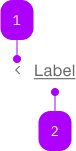
| Nummer | Typ | Beschreibung | Optional | Hinweis |
|---|---|---|---|---|
| 1 | Komponente | sbb-icon | Ja | Kann am Anfang oder Ende gesetzt werden. |
| 2 | Text | Label | Nein |
Spielwiese
The sbb-block-link component provides the same functionality as a native <a> enhanced with the SBB Design.
Slots
The text is provided via an unnamed slot; the component can optionally display a sbb-icon using
the iconName property or via custom content using the icon slot.
By default, the icon is placed at the component's end, but this can be changed using the iconPlacement property.
<sbb-block-link href="https://www.sbb.ch" icon-name="chevron-small-right-small">
  Help
</sbb-block-link>

<sbb-block-link
  href="https://www.sbb.ch"
  icon-name="chevron-small-left-small"
  icon-placement="start"
>
  Contact
</sbb-block-link>
States
The component can be displayed in disabled state using the self-named property.
<sbb-block-link href="https://www.sbb.ch" disabled>Refunds</sbb-block-link>
Link properties
The component is internally rendered as a link,
accepting its associated properties (href, target, rel and download).
<sbb-block-link href="https://github.com/sbb-design-systems/lyne-components" target="_blank">
  Travel-cards and tickets
</sbb-block-link>
Style
The component has three sizes (xs, s, which is the default, and m).
<sbb-block-link href="https://www.sbb.ch" size="m">Refunds</sbb-block-link>
Active state
To show a currently active link, the CSS class sbb-active can be placed on the sbb-block-link.
One possible use case would be to use it within the sbb-sidebar.
<sbb-block-link class="sbb-active" accessibility-current="page">Refunds</sbb-block-link>
Properties
| Name | Attribute | Privacy | Type | Default | Description |
|---|---|---|---|---|---|
accessibilityCurrent | accessibility-current | public | string | '' | This will be forwarded as aria-current to the inner anchor element. |
accessibilityLabel | accessibility-label | public | string | '' | This will be forwarded as aria-label to the inner anchor element. |
disabled | disabled | public | boolean | false | Whether the component is disabled. |
download | download | public | boolean | false | Whether the browser will show the download dialog on click. |
href | href | public | string | '' | The href value you want to link to. |
iconName | icon-name | public | string | '' | The icon name we want to use, choose from the small icon variants from the ui-icons category from here https://icons.app.sbb.ch. |
iconPlacement | icon-placement | public | SbbIconPlacement | 'start' | Moves the icon to the end of the component if set to true. |
rel | rel | public | string | '' | The relationship of the linked URL as space-separated link types. |
size | size | public | SbbLinkSize | 's' / 'xs' (lean) | Text size, the link should get in the non-button variation. With inline variant, the text size adapts to where it is used. |
target | target | public | LinkTargetType | string | '' | Where to display the linked URL. |
Slots
| Name | Description |
|---|---|
Use the unnamed slot to add content to the sbb-block-link. | |
icon | Slot used to display the icon, if one is set. |