Was macht die Komponente?
Eine Alert-Komponente ist ein visuelles Element, das wichtige Informationen oder Warnungen an die Nutzenden kommuniziert.
Wann soll die Komponente eingesetzt werden?
- Um die Nutzende über kritische Fehler, Warnungen oder wichtige Informationen zu informieren.
- Um sofortige Aufmerksamkeit auf kritische Nachrichten zu lenken.
Regeln
- Ein Alert soll eine klare und prägnante Nachricht enthalten
- Alerts und Notifications sollten nicht kombiniert werden.
- Alert sollen nicht für Fehlermeldungen in Formularen eingesetzt werden.
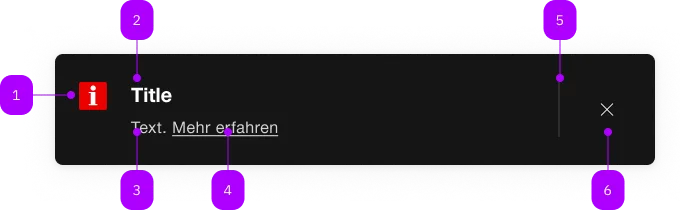
| Nummer | Typ | Beschreibung | Optional | Hinweis |
|---|---|---|---|---|
| 1 | Komponente | sbb-icon | Nein | |
| 2 | Komponente | sbb-title | Nein | |
| 3 | Text | Nein | ||
| 4 | Komponente | sbb-link | Ja | |
| 5 | Komponente | sbb-divider | - | Erscheint bei readonly="false" |
| 6 | Komponente | sbb-transparent-button | - | Erscheint bei readonly="false" |
Spielwiese
The <sbb-alert> is a component which should be used to display important messages to a client.
Multiple instances of this component can be used within the <sbb-alert-group> component.
The group also manages the accessibility of one or multiple alert instances and also the
visual gap between each other.
<sbb-alert-group accessibility-title="Disruptions" accessibility-level="2">
  <sbb-alert size="l">
    <sbb-title level="3">Interruption between Genève and Lausanne</sbb-title>
    The rail traffic between Allaman and Morges is interrupted. All trains are cancelled.
    <sbb-link href="https://www.sbb.ch">Find out more</sbb-link>
  </sbb-alert>
  <sbb-alert>
    <sbb-title level="3">Interruption between Berne and Olten</sbb-title>
    Between Berne and Olten from 03.11.2021 to 05.12.2022 each time from 22:30 to 06:00 o'clock
    construction work will take place. You have to expect changed travel times and changed
    connections. <sbb-link href="https://www.sbb.ch">Find out more</sbb-link>
  </sbb-alert>
</sbb-alert-group>
Interactions
If all <sbb-alert> instances in a group are dismissed, it's recommended to completely
remove the <sbb-alert-group> from DOM.
Listen to the empty event dispatched by the group and react accordingly.
Slots
The unnamed slot is used to project an <sbb-title>, text content and one or more <sbb-link> elements.
The component can optionally display an <sbb-icon> at the component start using the iconName property or via custom content using the icon slot.
<sbb-alert icon-name="disruption">
  <sbb-title level="3">Interruption between Berne and Olten</sbb-title>
  Between Bern and Olten from 03.11.2021 to 05.12.2022 each time from 22:30 to 06:00 o'clock
  construction work will take place. You have to expect changed travel times and changed
  connections. <sbb-link href="https://www.sbb.ch">Find out more</sbb-link>
</sbb-alert>

<sbb-alert>
  <sbb-title level="3">Interruption between Berne and Olten</sbb-title>
  <sbb-icon slot="icon" name="disruption"></sbb-icon>
  Between Bern and Olten from 03.11.2021 to 05.12.2022 each time from 22:30 to 06:00 o'clock
  construction work will take place. You have to expect changed travel times and changed
  connections. <sbb-link href="https://www.sbb.ch">Find out more</sbb-link>
</sbb-alert>
Readonly
Per default a <sbb-alert> can be dismissed by a user. If an alert should not be dismissable,
use the readonly attribute/readOnly property.
<sbb-alert readonly>
  <sbb-title level="3">Interruption between Berne and Olten</sbb-title>
  Between Bern and Olten from 03.11.2021 to 05.12.2022 each time from 22:30 to 06:00 o'clock
  construction work will take place. You have to expect changed travel times and changed
  connections.
</sbb-alert>
Style
Users can choose between three size options: s, m (default) and l.
<sbb-alert size="s"> ... </sbb-alert>

<sbb-alert size="l"> ... </sbb-alert>
Animation
Set the animation property to manage which animations are enabled.
As a base rule, opening animations should be active if an alert arrives after the initial page load.
Accessibility
Accessibility is mainly done by wrapping the alerts into the <sbb-alert-group>.
The description text is wrapped into an <p> element to guarantee the semantic meaning.
Avoid slotting block elements (e.g. <div>) as this violates semantic rules and can have
negative effects on screen readers.
For the <sbb-alert-group> it's possible to add a hidden title by specifying the accessibility-title.
The heading level can be set via accessibility-title-level.
By default, the <sbb-alert-group> has the role status which means that if a new alert
arrives, it will be read out as soon as the user is idle
(equal to aria-live="polite").
You can change the role or aria-live attributes to fit your needs.
For example, you can set the role to alert which implicitly sets aria-live to assertive
and therefore interrupts screen reader flow, to immediately read out the alert content.
Note that with role alert, in some combinations of screen readers and browsers not every part of the alert is fully read.
API Documentation
class: SbbAlertElement, sbb-alert
Properties
| Name | Attribute | Privacy | Type | Default | Description |
|---|---|---|---|---|---|
animation | animation | public | 'open' | 'close' | 'all' | 'none' | 'all' | The enabled animations. |
iconName | icon-name | public | string | '' | The icon name we want to use, choose from the small icon variants from the ui-icons category from here https://icons.app.sbb.ch. |
isOpen | - | public | boolean | Whether the element is open. | |
readOnly | readonly | public | boolean | false | Whether the component is readonly. |
size | size | public | 's' | 'm' | 'l' | 'm' / 's' (lean) | You can choose between s, m or l size. |
Methods
| Name | Privacy | Description | Parameters | Return | Inherited From |
|---|---|---|---|---|---|
close | public | Close the alert. | void | SbbOpenCloseBaseElement | |
escapeStrategy | public | The method which is called on escape key press. Defaults to calling close() | void | SbbOpenCloseBaseElement | |
open | public | Open the alert. | void | SbbOpenCloseBaseElement |
Events
| Name | Type | Description | Inherited From |
|---|---|---|---|
beforeclose | Event | Emits whenever the component begins the closing transition. Can be canceled. | SbbOpenCloseBaseElement |
beforeopen | Event | Emits whenever the component starts the opening transition. Can be canceled. | SbbOpenCloseBaseElement |
close | Event | Emits whenever the component is closed. | SbbOpenCloseBaseElement |
open | Event | Emits whenever the component is opened. | SbbOpenCloseBaseElement |
Slots
| Name | Description |
|---|---|
Use the unnamed slot to add content to the sbb-alert. At a minimum an sbb-title element and a descriptive text should be used. | |
icon | Should be a sbb-icon which is displayed next to the title. Styling is optimized for icons of type HIM-CUS. |
title | Slot for the title. For the standard sbb-title element, the slot is automatically assigned when slotted in the unnamed slot. |
class: SbbAlertGroupElement, sbb-alert-group
Properties
| Name | Attribute | Privacy | Type | Default | Description |
|---|---|---|---|---|---|
accessibilityTitle | accessibility-title | public | string | '' | Title for this alert group which is only visible for screen reader users. |
accessibilityTitleLevel | accessibility-title-level | public | SbbTitleLevel | '2' | Level of the accessibility title, will be rendered as heading tag (e.g. h2). Defaults to level 2. |
role | role | public | 'alert' | 'status' | string | 'status' | The role attribute defines how to announce alerts to the user. 'status': sets aria-live to polite and aria-atomic to true. 'alert': sets aria-live to assertive and aria-atomic to true. |
Events
| Name | Type | Description | Inherited From |
|---|---|---|---|
empty | Event | Emits when sbb-alert-group becomes empty. |
Slots
| Name | Description |
|---|---|
Use the unnamed slot to add sbb-alert elements to the sbb-alert-group. | |
accessibility-title | title for this sbb-alert-group which is only visible for screen reader users. |