Was macht die Komponente?
Versteckt Inhalt hinter einem Titel. Mit einem Klick auf den Titel kann der dazugehörige Inhalt ein- und ausgeblendet werden.
Wann soll die Komponente eingesetzt werden?
- Um die Informationsarchitektur einer Seite zu verbessern, bzw. um Inhalt zu strukturieren.
- Um langes Scrollen zu vermeiden.
- Um Übersichtlichkeit zu gewährleisten/herzustellen.
Regeln
- Ein Accordion soll aus min. zwei Einträgen bestehen.
- Ineinander verschachtelte Akkordeons sind nicht erlaubt.
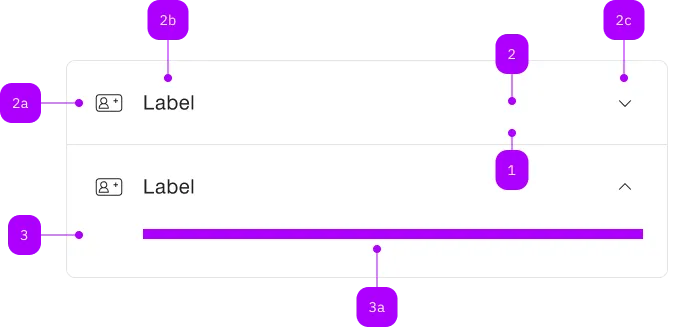
| Nummer | Typ | Beschreibung | Optional | Hinweis |
|---|---|---|---|---|
| 1 | Komponente | sbb-extension-panel | Nein | |
| 2 | Komponente | sbb-expansion-panel-header | Nein | |
| 2a | Komponente | sbb-icon | Ja | |
| 2b | Text | Label | Nein | |
| 2c | Komponente | sbb-icon | Nein | Zeigt den Zustand an |
| 3 | Komponente | sbb-expansion-panel-content | Nein | |
| 3a | Slot | Beliebiger Inhalt erlaubt | Nein |
Spielwiese
The <sbb-accordion> is a component which acts as a container
for one or more sbb-expansion-panel.
<sbb-accordion>
  <sbb-expansion-panel>
    <sbb-expansion-panel-header>Header 1</sbb-expansion-panel-header>
    <sbb-expansion-panel-content>Content 1</sbb-expansion-panel-content>
  </sbb-expansion-panel>
  <sbb-expansion-panel>
    <sbb-expansion-panel-header>Header 2</sbb-expansion-panel-header>
    <sbb-expansion-panel-content>Content 2</sbb-expansion-panel-content>
  </sbb-expansion-panel>
</sbb-accordion>
Interaction
The multi property, if set, allows having more than one <sbb-expansion-panel> expanded at the same time.
<sbb-accordion multi> ... </sbb-accordion>
Style
The component has two different sizes, l (default) and s, which can be changed using the size property.
The property overrides the size value of any inner <sbb-expansion-panel>.
<sbb-accordion size="s"> ... </sbb-accordion>
The component has a titleLevel property, which is proxied to each inner <sbb-expansion-panel-header>, and can be used
to wrap the header of each <sbb-expansion-panel> in a heading tag; if the property is unset, a div is used.
In the following example, all the <sbb-expansion-panel-header> would be wrapped in a h3 heading tag.
<sbb-accordion title-level="3">
  <sbb-expansion-panel>
    <sbb-expansion-panel-header>Header 1</sbb-expansion-panel-header>
    <sbb-expansion-panel-content>Content 1</sbb-expansion-panel-content>
  </sbb-expansion-panel>
  ...
</sbb-accordion>
API Documentation
class: SbbAccordionElement, sbb-accordion
Properties
| Name | Attribute | Privacy | Type | Default | Description |
|---|---|---|---|---|---|
multi | multi | public | boolean | false | Whether more than one sbb-expansion-panel can be open at the same time. |
size | size | public | 's' | 'l' | 'l' / 's' (lean) | Size variant, either l or s; overrides the size on any projected sbb-expansion-panel. |
titleLevel | title-level | public | SbbTitleLevel | null | null | The heading level for the sbb-expansion-panel-headers within the component. |
Slots
| Name | Description |
|---|---|
Use the unnamed slot to add sbb-expansion-panel elements. |