Was macht die Komponente?
Ein Teaser ist eine Vorschau, der Nutzende neugierig machen und sie dazu anregen soll, auf weitere Inhalte oder Seiten zu klicken.
Wann soll die Komponente eingesetzt werden?
- Um Inhalte, Artikel, Produkte oder Dienstleistungen hervorzuheben und zu bewerben.
- Um Nutzende auf weiterführende Informationen oder interessante Inhalte aufmerksam zu machen.
Regeln
- Verwende eine prägnante und einladende Überschrift sowie eine kurze, interessante Beschreibung.
- Verwende nicht zu viele verschiedene Teaser-Arten- und Grössen auf einer Seite.
- Mehrere Teaser können mit einem Titel strukturiert werden.
- Der Teaser-Product-Static soll nur verwendet werden, wenn der Teaser mehrere CTA enthalten soll.
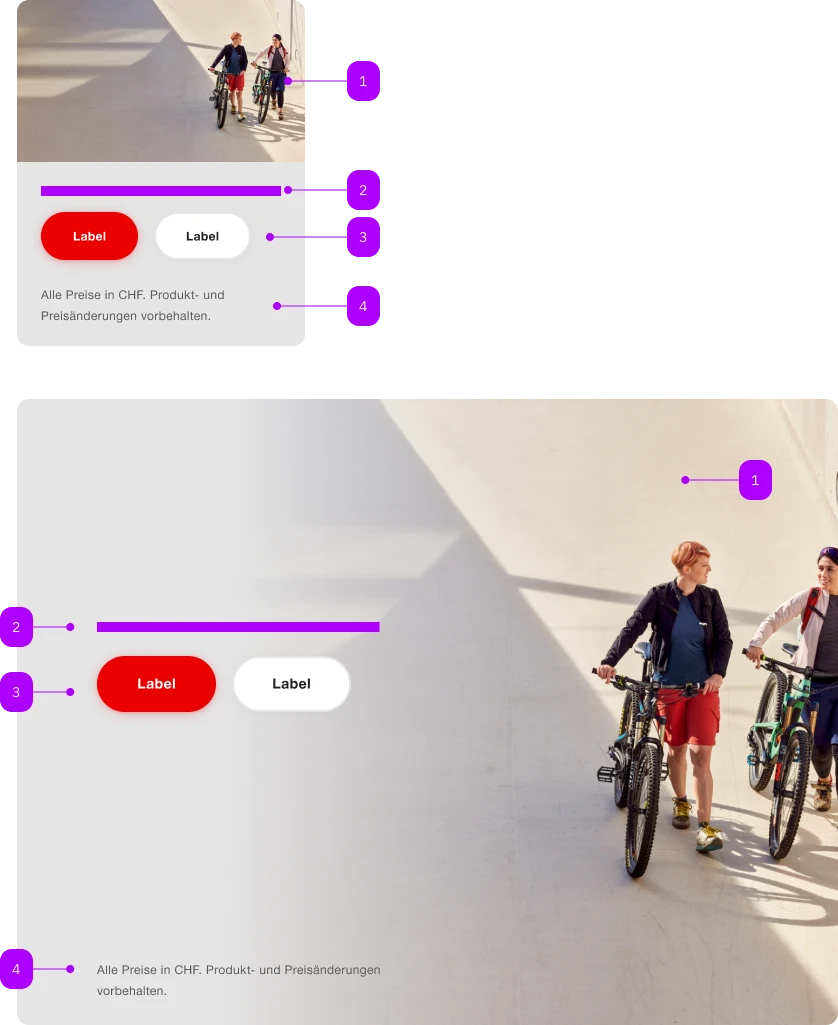
| Nummer | Typ | Beschreibung | Optional | Hinweis |
|---|---|---|---|---|
| 1 | Komponente | sbb-image | Nein | |
| 2 | Slot | Für textuellen Inhalt. | Nein | |
| 3 | Komponente | sbb-action-group | Nein | Enthält mehrere Buttons oder Links |
| 4 | Slot | Footnote | Ja |
Spielwiese
Footnote Lorem ipsum dolor sit amet, consectetur adipiscing elit. Praesent pretium felis sitamet felis viverra lacinia. Donec et enim mi. Aliquam erat volutpat. Proin ut odio tellus. Donectempor mi vel dapibus lobortis.
The sbb-teaser-product-static is a component that can display a text and a footnote,
combined with an image as background, to tease a product.
It should be used if there is more than one interactive action,
otherwise, see sbb-teaser-product.
<sbb-teaser-product-static>
  <sbb-image slot="image" image-src="..."></sbb-image>

  <p class="sbb-teaser-product--spacing">Content ...</p>

  <p slot="footnote" class="sbb-teaser-product--spacing">...</p>
</sbb-teaser-product-static>
Slots
Use the image slot to pass an sbb-image or an img that will be used as background.
Optionally, you can add an overlapping sbb-chip-label by wrapping the sbb-image in a figure tag (see sbb-image doc).
Use the optional footnote slot to add a text anchored to the bottom-end of the component.
The default slot is reserved for the main content: it could be a simple text or a text combined with more elements,
like a sbb-title or some interactive elements, like buttons or links within the sbb-action-group component.
<sbb-teaser-product-static>
  <figure slot="image" class="sbb-figure">
    <sbb-image image-src="..."></sbb-image>
    <sbb-chip-label class="sbb-figure-overlap-start-start">Chip label</sbb-chip-label>
  </figure>

  <p class="sbb-teaser-product--spacing">Content ...</p>
</sbb-teaser-product-static>
If paragraphs, title and/or button are used, consumers can apply the helper class sbb-teaser-product--spacing
to display the components with the correct spacings.
<sbb-teaser-product-static>
  <sbb-image slot="image" image-src="..."></sbb-image>
  <sbb-title level="3" class="sbb-teaser-product--spacing">
    Benefit from up to 70% discount
  </sbb-title>
  <p class="sbb-teaser-product--spacing">
    Lorem ipsum dolor sit amet, consectetur adipiscing elit. Praesent pretium felis sit amet felis
    viverra lacinia. Donec et enim mi. Aliquam erat volutpat. Proin ut odio tellus.
  </p>
  <sbb-action-group class="sbb-teaser-product--spacing">
    <sbb-button>Label</sbb-button>
    <sbb-secondary-button>Label</sbb-secondary-button>
  </sbb-action-group>
</sbb-teaser-product-static>
Style
Use the image-alignment attribute to anchor the content after (on the left) or before (on the right).
<sbb-teaser-product-static image-alignment="before"> ... </sbb-teaser-product-static>
Add the negative attribute to enable the negative variant.
<sbb-teaser-product-static negative> ... </sbb-teaser-product-static>
Properties
| Name | Attribute | Privacy | Type | Default | Description |
|---|---|---|---|---|---|
imageAlignment | image-alignment | public | 'after' | 'before' | 'after' | Whether the fully visible part of the image is aligned 'before' or 'after' the content. Only relevant starting from large breakpoint. |
negative | negative | public | boolean | false | Negative coloring variant flag. |
CSS Properties
| Name | Default | Description |
|---|---|---|
--sbb-teaser-product-background-gradient-end | 75% | At which percentage the background should be fully transparent. |
--sbb-teaser-product-background-gradient-start | 25% | At which percentage the background should start getting transparent. |
Slots
| Name | Description |
|---|---|
| Use this slot to provide the main content. | |
footnote | Use this slot to provide a footnote. |
image | Use this slot to provide an image or a sbb-image as a background. |