Was macht die Komponente?
Ein Teaser ist eine Vorschau, der Nutzende neugierig machen und sie dazu anregen soll, auf weitere Inhalte oder Seiten zu klicken.
Wann soll die Komponente eingesetzt werden?
- Um Inhalte, Artikel, Produkte oder Dienstleistungen hervorzuheben und zu bewerben.
- Um Nutzende auf weiterführende Informationen oder interessante Inhalte aufmerksam zu machen.
Regeln
- Verwende eine prägnante und einladende Überschrift sowie eine kurze, interessante Beschreibung.
- Verwende nicht zu viele verschiedene Teaser-Arten- und Grössen auf einer Seite.
- Mehrere Teaser können mit einem Titel strukturiert werden.
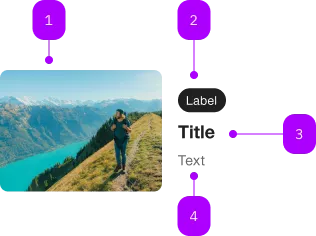
| Nummer | Typ | Beschreibung | Optional | Hinweis |
|---|---|---|---|---|
| 1 | Komponente | sbb-image | Nein | |
| 2 | Komponente | sbb-chip | Ja | |
| 3 | Komponente | sbb-title | Nein | |
| 4 | Text | Subtext | Nein |
Spielwiese

The <sbb-teaser> is a component which can display an image with a caption, and it behaves like a link on user interaction.
Simple teaser example:
<sbb-teaser href="https://www.sbb.ch">
  <img slot="image" src="..." alt="400x300" />
  <sbb-chip-label>Chip label</sbb-chip-label>
  <sbb-title level="2">Title</sbb-title>
  A brief description.
</sbb-teaser>
Slots
The default slot is reserved for the description and,
optionally, a sbb-title and a sbb-chip-label.
The component displays the image with the self-named slot.
Use the image slot to pass a figure containing an <sbb-image> or an img that will be used as background.
Optionally, you can add an overlapping <sbb-chip-label> to the slotted figure (see sbb-image doc).
<sbb-teaser href="https://www.sbb.ch">
  <figure slot="image" class="sbb-figure">
    <img src="..." alt="400x300" />
    <sbb-chip-label class="sbb-figure-overlap-start-start">AI Generated</sbb-chip-label>
  </figure>
  <sbb-chip-label>Chip label</sbb-chip-label>
  <sbb-title level="2">Title</sbb-title>
  A brief description.
</sbb-teaser>
Style
Using the alignment property, it is possible to change the text position respect to the image.
Possible values are after-centered (default), after and below.
<sbb-teaser href="https://www.sbb.ch" alignment="below"> ... </sbb-teaser>
By default, the image dimensions are set using the width and the aspect ratio.
Default values are 300px and 4/3. Consumers can change these values on their slotted image element.
Flexible Layouts
If using the teaser in a flexible layout like CSS grid or flex together with alignment=below,
the CSS variable --sbb-teaser-align-items with stretch as value can be used
to achieve the image width taking the full available space. On the image itself, the width must be set to 100%.
<div style="display: grid; gap: 1rem; grid-template-rows: repeat(2, 1fr)">
  <sbb-teaser style="--sbb-teaser-align-items: stretch" href="https://www.sbb.ch" alignment="below">
    <sbb-image style="width: 100%;" slot="image" image-src="..." alt="description"></sbb-image>
    ...
  </sbb-teaser>
  <sbb-teaser style="--sbb-teaser-align-items: stretch" href="https://www.sbb.ch" alignment="below">
    <sbb-image style="width: 100%;" slot="image" image-src="..." alt="description"></sbb-image>
    ...
  </sbb-teaser>
</div>
Accessibility
It's important to set the accessibilityLabel on the <sbb-teaser>, which describes the <sbb-teaser> for screen-reader users.
The description text is wrapped into an <p> element to guarantee the semantic meaning.
API Documentation
class: SbbTeaserElement, sbb-teaser
Properties
| Name | Attribute | Privacy | Type | Default | Description |
|---|---|---|---|---|---|
accessibilityCurrent | accessibility-current | public | string | '' | This will be forwarded as aria-current to the inner anchor element. |
accessibilityLabel | accessibility-label | public | string | '' | This will be forwarded as aria-label to the inner anchor element. |
alignment | alignment | public | 'after-centered' | 'after' | 'below' | 'after-centered' | Teaser variant - define the position and the alignment of the text block. |
download | download | public | boolean | false | Whether the browser will show the download dialog on click. |
href | href | public | string | '' | The href value you want to link to. |
rel | rel | public | string | '' | The relationship of the linked URL as space-separated link types. |
target | target | public | LinkTargetType | string | '' | Where to display the linked URL. |
Slots
| Name | Description |
|---|---|
| Use the unnamed slot to render the description, the sbb-title and the sbb-chip-label. | |
chip | Slot for the sbb-chip-label element. The slot on the sbb-chip-label element is automatically assigned when slotted in the unnamed slot. |
image | Slot used to render the image. |
title | Slot for the title. For the standard sbb-title element, the slot is automatically assigned when slotted in the unnamed slot. |