Was macht die Komponente?
Sie ist Teil der Container-Komponente.
Wann soll die Komponente eingesetzt werden?
- Nur innerhalb der Container-Komponente.
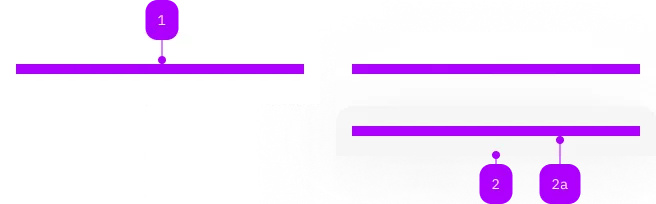
| Nummer | Typ | Beschreibung | Optional | Hinweis |
|---|---|---|---|---|
| 1 | Slot | Beliebiger Inhalt erlaubt | Nein | |
| 2 | Komponente | sbb-sticky-bar | Ja | |
| 2a | Slot | z.B. für Action-Group | Nein |
The <sbb-container> is a component that displays its content with the default page spacing.
<sbb-container>
  <sbb-title>My Title</sbb-title>
  <p>...</p>
  ...
</sbb-container>
It also supports the slotting of an <sbb-sticky-bar>.
<sbb-container>
  <!-- Any other kind of content. -->
  ...

  <!-- Sticky bar should go last. -->
  <sbb-sticky-bar> ... </sbb-sticky-bar>
</sbb-container>
Slots
The <sbb-container> content is provided via an unnamed slot.
The image slot can be used to place a background image. If you need to
control the object position, use CSS object-position for slotted img, or
--sbb-image-object-position variable for slotted <sbb-image>.
If an image is present, the container receives a pre-defined padding.
It's possible to override the padding by using the CSS variable
--sbb-container-padding.
Optionally, you can add an overlapping <sbb-chip-label> by wrapping the
<sbb-image> in a figure tag (see sbb-image doc).
<sbb-container>
  <figure class="sbb-figure" slot="image">
    <sbb-image
      image-src="https://cdn.img.sbb.ch/content/dam/internet/externe-assets/lyne/Bahnhof-Luzern.jpg"
      alt="Station of Lucerne from outside"
    ></sbb-image>
    <sbb-chip-label class="sbb-figure-overlap-start-start">...</sbb-chip-label>
  </figure>
  ...
</sbb-container>
Style
By default <sbb-container> uses the page spacing defined in the layout documentation.
Optionally the user can use the expanded property (default: false) to switch to the page spacing expanded layout.
Spacing options are applied to all the container's content, including the <sbb-sticky-bar>.
The component has also five color variants that can be set using the color property (default: white).
In midnight and charcoal variants, the slotted content text color and the focus outline color change to white,
but it's up to the consumer to correctly set the negative property on slotted Lyne components, if needed.
<sbb-container expanded variant="milk"> ... </sbb-container>

<sbb-container variant="midnight">
  <sbb-title negative>Title</sbb-title>
  <p>Text</p>
</sbb-container>
Sticky Bar
The <sbb-sticky-bar> is a component meant to be slotted inside a <sbb-container> component.
It is displayed with sticky positioning at the bottom of the container that contains it.
<sbb-container>
  <sbb-sticky-bar>
    <!-- Sticky bar content. -->
  </sbb-sticky-bar>
</sbb-container>
Animate from sticky to normal content flow and vice versa
By default, the sticky bar is set to position: sticky. In certain cases, the consumer needs
to control the sliding out (or sliding in) of the sticky bar.
By calling the stick() or unstick() methods, the position property is toggled
between position: sticky and position: relative by displaying a slide animation. When the sticky bar is unstick,
the <sbb-sticky-bar> will behave like a normal container without any sticky behavior.
Whenever the sticky bar is currently not sticky (e.g. scrolled down),
calling stick() or unstick() won't have any visual effect.
An example use case is to call unstick(), which visually slides out the sticky bar, and
then the consumer can remove it from the DOM by listening to the unstick event.
Style
The <sbb-sticky-bar> inherits its variant from the <sbb-container> it's placed in.
Optionally the user can set the color property on the <sbb-sticky-bar> in order to override the one inherited by the <sbb-container>.
The color is only applied when the sticky bar is sticking, and will become transparent once it settles on the bottom of the container.
The component has two sizes, m and s, that can be set using the size property.
API Documentation
class: SbbContainerElement, sbb-container
Properties
| Name | Attribute | Privacy | Type | Default | Description |
|---|---|---|---|---|---|
backgroundExpanded | background-expanded | public | boolean | false | Whether the background color is shown on full container width on large screens. |
color | color | public | 'transparent' | 'white' | 'milk' | 'midnight' | 'charcoal' | 'white' | Color of the container, like transparent, white etc. |
expanded | expanded | public | boolean | false | Whether the container is expanded. |
CSS Properties
| Name | Default | Description |
|---|---|---|
--sbb-page-spacing-padding | Use this variable to override the default page spacing. Note that overriding this will disable the standard responsive spacing behavior of the container. |
Slots
| Name | Description |
|---|---|
| Use the unnamed slot to add anything to the container. | |
image | The slot used to slot an sbb-image to use as background. |
sticky-bar | The slot used by the sbb-sticky-bar component. |
class: SbbStickyBarElement, sbb-sticky-bar
Properties
| Name | Attribute | Privacy | Type | Default | Description |
|---|---|---|---|---|---|
color | color | public | 'white' | 'milk' | 'midnight' | 'charcoal' | null | null | Color of the container, like transparent, white etc. |
size | size | public | 'm' | 's' | 'm' / 's' (lean) | Size of the container. |
Methods
| Name | Privacy | Description | Parameters | Return | Inherited From |
|---|---|---|---|---|---|
stick | public | Animates from normal content flow position to position: sticky. | void | ||
unstick | public | Animates position: sticky to normal content flow position. | void |
Events
| Name | Type | Description | Inherited From |
|---|---|---|---|
beforestick | Event | Emits when the animation from normal content flow to position: sticky starts. Can be canceled. | |
beforeunstick | Event | Emits when the animation from position: sticky to normal content flow starts. Can be canceled. | |
stick | Event | Emits when the animation from normal content flow to position: sticky ends. | |
unstick | Event | Emits when the animation from position: sticky to normal content flow ends. |
CSS Properties
| Name | Default | Description |
|---|---|---|
--sbb-sticky-bar-bottom-overlapping-height | 0px | Define an additional area where the sticky bar overlaps the following content on the bottom. This area becomes visible when the sticky bar transitions from sticky to the normal document flow. |
--sbb-sticky-bar-padding-block | var(--sbb-spacing-responsive-xs) | Block padding of the sticky bar. |
--sbb-sticky-bar-z-index | To specify a custom stack order, the z-index can be overridden by defining this CSS variable. |
Slots
| Name | Description |
|---|---|
| Use the unnamed slot to add content to the sticky bar. |