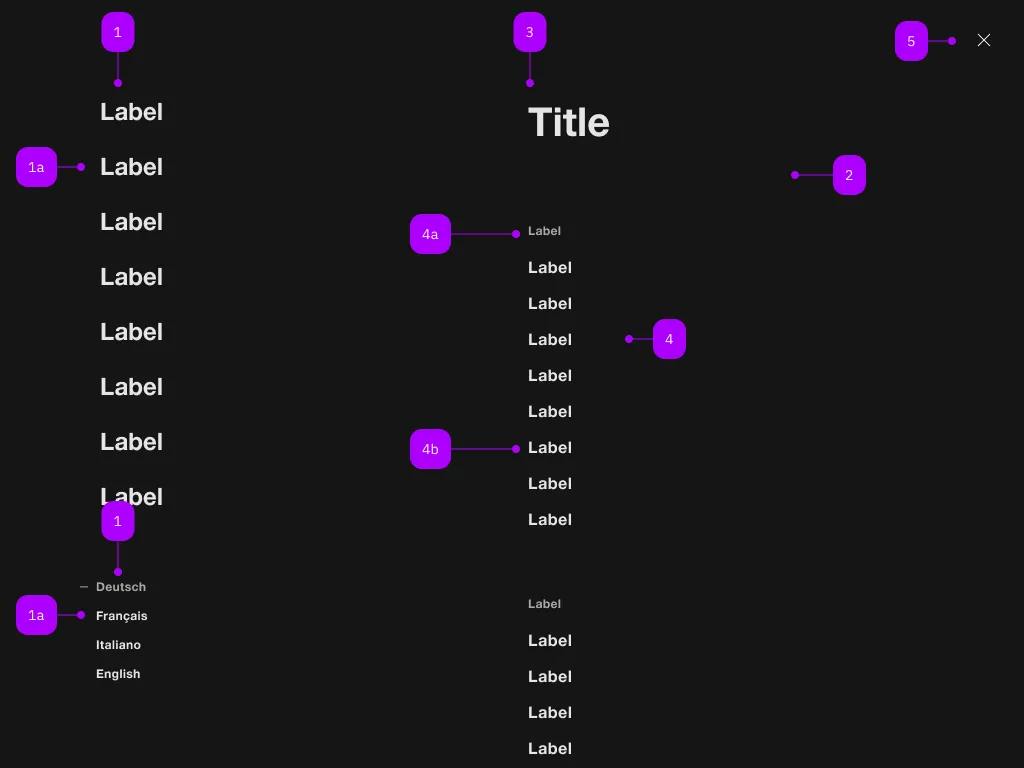
The <sbb-navigation> component provides a way to present a modal navigation menu.
It creates a backdrop for disabling interaction behind the navigation and disables scrolling of the page
content while open.
Focus is managed properly by setting it on the first focusable element or the first action with the
sbb-active class.
<sbb-navigation>
  <sbb-navigation-marker>
    <sbb-navigation-button aria-current="page" id="nav-section-1">Label 1</sbb-navigation-button>
    <sbb-navigation-button id="nav-section-2">Label 2</sbb-navigation-button>
    <sbb-navigation-link href="https://www.sbb.ch/some/route">Label 3</sbb-navigation-link>
  </sbb-navigation-marker>
</sbb-navigation>
It is possible to use it either with or without <sbb-navigation-section> instances.
Interactions
To display the <sbb-navigation> component you can either provide a trigger element using the trigger property,
or call the open() method on the <sbb-navigation> component.
<!-- Trigger element -->
<sbb-button id="nav-trigger">Navigation trigger</sbb-button>

<!-- Navigation component with navigation sections -->
<sbb-navigation trigger="nav-trigger">
  <sbb-navigation-marker>
    <sbb-navigation-button aria-current="page" id="nav-section-1">Label 1</sbb-navigation-button>
    <sbb-navigation-button id="nav-section-2">Label 2</sbb-navigation-button>
    <sbb-navigation-link href="https://www.sbb.ch/some/route">Label 3</sbb-navigation-link>
  </sbb-navigation-marker>

  <sbb-navigation-marker>
    <sbb-navigation-button aria-pressed="true">Language 1</sbb-navigation-button>
    <sbb-navigation-button aria-pressed="false">Language 2</sbb-navigation-button>
    <sbb-navigation-button aria-pressed="false">Language 3</sbb-navigation-button>
  </sbb-navigation-marker>

  <sbb-navigation-section trigger="nav-section-1">
    <span slot="label">Title 1</span>
    <sbb-navigation-list>
      <span slot="label">Label 1.1</span>
      <sbb-navigation-link href="...">Label 1.1.1</sbb-navigation-link>
      <sbb-navigation-link href="...">Label 1.1.2</sbb-navigation-link>
      <sbb-navigation-link href="...">Label 1.1.3</sbb-navigation-link>
    </sbb-navigation-list>
    ...
    <sbb-button>Something</sbb-button>
  </sbb-navigation-section>
  ...
</sbb-navigation>
Navigation Actions
There are two types of navigation actions: links and buttons, represented by the <sbb-navigation-link>
and <sbb-navigation-button> components respectively.
They can be used within an <sbb-navigation-list> component or an <sbb-navigation-marker> component.
<sbb-navigation-link href="#info" target="_blank">Link</sbb-navigation-link>
<sbb-navigation-button value="menu" name="menu">Button</sbb-navigation-button>
State
The navigation actions can have an initial active state which can be set by using the class sbb-active.
<sbb-navigation-link class="sbb-active" href="#info" target="_blank">Link</sbb-navigation-link>
Style
The action components have three different sizes, which can be changed using the size property (l, which is the default, m and s).
<sbb-navigation-link href="#info" size="m">Link</sbb-navigation-link>
Navigation Marker
The <sbb-navigation-marker> component is a collection of <sbb-navigation-button> and <sbb-navigation-link>.
<sbb-navigation-marker>
  <sbb-navigation-button id="nav1">Label 1</sbb-navigation-button>
  <sbb-navigation-button id="nav2">Label 2</sbb-navigation-button>
  <sbb-navigation-link href="https://www.sbb.ch/some/route">Label 3</sbb-navigation-link>
</sbb-navigation-marker>
Style
The component has a property named size which is proxied to all the <sbb-navigation-button>/<sbb-navigation-link> within it.
Possible values are l (default) and s.
<sbb-navigation-marker size="s">
  ...
  <sbb-navigation-marker></sbb-navigation-marker
></sbb-navigation-marker>
Navigation List
The <sbb-navigation-list> component is a collection of <sbb-navigation-button> and <sbb-navigation-link>.
Optionally, a label can be provided via the label attribute/property or the label slot.
<sbb-navigation-list label="Label 1.1">
  <sbb-navigation-link href="...">Label 1.1.1</sbb-navigation-link>
  <sbb-navigation-link href="...">Label 1.1.2</sbb-navigation-link>
  <sbb-navigation-button>Label 1.1.3</sbb-navigation-link>
</sbb-navigation-list>
Navigation Section
The <sbb-navigation-section> is a container for both <sbb-navigation-list> and <sbb-button>.
Its intended use is inside a <sbb-navigation> component, in which it can be seen as a 'second-level' panel.
Trigger
To display the <sbb-navigation-section> component you must provide a trigger element using the trigger property,
Optionally a label can be provided via slot or via the titleContent property.
<sbb-navigation-section trigger="nav1" titleContent="Title 1">
  <sbb-navigation-list label="Label 1.1">
    <sbb-navigation-link accessibility-current="page" href="...">Label 1.1.1</sbb-navigation-link>
    <sbb-navigation-link href="...">Label 1.1.2</sbb-navigation-link>
    ...
  </sbb-navigation-list>
  <sbb-button>Something</sbb-button>
</sbb-navigation-section>
Accessibility
On opening, the focus will be automatically set on the first focusable element (unless manually specified, see below).
If there is a trigger for a navigation section with the CSS class sbb-active,
the first occurrence automatically opens the connected section.
When a navigation action is marked to indicate the user is currently on that page,
accessibility-current="page" (for <sbb-navigation-link>s) or aria-current="page" (for <sbb-navigation-button>s)
should be set on that action.
Similarly, if a navigation action is marked to indicate a selected option (e.g. the selected language),
aria-pressed should be set on that action.
Controlling initial focus
The first element with the attribute sbb-focus-initial will receive focus on opening.
If the attribute is not used, the first focusable element receives focus (recommended).
<sbb-navigation >
  <sbb-navigation-marker>
    <sbb-navigation-button>Label 1</sbb-navigation-button>
    <sbb-navigation-button sbb-focus-initial>Label 2</sbb-navigation-button>
      ...
</sbb-navigation>
<sbb-navigation-section trigger="nav1">
  <sbb-navigation-list label="Label 1.1">
    <sbb-navigation-link href="...">Label 1.1.1</sbb-navigation-link>
    <sbb-navigation-link sbb-focus-initial href="...">Label 1.1.2</sbb-navigation-link>
    ...
  </sbb-navigation-list>
</sbb-navigation-section>
API Documentation
Properties
| Name | Attribute | Privacy | Type | Default | Description |
connectedSection | - | public | SbbNavigationSectionElement | undefined | | The section that is being controlled by the action, if any. |
form | form | public | HTMLFormElement | null | | The <form> element to associate the button with. |
marker | - | public | SbbNavigationMarkerElement | null | | The navigation marker in which the action is nested. |
name | name | public | string | | Name of the form element. Will be read from name attribute. |
section | - | public | SbbNavigationSectionElement | null | | The section in which the action is nested. |
size | size | public | SbbNavigationActionSize | 'l' / 's' (lean) | Action size variant, either s, m or l. |
type | type | public | SbbButtonType | 'button' | The type attribute to use for the button. |
validationMessage | - | public | string | | Returns the current error message, if available, which corresponds to the current validation state. Please note that only one message is returned at a time (e.g. if multiple validity states are invalid, only the chronologically first one is returned until it is fixed, at which point the next message might be returned, if it is still applicable). Also, a custom validity message (see below) has precedence over native validation messages. |
validity | - | public | ValidityState | | Returns the ValidityState object for this element. |
value | value | public | string | '' | Value of the form element. |
willValidate | - | public | boolean | | Returns true if this element will be validated when the form is submitted; false otherwise. |
Methods
| Name | Privacy | Description | Parameters | Return | Inherited From |
checkValidity | public | Returns true if this element has no validity problems; false otherwise. Fires an invalid event at the element in the latter case. | | boolean | SbbFormAssociatedMixin |
reportValidity | public | Returns true if this element has no validity problems; otherwise, returns false, fires an invalid event at the element, and (if the event isn't canceled) reports the problem to the user. | | boolean | SbbFormAssociatedMixin |
setCustomValidity | public | Sets the custom validity message for this element. Use the empty string to indicate that the element does not have a custom validity error. | message: string | void | SbbFormAssociatedMixin |
Slots
| Name | Description |
| Use the unnamed slot to add content to the sbb-navigation-button. |
class: SbbNavigationElement, sbb-navigation
Properties
| Name | Attribute | Privacy | Type | Default | Description |
accessibilityCloseLabel | accessibility-close-label | public | string | '' | This will be forwarded as aria-label to the close button element. |
activeNavigationSection | - | public | SbbNavigationSectionElement | null | null | Returns the active navigation section element. |
closeButton | - | public | HTMLElement | null | | Returns the close button element. |
isOpen | - | public | boolean | | Whether the element is open. |
navigationContent | - | public | HTMLElement | null | | Returns the navigation content element. |
trigger | trigger | public | HTMLElement | null | null | The element that will trigger the navigation. For attribute usage, provide an id reference. |
Methods
| Name | Privacy | Description | Parameters | Return | Inherited From |
close | public | Closes the navigation. | | void | SbbOpenCloseBaseElement |
escapeStrategy | public | The method which is called on escape key press. Defaults to calling close() | | void | SbbOpenCloseBaseElement |
open | public | Opens the navigation. | | void | SbbOpenCloseBaseElement |
Events
| Name | Type | Description | Inherited From |
beforeclose | Event | Emits whenever the component begins the closing transition. Can be canceled. | SbbOpenCloseBaseElement |
beforeopen | Event | Emits whenever the component starts the opening transition. Can be canceled. | SbbOpenCloseBaseElement |
close | Event | Emits whenever the component is closed. | SbbOpenCloseBaseElement |
open | Event | Emits whenever the component is opened. | SbbOpenCloseBaseElement |
CSS Properties
| Name | Default | Description |
--sbb-navigation-z-index | var(--sbb-overlay-default-z-index) | To specify a custom stack order, the z-index can be overridden by defining this CSS variable. The default z-index of the component is set to var(--sbb-overlay-default-z-index) with a value of 1000. |
Slots
| Name | Description |
| Use the unnamed slot to add sbb-navigation-button/sbb-navigation-link elements into the sbb-navigation menu. |
class: SbbNavigationLinkElement, sbb-navigation-link
Properties
| Name | Attribute | Privacy | Type | Default | Description |
accessibilityCurrent | accessibility-current | public | string | '' | This will be forwarded as aria-current to the inner anchor element. |
accessibilityLabel | accessibility-label | public | string | '' | This will be forwarded as aria-label to the inner anchor element. |
connectedSection | - | public | SbbNavigationSectionElement | undefined | | The section that is being controlled by the action, if any. |
download | download | public | boolean | false | Whether the browser will show the download dialog on click. |
href | href | public | string | '' | The href value you want to link to. |
marker | - | public | SbbNavigationMarkerElement | null | | The navigation marker in which the action is nested. |
rel | rel | public | string | '' | The relationship of the linked URL as space-separated link types. |
section | - | public | SbbNavigationSectionElement | null | | The section in which the action is nested. |
size | size | public | SbbNavigationActionSize | 'l' / 's' (lean) | Action size variant, either s, m or l. |
target | target | public | LinkTargetType | string | '' | Where to display the linked URL. |
Slots
| Name | Description |
| Use the unnamed slot to add content to the sbb-navigation-link. |
class: SbbNavigationListElement, sbb-navigation-list
Properties
| Name | Attribute | Privacy | Type | Default | Description |
label | label | public | string | '' | The label to be shown before the action list. |
Slots
| Name | Description |
| Use the unnamed slot to add content to the sbb-navigation-list. |
label | Use this to provide a label element. |
class: SbbNavigationMarkerElement, sbb-navigation-marker
Properties
| Name | Attribute | Privacy | Type | Default | Description |
size | size | public | 'l' | 's' | 'l' / 's' (lean) | Marker size variant, either s or l. |
Methods
| Name | Privacy | Description | Parameters | Return | Inherited From |
reset | public | | | void | |
select | public | | action: SbbNavigationButtonElement | SbbNavigationLinkElement | void | |
Slots
| Name | Description |
| Use the unnamed slot to add sbb-navigation-button/sbb-navigation-link elements into the sbb-navigation-marker. |
class: SbbNavigationSectionElement, sbb-navigation-section
Properties
| Name | Attribute | Privacy | Type | Default | Description |
accessibilityBackLabel | accessibility-back-label | public | string | '' | This will be forwarded as aria-label to the back button element. |
accessibilityLabel | accessibility-label | public | string | '' | This will be forwarded as aria-label to the nav element and is read as a title of the navigation-section. |
isOpen | - | public | boolean | | Whether the element is open. |
titleContent | title-content | public | string | '' | The label to be shown before the action list. |
trigger | trigger | public | HTMLElement | null | null | The element that will trigger the navigation section. For attribute usage, provide an id reference. |
Methods
| Name | Privacy | Description | Parameters | Return | Inherited From |
close | public | Closes the navigation section. | | void | SbbOpenCloseBaseElement |
escapeStrategy | public | The method which is called on escape key press. Defaults to calling close() | | void | SbbOpenCloseBaseElement |
open | public | Opens the navigation section on trigger click. | | void | SbbOpenCloseBaseElement |
Events
| Name | Type | Description | Inherited From |
beforeclose | Event | Emits whenever the component begins the closing transition. Can be canceled. | SbbOpenCloseBaseElement |
beforeopen | Event | Emits whenever the component starts the opening transition. Can be canceled. | SbbOpenCloseBaseElement |
close | Event | Emits whenever the component is closed. | SbbOpenCloseBaseElement |
open | Event | Emits whenever the component is opened. | SbbOpenCloseBaseElement |
Slots
| Name | Description |
| Use the unnamed slot to add content into the sbb-navigation-section. |