Was macht die Komponente?
Ein Date-Picker ist eine Eingabekomponente, die es den Nutzenden ermöglicht, ein Datum aus einer Kalender-Ansicht auszuwählen.
Wann soll die Komponente eingesetzt werden?
- Um Nutzenden die Auswahl eines spezifischen Datums zu erleichtern.
- Um die Genauigkeit und Konsistenz der Datumseingabe zu gewährleisten.
- Um eine benutzerfreundliche Alternative zur manuellen Datumseingabe anzubieten.
Regeln
- Der Date-Picker soll nach Möglichkeit ein Standardwert anzeigen, z.B. das heutige Datum.
- Der Date-Picker kann mit oder ohne Vor- und Zurück-Buttons dargestellt werden.
- Der Date-Picker soll lokalisiert dargestellt werden und das Datumsformat der Nutzenden berücksichtigen.
- Bei Fehlermeldungen (z.B. ungültiges Datum) soll eine klare und verständliche Fehlermeldung angezeigt werden.
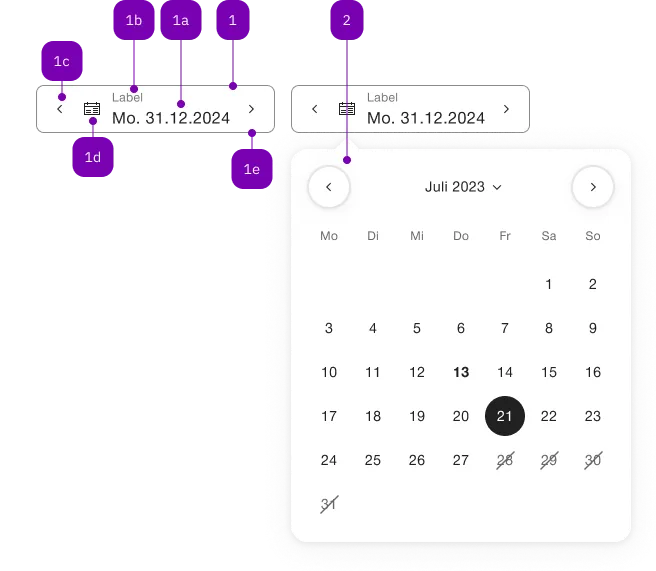
| Nummer | Typ | Beschreibung | Optional | Hinweis |
|---|---|---|---|---|
| 1 | Komponente | sbb-form-field | Nein | |
| 1a | Standard-HTML | input | Nein | |
| 1b | Standard-HTML | label | Nein | |
| 1c | Komponente | sbb-datepicker-previous-day | Ja | |
| 1d | Komponente | sbb-datepicker-toggle | Ja | |
| 1e | Komponente | sbb-datepicker-next-day | Ja | |
| 2 | Komponente | sbb-datepicker | Nein |
Spielwiese
The <sbb-datepicker> is a component which can be used together with
an <sbb-date-input> and an <sbb-datepicker-toggle> element to attach
a dropdown to select a date from a calendar.
It's also possible to display a two-months view using the wide property.
The component and the <sbb-date-input> can be connected using the
input property, which accepts the id of the native input, or directly
its reference.
<sbb-date-input id="datepicker-input"></sbb-date-input>
<sbb-datepicker-toggle input="datepicker-input" datepicker="datepicker"></sbb-datepicker-toggle>
<sbb-datepicker input="datepicker-input" id="datepicker"></sbb-datepicker>
It is however recommend to use it in an <sbb-form-field>, which will
automatically take care of connecting the corresponding components.
In <sbb-form-field>
If the <sbb-datepicker> is used within a sbb-form-field
with an <sbb-date-input>, they are automatically linked. This also
applies to the <sbb-datepicker-previous-day> and
<sbb-datepicker-next-day> components.
<sbb-form-field>
  <sbb-date-input></sbb-date-input>
  <sbb-datepicker></sbb-datepicker>
</sbb-form-field>
<!-- Component's usage with all the related components. -->
<sbb-form-field>
  <sbb-datepicker-previous-day></sbb-datepicker-previous-day>
  <sbb-date-input value="2023-01-01" min="2000-01-01" max="2050-12-31"></sbb-date-input>
  <sbb-datepicker-toggle></sbb-datepicker-toggle>
  <sbb-datepicker-next-day></sbb-datepicker-next-day>
  <sbb-datepicker></sbb-datepicker>
</sbb-form-field>
<sbb-datepicker-previous-day> & <sbb-datepicker-next-day>
The components <sbb-datepicker-previous-day> and <sbb-datepicker-next-day>
can be used as quick navigation buttons to either decrement or increment
the selected date.
The components can be connected using the input id reference attribute or property, similar to the <sbb-datepicker> component.
Same as before, it is recommended to use them in an <sbb-form-field>,
which will automatically take care of connecting the corresponding
components.
If the two components are used within a sbb-form-field,
they are automatically linked and, depending on the position relative to the
<sbb-date-input>, the <sbb-datepicker-previous-day> will be projected in the
prefix slot (if placed before the <sbb-date-input>) or the
suffix slot (if placed after the <sbb-date-input>) of the <sbb-form-field>, whereas the <sbb-datepicker-next-day> will be projected in the
suffix slot (if placed after the <sbb-date-input>) or the
prefix slot (if placed before the <sbb-date-input>) of the <sbb-form-field>.
Both the <sbb-datepicker-previous-day> and the <sbb-datepicker-next-day>
component have an internal disabled state, which is
synchronized with the <sbb-date-input> state:
It is disabled if the date input is disabled or if the selected date is equal
to the input's min/max attribute/property.
Custom current date
For testing purposes you might want to set a fixed date as today.
This can be achieved by using the underlying date adapter that
the date components use.
By default, the defaultDateAdapter is used in the background.
You can e.g. stub the today() method and return your fixed date.
import { defaultDateAdapter } from '@sbb-esta/lyne-elements/datetime.js';
import { stub, type SinonStub } from 'sinon';

// Have defaultDateAdapter.today() return 2022-05-01
todayStub = stub(defaultDateAdapter, 'today').returns(new Date(2022, 4, 1, 0, 0, 0, 0));
// Restore the original method
todayStub.restore();
API Documentation
class: SbbDatepickerElement, sbb-datepicker
Properties
| Name | Attribute | Privacy | Type | Default | Description |
|---|---|---|---|---|---|
input | input | public | SbbDateInputElement<T> | null | null | Reference to the sbb-date-input instance or the native input connected to the datepicker. For attribute usage, provide an id reference. |
isOpen | - | public | boolean | Whether the element is open. | |
trigger | trigger | public | HTMLElement | null | null | The element that will trigger the popover overlay. For attribute usage, provide an id reference. |
view | view | public | CalendarView | 'day' | The initial view of calendar which should be displayed on opening. |
wide | wide | public | boolean | false | If set to true, two months are displayed. |
Methods
| Name | Privacy | Description | Parameters | Return | Inherited From |
|---|---|---|---|---|---|
close | public | Closes the popover. | target: HTMLElement | void | SbbOpenCloseBaseElement |
escapeStrategy | public | The method which is called on escape key press. Defaults to calling close() | void | SbbOpenCloseBaseElement | |
open | public | Opens the popover on trigger click. | void | SbbOpenCloseBaseElement |
Events
| Name | Type | Description | Inherited From |
|---|---|---|---|
beforeclose | CustomEvent<{ closeTarget: HTMLElement | null }> | Emits whenever the component begins the closing transition. Can be canceled. | SbbOpenCloseBaseElement |
beforeopen | Event | Emits whenever the component starts the opening transition. Can be canceled. | SbbOpenCloseBaseElement |
close | CustomEvent<{ closeTarget: HTMLElement | null }> | Emits whenever the component is closed. | SbbOpenCloseBaseElement |
dateselected | CustomEvent<T> | Event emitted on date selection. | |
open | Event | Emits whenever the component is opened. | SbbOpenCloseBaseElement |
class: SbbDatepickerNextDayElement, sbb-datepicker-next-day
Properties
| Name | Attribute | Privacy | Type | Default | Description |
|---|---|---|---|---|---|
disabled | - | public | boolean | true | Whether this button is disabled. |
form | form | public | HTMLFormElement | null | The <form> element to associate the button with. | |
input | input | public | SbbDateInputElement<T> | null | null | The associated date input element. For attribute usage, provide an id reference. |
name | name | public | string | Name of the form element. Will be read from name attribute. | |
negative | negative | public | boolean | false | Negative coloring variant flag. |
type | type | public | SbbButtonType | 'button' | The type attribute to use for the button. |
validationMessage | - | public | string | Returns the current error message, if available, which corresponds to the current validation state. Please note that only one message is returned at a time (e.g. if multiple validity states are invalid, only the chronologically first one is returned until it is fixed, at which point the next message might be returned, if it is still applicable). Also, a custom validity message (see below) has precedence over native validation messages. | |
validity | - | public | ValidityState | Returns the ValidityState object for this element. | |
value | value | public | string | '' | Value of the form element. |
willValidate | - | public | boolean | Returns true if this element will be validated when the form is submitted; false otherwise. |
Methods
| Name | Privacy | Description | Parameters | Return | Inherited From |
|---|---|---|---|---|---|
checkValidity | public | Returns true if this element has no validity problems; false otherwise. Fires an invalid event at the element in the latter case. | boolean | SbbFormAssociatedMixin | |
reportValidity | public | Returns true if this element has no validity problems; otherwise, returns false, fires an invalid event at the element, and (if the event isn't canceled) reports the problem to the user. | boolean | SbbFormAssociatedMixin | |
setCustomValidity | public | Sets the custom validity message for this element. Use the empty string to indicate that the element does not have a custom validity error. | message: string | void | SbbFormAssociatedMixin |
class: SbbDatepickerPreviousDayElement, sbb-datepicker-previous-day
Properties
| Name | Attribute | Privacy | Type | Default | Description |
|---|---|---|---|---|---|
disabled | - | public | boolean | true | Whether this button is disabled. |
form | form | public | HTMLFormElement | null | The <form> element to associate the button with. | |
input | input | public | SbbDateInputElement<T> | null | null | The associated date input element. For attribute usage, provide an id reference. |
name | name | public | string | Name of the form element. Will be read from name attribute. | |
negative | negative | public | boolean | false | Negative coloring variant flag. |
type | type | public | SbbButtonType | 'button' | The type attribute to use for the button. |
validationMessage | - | public | string | Returns the current error message, if available, which corresponds to the current validation state. Please note that only one message is returned at a time (e.g. if multiple validity states are invalid, only the chronologically first one is returned until it is fixed, at which point the next message might be returned, if it is still applicable). Also, a custom validity message (see below) has precedence over native validation messages. | |
validity | - | public | ValidityState | Returns the ValidityState object for this element. | |
value | value | public | string | '' | Value of the form element. |
willValidate | - | public | boolean | Returns true if this element will be validated when the form is submitted; false otherwise. |
Methods
| Name | Privacy | Description | Parameters | Return | Inherited From |
|---|---|---|---|---|---|
checkValidity | public | Returns true if this element has no validity problems; false otherwise. Fires an invalid event at the element in the latter case. | boolean | SbbFormAssociatedMixin | |
reportValidity | public | Returns true if this element has no validity problems; otherwise, returns false, fires an invalid event at the element, and (if the event isn't canceled) reports the problem to the user. | boolean | SbbFormAssociatedMixin | |
setCustomValidity | public | Sets the custom validity message for this element. Use the empty string to indicate that the element does not have a custom validity error. | message: string | void | SbbFormAssociatedMixin |
class: SbbDatepickerToggleElement, sbb-datepicker-toggle
Properties
| Name | Attribute | Privacy | Type | Default | Description |
|---|---|---|---|---|---|
datepicker | datepicker | public | SbbDatepickerElement<T> | null | null | Datepicker reference. |
disabled | - | public | boolean | Whether this button is disabled. | |
form | form | public | HTMLFormElement | null | The <form> element to associate the button with. | |
input | input | public | SbbDateInputElement<T> | null | null | The associated date input element. For attribute usage, provide an id reference. |
name | name | public | string | Name of the form element. Will be read from name attribute. | |
negative | negative | public | boolean | false | Negative coloring variant flag. |
type | type | public | SbbButtonType | 'button' | The type attribute to use for the button. |
validationMessage | - | public | string | Returns the current error message, if available, which corresponds to the current validation state. Please note that only one message is returned at a time (e.g. if multiple validity states are invalid, only the chronologically first one is returned until it is fixed, at which point the next message might be returned, if it is still applicable). Also, a custom validity message (see below) has precedence over native validation messages. | |
validity | - | public | ValidityState | Returns the ValidityState object for this element. | |
value | value | public | string | '' | Value of the form element. |
willValidate | - | public | boolean | Returns true if this element will be validated when the form is submitted; false otherwise. |
Methods
| Name | Privacy | Description | Parameters | Return | Inherited From |
|---|---|---|---|---|---|
checkValidity | public | Returns true if this element has no validity problems; false otherwise. Fires an invalid event at the element in the latter case. | boolean | SbbFormAssociatedMixin | |
reportValidity | public | Returns true if this element has no validity problems; otherwise, returns false, fires an invalid event at the element, and (if the event isn't canceled) reports the problem to the user. | boolean | SbbFormAssociatedMixin | |
setCustomValidity | public | Sets the custom validity message for this element. Use the empty string to indicate that the element does not have a custom validity error. | message: string | void | SbbFormAssociatedMixin |