Was macht die Komponente?
Sie ist Teil der Card-Komponente.
Wann soll die Komponente eingesetzt werden?
- Nur innerhalb der Card-Komponente.
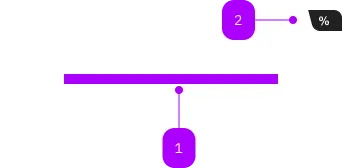
| Nummer | Typ | Beschreibung | Optional | Hinweis |
|---|---|---|---|---|
| 1 | Slot | Beliebiger Inhalt erlaubt | Nein | |
| 2 | Komponente | sbb-card-badge | Ja |
Spielwiese
The sbb-card-badge can contain some information like prices or discounts,
and can be used in sbb-card or
sbb-selection-expansion-panel.
To achieve the correct spacing between elements inside the card badge, we recommend to use span-elements.
All content parts are presented with a predefined gap in between.
<sbb-card>
  <sbb-card-badge aria-label="Super saver sales ticket price starts at CHF 19.99">
    <span>%</span>
    <span>from CHF</span>
    <span>19.99</span>
  </sbb-card-badge>
  Card content...
</sbb-card>
Accessibility
It's recommended to place an aria-label on sbb-card-badge to describe the displayed information in a full sentence,
as in the example above.
Properties
| Name | Attribute | Privacy | Type | Default | Description |
|---|---|---|---|---|---|
color | color | public | 'charcoal' | 'white' | 'charcoal' | Color of the card badge. |
Slots
| Name | Description |
|---|---|
Use the unnamed slot to add content to the badge. Content parts should be wrapped in <span> tags to achieve correct spacings. |