Was macht die Komponente?
Ein Kalender ist eine Komponente, die es Nutzenden ermöglicht, Datumsinformationen anzuzeigen und auszuwählen.
Wann soll die Komponente eingesetzt werden?
- Um Nutzenden eine einfache Möglichkeit zu bieten, Datumsabhänige Informationen wie z.B. Termine zu sehen und zu verwalten.
- Um die Auswahl von Datumsbereichen für Buchungen oder Planungen zu ermöglichen.
- Um wiederkehrende Ereignisse und deren Muster darzustellen.
Regeln
- Es können einzelne Monate oder ganze Jahre dargestellt werden.
- Wird der Kalender im Date-Picker eingesetzt, kann nur ein Datum gewählt werden.
- Wird der Kalender Standalone eingesetzt, so können mehrere Daten gewählt werden.
- Einzelne Tage können mehrere Stati haben.
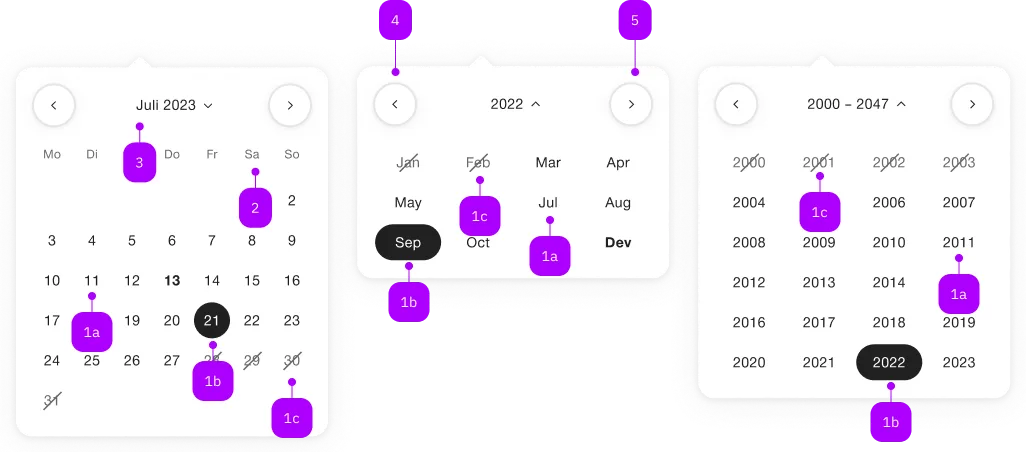
| Nummer | Typ | Beschreibung | Optional | Hinweis |
|---|---|---|---|---|
| 1a | – | Tag, Monat, Jahr, gewählt | Nein | |
| 1b | – | Tag, Monat, Jahr, default | Nein | |
| 1b | – | Tag, Monat, Jahr, disabled | Ja | |
| 2 | – | Wochentage | Nein | |
| 3 | – | Monat/Jahr/Jahre (inkl. Switcher) | Nein | |
| 4 | – | Vorheriger Monat | Ja | |
| 5 | – | Nächster Monat | Ja |
Spielwiese
The <sbb-calendar> component displays a calendar that allows the user to select a date.
This is used internally in the datepicker component, but it can be used on its own.
<sbb-calendar></sbb-calendar>
Slots and day customization
The component uses the <sbb-calendar-day> component to render day cells.
Consumers can override this behavior by slotting their own customized <sbb-calendar-day>,
mainly if some extra content is needed.
The slot name is mandatory, and it requires a date in ISO8601 format (e.g. 2025-01-01).
<sbb-calendar-day slot="2025-01-01"></sbb-calendar-day>
The <sbb-calendar> creates its own slots based on the month to be displayed;
during initialization, the month is the current one (if there's no selected date).
So for the first render, the slotted <sbb-calendar-day> elements must match that month.
For wide mode, also the following one must be taken into account.
Each time the month changes due to user interaction with the previous/next month buttons,
or via selecting a different year and then a month, a monthchange event is emitted, typed as SbbMonthChangeEvent.
The event has a range: Day[] property, which can be accessed to have information about the days to render.
Consumers can listen to this event to dynamically create and slot the <sbb-calendar-day>s of the chosen month.
/* Custom CSS for the extra content */
.my-custom-content {
  display: flex;
  flex-direction: column;
  justify-content: center;
  color: light-dark(var(--sbb-color-metal), var(--sbb-color-smoke));
}
<!-- Slot days based on the current date, or the selected one if available.-->
<sbb-calendar selected="2025-01-15" @monthchange="(event) => monthChangeHandler(event)">
  <sbb-calendar-day slot="2025-01-01">
    <span class="sbb-text-xxs my-custom-content"> 19.99 </span>
  </sbb-calendar-day>
  <sbb-calendar-day slot="2025-01-02">
    <span class="sbb-text-xxs my-custom-content"> 9.99 </span>
  </sbb-calendar-day>
  ...
  <sbb-calendar-day slot="2025-01-31">
    <span class="sbb-text-xxs my-custom-content"> 99.99 </span>
  </sbb-calendar-day>
</sbb-calendar>
function monthChangeHandler(e: SbbMonthChangeEvent): void {
  const calendar = e.target;
  // Remove slotted days to keep the DOM clean.
  Array.from(calendar.children).forEach((e) => e.remove());
  // Add the new days
  e.range.map((day) => {
    const child = document.createElement('sbb-calendar-day');
    // The day.value property is the date in ISO8601 format,
    // the correct one for the `<sbb-calendar-day>`'s slot property.
    child.setAttribute('slot', day.value);
    calendar.appendChild(child);
  });
}
States
The <sbb-calendar-day> component has a current state, which is set if the slot name matches the current day.
Also, it has other states based on the properties of the parent <sbb-calendar>.
The disabled and the crossed-out states are based on the value of the min, max and dateFilter properties,
while the selected matches the parent selected properties, including the multiple variant.
Configuration
It's possible to set a date using the dateSelected property. Also, it's possible to place limits on the selection
using the two properties named min and max. For these three properties, the accepted formats are:
- Date objects
- ISO String
- Unix Timestamp (number of seconds since Jan 1, 1970)
It's recommended to set the time to 00:00:00.
<sbb-calendar min="1599955200" max="1699920000" selected="1649980800"></sbb-calendar>
By default, the component takes, in order of priority,
the dateSelected property or the current date to calculate which month it has to show.
It's possible to move to the previous/next month using the two buttons at the top of the component.
It's also possible to select a specific date by clicking on the month label between the buttons:
this action opens a list of twenty-four selectable years, and, after the year selection, the list of months of that year.
Clicking on an element will set the month and restore the first view, allowing to select the desired day.
The <sbb-calendar> can be directly displayed in one of these modalities using the view property (default: day).
<sbb-calendar selected="1585699200" view="month"></sbb-calendar>

<sbb-calendar selected="1585699200" view="year"></sbb-calendar>
The <sbb-calendar> uses two different components to render years and months in their view,
named <sbb-calendar-month> and <sbb-calendar-year>.
These are 'internal-use-only' components, and they are not meant to be used by consumers.
Unwanted dates can be filtered out using the dateFilter property.
Note that the dateFilter function should not be used as a replacement for the min and max properties.
The dateFilter is applied in all the views, so if some months or years are not allowed they will be displayed as disabled in the corresponding view.
/** Returns only working days (Mon-Fri). */
const dateFilterFn: (d: Day) => boolean = d.getDay() !== 6 && d.getDay() !== 0;
<sbb-calendar .dateFilter="${dateFilterFn}"></sbb-calendar>
Multiple mode
By default, the component allows selecting a single date:
this behavior can be changed by setting the multiple attribute to true.
In this case the selected property, if set, must be an array; moreover, the days of the week become clickable,
allowing to select an entire column (e.g. all the Mondays, all the Tuesdays and so on).
<sbb-calendar multiple></sbb-calendar>
If the week-numbers property is set, the ISO week dates are also clickable, allowing to select all the days in the week.
<sbb-calendar multiple week-numbers></sbb-calendar>
Style
The component displays by default a single month in the day view, or a list of twenty-four years in the year view,
or a list of months in the month view;
however, setting the wide property to true it's possible to duplicate the view, showing, respectively, two consecutive months or
two sets of twenty-four years or the list of the twelve months for two consecutive years.
<sbb-calendar wide="true" selected="1699920000"></sbb-calendar>
It's also possible to change the orientation of dates by setting the orientation property to vertical.
In this variant, the weekdays are displayed on the left side of the component and the days progress along the vertical direction.
This visual change is applied only to the day view.
<sbb-calendar orientation="vertical"></sbb-calendar>
In both orientations, the week days are always displayed;
using the week-numbers property, it's possible to display the ISO week dates perpendicularly to week days,
so on the left side in horizontal and on top in vertical.
<sbb-calendar week-numbers></sbb-calendar>

<sbb-calendar orientation="vertical" week-numbers></sbb-calendar>
Two more components, named <sbb-calendar-weeknumber> and <sbb-calendar-weekday>, are used to render
a single week number and a single week day cell.
These are 'internal-use-only' components too, and they are not meant to be used by consumers.
Events
Consumers can listen to the dateselected event on the <sbb-calendar> component to intercept the selected date
which can be read from event.detail.
Check the Slot and day customization paragraph
for more information about the monthchange event.
Keyboard interaction
It's possible to move within the component using the keyboard.
The days disabled due to the presence of the min, max and dateFilter properties are taken into account: for example,
pressing the <kbd>Home</kbd> when the first day of the month is disabled will result in moving to the first non-disabled day.
Horizontal orientation
| Keyboard | Action |
|---|---|
| Left Arrow | Go to previous day. |
| Right Arrow | Go to next day. |
| Up Arrow | Go to the same day in the previous week (eg. from Monday to previous Monday). In wide mode it's possible to move between the two months. |
| Down Arrow | Go to the same day in the next week (eg. from Monday to next Monday). In wide mode it's possible to move between the two months. |
| Home | Go to the first day of the month. |
| End | Go to the last day of the month. |
| Page Up | Go to the same day in the first week (eg. from Monday to the first Monday of the month). |
| Page Down | Go to the same day in the last week (eg. from Monday to the last Monday of the month). |
Vertical orientation
| Keyboard | Action |
|---|---|
| Left Arrow | Go to the same day in the next week (eg. from Monday to next Monday). In wide mode it's possible to move between the two months. |
| Right Arrow | Go to the same day in the next week (eg. from Monday to next Monday). In wide mode it's possible to move between the two months. |
| Up Arrow | Go to previous day. |
| Down Arrow | Go to next day. |
| Home | Go to the first day of the month. |
| End | Go to the last day of the month. |
| Page Up | Go to the first day of the week (eg. from any day to Monday of the same week). |
| Page Down | Go to the last day of the week (eg. from any day to Sunday of the same week). |
Accessibility
For accessibility purposes, the component is rendered as a native table element and each day is a button.
API Documentation
class: SbbCalendarDayElement, sbb-calendar-day
Properties
| Name | Attribute | Privacy | Type | Default | Description |
|---|---|---|---|---|---|
disabled | disabled | public | boolean | false | Whether the component is disabled. |
form | - | public | HTMLFormElement | null | Returns the form owner of this element. | |
name | name | public | string | Name of the form element. Will be read from name attribute. | |
slot | slot | public | string | ||
validationMessage | - | public | string | Returns the current error message, if available, which corresponds to the current validation state. Please note that only one message is returned at a time (e.g. if multiple validity states are invalid, only the chronologically first one is returned until it is fixed, at which point the next message might be returned, if it is still applicable). Also, a custom validity message (see below) has precedence over native validation messages. | |
validity | - | public | ValidityState | Returns the ValidityState object for this element. | |
value | - | public | T | null | null | Value of the calendar-day element. |
willValidate | - | public | boolean | Returns true if this element will be validated when the form is submitted; false otherwise. |
Methods
| Name | Privacy | Description | Parameters | Return | Inherited From |
|---|---|---|---|---|---|
checkValidity | public | Returns true if this element has no validity problems; false otherwise. Fires an invalid event at the element in the latter case. | boolean | SbbFormAssociatedMixin | |
reportValidity | public | Returns true if this element has no validity problems; otherwise, returns false, fires an invalid event at the element, and (if the event isn't canceled) reports the problem to the user. | boolean | SbbFormAssociatedMixin | |
setCustomValidity | public | Sets the custom validity message for this element. Use the empty string to indicate that the element does not have a custom validity error. | message: string | void | SbbFormAssociatedMixin |
Slots
| Name | Description |
|---|---|
| Use the unnamed slot to add some custom content to the day. |
class: SbbCalendarElement, sbb-calendar
Properties
| Name | Attribute | Privacy | Type | Default | Description |
|---|---|---|---|---|---|
dateFilter | date-filter | public | ((date: T | null) => boolean) | null | null | A function used to filter out dates. |
max | max | public | T | null | null | The maximum valid date. Accepts a date object or null. Accepts an ISO8601 formatted string (e.g. 2024-12-24) as attribute. |
min | min | public | T | null | null | The minimum valid date. Accepts a date object or null. Accepts an ISO8601 formatted string (e.g. 2024-12-24) as attribute. |
multiple | multiple | public | boolean | false | Whether the calendar allows for multiple date selection. |
orientation | orientation | public | SbbOrientation | 'horizontal' | The orientation of days in the calendar. |
selected | selected | public | T | T[] | null | null | The selected date: accepts a date object, or, if multiple, an array of dates. |
view | view | public | CalendarView | 'day' | The initial view of the calendar which should be displayed on opening. |
weekNumbers | week-numbers | public | boolean | false | Whether it has to display the week numbers in addition to week days. |
wide | wide | public | boolean | false | If set to true, two months are displayed |
Methods
| Name | Privacy | Description | Parameters | Return | Inherited From |
|---|---|---|---|---|---|
resetPosition | public | Resets the active month according to the new state of the calendar. | void |
Events
| Name | Type | Description | Inherited From |
|---|---|---|---|
dateselected | CustomEvent<T | T[]> | Event emitted on date selection. | |
monthchange | SbbMonthChangeEvent | Emits when the month changes. The range property contains the days array of the chosen month. |
Slots
| Name | Description |
|---|---|
Use the unnamed slot to add customized sbb-calendar-day elements. |
class: SbbCalendarMonthElement, sbb-calendar-month
Properties
| Name | Attribute | Privacy | Type | Default | Description |
|---|---|---|---|---|---|
disabled | disabled | public | boolean | false | Whether the component is disabled. |
form | - | public | HTMLFormElement | null | Returns the form owner of this element. | |
name | name | public | string | Name of the form element. Will be read from name attribute. | |
validationMessage | - | public | string | Returns the current error message, if available, which corresponds to the current validation state. Please note that only one message is returned at a time (e.g. if multiple validity states are invalid, only the chronologically first one is returned until it is fixed, at which point the next message might be returned, if it is still applicable). Also, a custom validity message (see below) has precedence over native validation messages. | |
validity | - | public | ValidityState | Returns the ValidityState object for this element. | |
value | - | public | string | null | null | Value of the calendar-month element in ISO format (YYYY-MM). |
willValidate | - | public | boolean | Returns true if this element will be validated when the form is submitted; false otherwise. |
Methods
| Name | Privacy | Description | Parameters | Return | Inherited From |
|---|---|---|---|---|---|
checkValidity | public | Returns true if this element has no validity problems; false otherwise. Fires an invalid event at the element in the latter case. | boolean | SbbFormAssociatedMixin | |
reportValidity | public | Returns true if this element has no validity problems; otherwise, returns false, fires an invalid event at the element, and (if the event isn't canceled) reports the problem to the user. | boolean | SbbFormAssociatedMixin | |
setCustomValidity | public | Sets the custom validity message for this element. Use the empty string to indicate that the element does not have a custom validity error. | message: string | void | SbbFormAssociatedMixin |
class: SbbCalendarWeekdayElement, sbb-calendar-weekday
Properties
| Name | Attribute | Privacy | Type | Default | Description |
|---|---|---|---|---|---|
disabled | disabled | public | boolean | false | Whether the component is disabled. |
form | - | public | HTMLFormElement | null | Returns the form owner of this element. | |
name | name | public | string | Name of the form element. Will be read from name attribute. | |
validationMessage | - | public | string | Returns the current error message, if available, which corresponds to the current validation state. Please note that only one message is returned at a time (e.g. if multiple validity states are invalid, only the chronologically first one is returned until it is fixed, at which point the next message might be returned, if it is still applicable). Also, a custom validity message (see below) has precedence over native validation messages. | |
validity | - | public | ValidityState | Returns the ValidityState object for this element. | |
value | - | public | Weekday | null | null | Value of the week day element. |
willValidate | - | public | boolean | Returns true if this element will be validated when the form is submitted; false otherwise. |
Methods
| Name | Privacy | Description | Parameters | Return | Inherited From |
|---|---|---|---|---|---|
checkValidity | public | Returns true if this element has no validity problems; false otherwise. Fires an invalid event at the element in the latter case. | boolean | SbbFormAssociatedMixin | |
reportValidity | public | Returns true if this element has no validity problems; otherwise, returns false, fires an invalid event at the element, and (if the event isn't canceled) reports the problem to the user. | boolean | SbbFormAssociatedMixin | |
setCustomValidity | public | Sets the custom validity message for this element. Use the empty string to indicate that the element does not have a custom validity error. | message: string | void | SbbFormAssociatedMixin |
class: SbbCalendarWeeknumberElement, sbb-calendar-weeknumber
Properties
| Name | Attribute | Privacy | Type | Default | Description |
|---|---|---|---|---|---|
disabled | disabled | public | boolean | false | Whether the component is disabled. |
form | - | public | HTMLFormElement | null | Returns the form owner of this element. | |
name | name | public | string | Name of the form element. Will be read from name attribute. | |
validationMessage | - | public | string | Returns the current error message, if available, which corresponds to the current validation state. Please note that only one message is returned at a time (e.g. if multiple validity states are invalid, only the chronologically first one is returned until it is fixed, at which point the next message might be returned, if it is still applicable). Also, a custom validity message (see below) has precedence over native validation messages. | |
validity | - | public | ValidityState | Returns the ValidityState object for this element. | |
value | - | public | string | null | null | Value of the week number element. |
willValidate | - | public | boolean | Returns true if this element will be validated when the form is submitted; false otherwise. |
Methods
| Name | Privacy | Description | Parameters | Return | Inherited From |
|---|---|---|---|---|---|
checkValidity | public | Returns true if this element has no validity problems; false otherwise. Fires an invalid event at the element in the latter case. | boolean | SbbFormAssociatedMixin | |
reportValidity | public | Returns true if this element has no validity problems; otherwise, returns false, fires an invalid event at the element, and (if the event isn't canceled) reports the problem to the user. | boolean | SbbFormAssociatedMixin | |
setCustomValidity | public | Sets the custom validity message for this element. Use the empty string to indicate that the element does not have a custom validity error. | message: string | void | SbbFormAssociatedMixin |
class: SbbCalendarYearElement, sbb-calendar-year
Properties
| Name | Attribute | Privacy | Type | Default | Description |
|---|---|---|---|---|---|
disabled | disabled | public | boolean | false | Whether the component is disabled. |
form | - | public | HTMLFormElement | null | Returns the form owner of this element. | |
name | name | public | string | Name of the form element. Will be read from name attribute. | |
validationMessage | - | public | string | Returns the current error message, if available, which corresponds to the current validation state. Please note that only one message is returned at a time (e.g. if multiple validity states are invalid, only the chronologically first one is returned until it is fixed, at which point the next message might be returned, if it is still applicable). Also, a custom validity message (see below) has precedence over native validation messages. | |
validity | - | public | ValidityState | Returns the ValidityState object for this element. | |
value | - | public | string | null | null | Value of the calendar-year element. |
willValidate | - | public | boolean | Returns true if this element will be validated when the form is submitted; false otherwise. |
Methods
| Name | Privacy | Description | Parameters | Return | Inherited From |
|---|---|---|---|---|---|
checkValidity | public | Returns true if this element has no validity problems; false otherwise. Fires an invalid event at the element in the latter case. | boolean | SbbFormAssociatedMixin | |
reportValidity | public | Returns true if this element has no validity problems; otherwise, returns false, fires an invalid event at the element, and (if the event isn't canceled) reports the problem to the user. | boolean | SbbFormAssociatedMixin | |
setCustomValidity | public | Sets the custom validity message for this element. Use the empty string to indicate that the element does not have a custom validity error. | message: string | void | SbbFormAssociatedMixin |