What does the component do?
The tooltip component displays additional information contextually and non-dominantly without interrupting the user flow.
When should the component be used?
The tooltip component is used when additional notes, explanations, or assistance are needed for an element. Tooltips are particularly well suited for:
- Explaining icons, abbreviations, or technical terms
- Providing additional information about controls
Rules
- The information in the tooltip should be short, precise, and understandable.
- Do not use interactive elements (such as buttons or links) within a tooltip — only text is allowed.
- The tooltip text must not contain essential content or mandatory information.
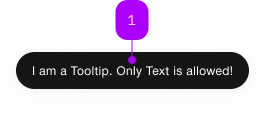
| Number | Type | Description | Optional | Info |
|---|---|---|---|---|
| 1 | Slot | Only text is allowed | No |
Playground
The <sbb-tooltip> component displays contextual information related to an element.
The standard way to use it is through the trigger property, referencing the element which activate the tooltip.
<sbb-button id="tooltip-trigger">Button</sbb-button>
<sbb-tooltip trigger="tooltip-trigger">Tooltip message</sbb-tooltip>
Attribute usage
It's also possible to use the component by setting the sbb-tooltip attribute on the trigger element.
The attribute's value is the tooltip's rendered message
(Note: it does not work if used in a Shadow DOM).
<sbb-button sbb-tooltip="Tooltip message">Button</sbb-button>
If the component is used this way, it's also possible to set the open and close delays
using the sbb-tooltip-open-delay and the sbb-tooltip-close-delay attributes.
<sbb-button sbb-tooltip="Tooltip message" sbb-tooltip-open-delay="250" sbb-tooltip-close-delay="250"
  >Button</sbb-button
>
Interactions
The tooltip opens when the user hovers the trigger element and closes on mouse leave. A delay can be optionally set, both on open and close actions.
On touch devices, the tooltip opens on long press and closes automatically after a longPressCloseDelay (default: 1500 ms).
Positioning
The tooltip uses the CSS anchor positioning to anchor itself to the trigger element.
Specifically, it uses the "position-area"
and "position-try-fallbacks" CSS properties to define where the tooltip should be positioned.
You can control the positioning of the tooltip by overriding the --sbb-overlay-position-area and --sbb-overlay-position-try-fallbacks CSS variables.
By default, it appears above the trigger element and, if there is insufficient space, it automatically chooses the best available position.
// Primary position
--sbb-overlay-position-area: block-start;

// Fallback positions. The first one that fits will be used.
--sbb-overlay-position-try-fallbacks:
  block-start span-inline-end, block-start span-inline-start, block-end, block-end span-inline-end,
  block-end span-inline-start;
ⓘ The CSS anchor positioning feature is not yet fully supported by all browsers.
Therefore, a polyfill is used which limits the available positions to the following:
| Logical positions | Physical positions |
| ------------------------------- | ------------------- |
| block-start | top |
| block-end | bottom |
| inline-start | left |
| inline-end | right |
| block-start span-inline-start | top span-left |
| block-start span-inline-end | top span-right |
| block-end span-inline-start | bottom span-left |
| block-end span-inline-end | bottom span-right |
| inline-start span-block-start | left span-top |
| inline-start span-block-end | left span-bottom |
| inline-end span-block-start | right span-top |
| inline-end span-block-end | right span-bottom |
Attribute usage
When using the sbb-tooltip attribute, you can configure the position by setting the sbb-tooltip-position attribute.
The value of the attribute is a comma-separated list of positions.
<sbb-button sbb-tooltip="Tooltip message" sbb-tooltip-position="block-end, block-start, inline-end"
  >Button</sbb-button
>
Configuration
The open and close delays can be configured via global configuration. These values will be used as default, unless explicitly set on the element.
import { mergeConfig } from '@sbb-esta/lyne-elements/core/config.js';

mergeConfig({
  tooltip: {
    openDelay: 0, // Delay before the tooltip opens (in ms)
    closeDelay: 0, // Delay before the tooltip closes (in ms)
    longPressCloseDelay: 1500, // Duration before the tooltip auto-closes after a long press (in ms)
  },
});
Accessibility
The <sbb-tooltip> adds an ariaDescribedby reference to an element containing the tooltip's message.
Avoid interactions that exclusively show a tooltip with pointer events like click and mouseenter.
Always ensure that keyboard users can perform the same set of actions available to mouse and touch users.
API Documentation
class: SbbTooltipElement, sbb-tooltip
Properties
| Name | Attribute | Privacy | Type | Default | Description |
|---|---|---|---|---|---|
closeDelay | close-delay | public | number | null | Close the tooltip after a given delay in milliseconds. Global configuration is used as default, if not set. |
disabled | disabled | public | boolean | false | Whether the component is disabled. |
isOpen | - | public | boolean | Whether the element is open. | |
longPressCloseDelay | long-press-close-delay | public | number | 1500 | Automatically close the tooltip after it has been open by long press. Global configuration is used as default, if not set. |
openDelay | open-delay | public | number | null | Open the tooltip after a given delay in milliseconds. Global configuration is used as default, if not set. |
trigger | trigger | public | HTMLElement | null | null | The element that will trigger the tooltip overlay. For attribute usage, provide an id reference. |
Methods
| Name | Privacy | Description | Parameters | Return | Inherited From |
|---|---|---|---|---|---|
close | public | Closes the component. | void | SbbOpenCloseBaseElement | |
escapeStrategy | public | The method which is called on escape key press. Defaults to calling close() | void | SbbOpenCloseBaseElement | |
open | public | Opens the component. | void | SbbOpenCloseBaseElement |
Events
| Name | Type | Description | Inherited From |
|---|---|---|---|
beforeclose | Event | Emits whenever the component begins the closing transition. Can be canceled. | SbbOpenCloseBaseElement |
beforeopen | Event | Emits whenever the component starts the opening transition. Can be canceled. | SbbOpenCloseBaseElement |
close | Event | Emits whenever the component is closed. | SbbOpenCloseBaseElement |
open | Event | Emits whenever the component is opened. | SbbOpenCloseBaseElement |
CSS Properties
| Name | Default | Description |
|---|---|---|
--sbb-overlay-position-area | block-end | The primary position for the tooltip. |
--sbb-overlay-position-try-fallbacks | block-end span-inline-end, block-end span-inline-start, block-start, block-start span-inline-end, block-start span-inline-start | The list of fallback positions, separated by ',', for the tooltip |
--sbb-tooltip-z-index | var(--sbb-overlay-default-z-index) | To specify a custom stack order, the z-index can be overridden by defining this CSS variable. The default z-index of the component is set to var(--sbb-overlay-default-z-index) with a value of 1000. |
Slots
| Name | Description |
|---|---|
| Use the unnamed slot to add the text into the tooltip. |