What does the component do?
A toggle-check allows users to switch between two states (usually "on" and "off" or "selected" and "not selected") and behaves identically to a checkbox.
When should the component be used?
- To provide a quick and easy way to activate or deactivate a function.
- When users need to change a setting that has an immediate effect.
- To present binary options clearly and intuitively.
Rules
- Avoid placing too many check toggles on a page to ensure clarity and maintain usability.
- Carefully consider which of the two components (checkbox and toggle-check) is more suitable.
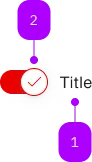
| Number | Type | Description | Optional | Info |
|---|---|---|---|---|
| 1 | Text | Label | No | |
| 2 | Component | sbb-icon | No | Kann überschrieben werden |
Playground
The <sbb-toggle-check> is a component which provides the same functionality as a native <input type="checkbox" />
enhanced with the SBB Design.
<sbb-toggle-check name="check" value="single-checkbox">Example</sbb-toggle-check>
Slots
It is possible to provide a label via an unnamed slot; the component can optionally display a <sbb-icon>
using the iconName property or via custom content using the icon slot.
The icon can be at the component start or end based on the value of the labelPosition property (default: after).
<sbb-toggle-check name="check" value="single-checkbox" icon-name="pie-small">
  Example
</sbb-toggle-check>

<sbb-toggle-check name="other" value="single-checkbox" icon-name="pie-small" label-position="start">
  Another example
</sbb-toggle-check>
States
The component can be displayed in checked or disabled states using the self-named properties.
<sbb-toggle-check name="check" value="Value" checked>Option</sbb-toggle-check>

<sbb-toggle-check name="other" value="Value" disabled>Option</sbb-toggle-check>
Style
The component has three different sizes (xs, s, which is the default, and m),
which can be changed using the size property.
<sbb-toggle-check size="m" value="single-checkbox"> Example in m size</sbb-toggle-check>

<sbb-toggle-check size="xs" value="single-checkbox"> Example in xs size </sbb-toggle-check>
Events
Consumers can listen to the native change event on the <sbb-toggle-check> component to intercept the input's change;
the current state can be read from event.target.checked and the value from event.target.value.
Accessibility
The component provides the same accessibility features as the native checkbox.
Avoid adding other interactive controls into the content of <sbb-toggle-check>, as this degrades the experience for users of assistive technology.
If you don't want the label to appear next to the <sbb-toggle-check> component,
you can not provide it and then use aria-label to specify an appropriate label for screen-readers.
<sbb-toggle-check aria-label="Subscribed to email message"></sbb-toggle-check>
Complex Values
This component supports any types of values, including complex objects.
The type can be specified using the generic type parameter T of SbbToggleCheck<T>.
<sbb-toggle-check .value=${{value: 'value', name: 'name'}} name="name">Toggle Check</sbb-toggle-check>
API Documentation
class: SbbToggleCheckElement, sbb-toggle-check
Properties
| Name | Attribute | Privacy | Type | Default | Description |
|---|---|---|---|---|---|
checked | checked | public | boolean | false | Whether the checkbox is checked. |
disabled | disabled | public | boolean | false | Whether the component is disabled. |
form | - | public | HTMLFormElement | null | Returns the form owner of this element. | |
iconName | icon-name | public | string | '' | The icon name we want to use, choose from the small icon variants from the ui-icons category from here https://icons.app.sbb.ch. |
labelPosition | label-position | public | 'before' | 'after' | 'after' | The label position relative to the toggle. Defaults to 'after' |
name | name | public | string | Name of the form element. Will be read from name attribute. | |
required | required | public | boolean | false | Whether the component is required. |
size | size | public | 'xs' | 's' | 'm' | 's' / 'xs' (lean) | Size variant, either m, s or xs. |
type | - | public | string | 'checkbox' | Form type of element. |
validationMessage | - | public | string | Returns the current error message, if available, which corresponds to the current validation state. Please note that only one message is returned at a time (e.g. if multiple validity states are invalid, only the chronologically first one is returned until it is fixed, at which point the next message might be returned, if it is still applicable). Also, a custom validity message (see below) has precedence over native validation messages. | |
validity | - | public | ValidityState | Returns the ValidityState object for this element. | |
value | value | public | (T = string) | null | null | Value of the form element. |
willValidate | - | public | boolean | Returns true if this element will be validated when the form is submitted; false otherwise. |
Methods
| Name | Privacy | Description | Parameters | Return | Inherited From |
|---|---|---|---|---|---|
checkValidity | public | Returns true if this element has no validity problems; false otherwise. Fires an invalid event at the element in the latter case. | boolean | SbbFormAssociatedMixin | |
reportValidity | public | Returns true if this element has no validity problems; otherwise, returns false, fires an invalid event at the element, and (if the event isn't canceled) reports the problem to the user. | boolean | SbbFormAssociatedMixin | |
setCustomValidity | public | Sets the custom validity message for this element. Use the empty string to indicate that the element does not have a custom validity error. | message: string | void | SbbFormAssociatedMixin |
Events
| Name | Type | Description | Inherited From |
|---|---|---|---|
change | Event | The change event is fired when the user modifies the element's value. Unlike the input event, the change event is not necessarily fired for each alteration to an element's value. | |
input | InputEvent | The input event fires when the value has been changed as a direct result of a user action. |
Slots
| Name | Description |
|---|---|
| Use the unnamed slot to add content to the toggle label. | |
icon | Use this slot to provide an icon. If icon-name is set, a sbb-icon will be used. |