What does the component do?
A teaser is a preview that is intended to arouse users' curiosity and encourage them to click on further content or pages.
When should the component be used?
- To highlight and promote content, articles, products or services.
- To make users aware of further information or interesting content.
Rules
- Use a catchy and inviting headline and a short, interesting description.
- Do not use too many different teaser types and sizes on one page.
- Several teasers can be structured with one title.
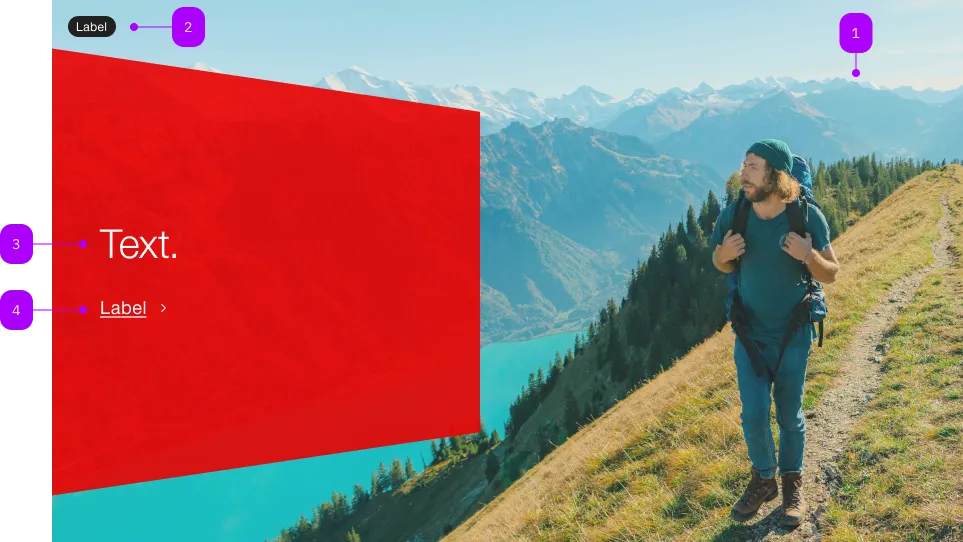
| Number | Type | Description | Optional | Info |
|---|---|---|---|---|
| 1 | Component | sbb-image | No | |
| 2 | Component | sbb-chip | Yes | |
| 3 | Text | No | ||
| 4 | Text | Link-Text | No |
Playground
The <sbb-teaser-hero> is a component with a background image and an action call within a panel;
it should be an eye-catcher and should have an emotional effect on the user with its large image component.
Slots
It is possible to provide the panel label via an unnamed slot,
while the link text can be provided using the link-content slot or the linkContent property;
Use the image slot to pass an <sbb-image> or an img that will be used as background.
<sbb-teaser-hero href="https://www.sbb.ch">
  Break out and explore castles and palaces.
  <span slot="link-content">Find out more</span>
  <sbb-image slot="image" image-src="https://path-to-source" alt="SBB CFF FFS Employee"></sbb-image>
</sbb-teaser-hero>
Optionally, you can add an overlapping <sbb-chip-label> or image (e.g. logo) by wrapping the <sbb-image>
in a figure tag (see sbb-image doc).
If the <sbb-chip-label> or the image (e.g. logo) should appear on top of the red panel (e.g. on small screens),
you need to set a z-index on the <sbb-chip-label> or the image (e.g. logo).
Otherwise, it stays behind the red panel.
<sbb-teaser-hero href="https://www.sbb.ch">
  Break out and explore castles and palaces.
  <span slot="link-content">Find out more</span>
  <figure slot="image" class="sbb-figure">
    <sbb-image image-src="https://path-to-source" alt="SBB CFF FFS Employee"></sbb-image>
    <sbb-chip-label class="sbb-figure-overlap-start-start" style="z-index: 1">
      Chip label
    </sbb-chip-label>
    <img
      class="sbb-figure-overlap-image sbb-figure-overlap-end-end"
      src="logo.png"
      alt="Logo"
      style="z-index: 1"
    />
  </figure>
</sbb-teaser-hero>
Accessibility
The description text is wrapped into an p element to guarantee the semantic meaning.
Avoid slotting block elements (e.g. div) as this violates semantic rules and can have negative effects on screen readers.
API Documentation
class: SbbTeaserHeroElement, sbb-teaser-hero
Properties
| Name | Attribute | Privacy | Type | Default | Description |
|---|---|---|---|---|---|
accessibilityCurrent | accessibility-current | public | string | '' | This will be forwarded as aria-current to the inner anchor element. |
accessibilityLabel | accessibility-label | public | string | '' | This will be forwarded as aria-label to the inner anchor element. |
download | download | public | boolean | false | Whether the browser will show the download dialog on click. |
href | href | public | string | '' | The href value you want to link to. |
linkContent | link-content | public | string | '' | Panel link text. |
rel | rel | public | string | '' | The relationship of the linked URL as space-separated link types. |
target | target | public | LinkTargetType | string | '' | Where to display the linked URL. |
Slots
| Name | Description |
|---|---|
| Use the unnamed slot to add text content to the panel | |
chip | The sbb-chip-label component that will be displayed on top-left corner |
image | The background image that can be a sbb-image |
link-content | Link content of the panel |