What does the component do?
A popover is a small overlay that displays additional context or interactive content when users click or focus on an element.
When should the component be used?
- To display additional information or actions without leaving the current page.
- When users need a detailed explanation or advanced options for a specific element.
- To display context-dependent content in a clear and space-saving way.
Rules
- Make sure that the content of the popover works well and is usable on different devices and screen sizes.
- Make sure that the popover does not contain too much information or elements to ensure clarity
- Avoid keeping several popovers open at the same time.
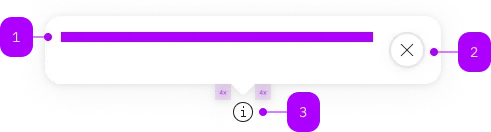
| Number | Type | Description | Optional | Info |
|---|---|---|---|---|
| 1 | Slot | Beliebiger Inhalt erlaubt | No | |
| 2 | Component | sbb-secondary-button | No | |
| 3 | Component | sbb-popover-trigger oder beliebiger Inhalt | No | Wenn kein Icon oder anderer Inhalt angegeben wird, wird das Info-Icon angezeigt. |
Playground
The <sbb-popover> component can be useful for displaying contextual and additional information on mouse hover or click of a trigger element.
The component could be used:
- to describe icons and buttons;
- when more information is useful to help a user make decisions;
- when an element needs more context or explanation;
- when defining a term or inline item.
The component must be connected with the trigger element using the trigger property,
which accepts the id of the element, or directly its reference;
the sbb-menu-button is meant to be used as trigger.
<sbb-mini-button icon-name="circle-information-small" id="popover-trigger"></sbb-mini-button>

<sbb-popover id="popover" trigger="popover-trigger">
  <sbb-title level="2" visual-level="6" style="margin-block-start: 0">Popover Title.</sbb-title>
  <p id="popover-content">Popover content.</p>
</sbb-popover>
Configuration
The open and close delays can be configured via global configuration. This values will be used as default, unless explicitly set on the element.
import { mergeConfig } from '@sbb-esta/lyne-elements/core/config.js';

mergeConfig({
  popover: {
    openDelay: 0, // ms before the popover opens
    closeDelay: 0, // ms before the popover closes
  },
});
Interactions
The <sbb-popover> can be dismissed by clicking on an interactive element within its content,
by clicking on the close button or by performing another action on the page.
You can also indicate that an element within the popover content should close the <sbb-popover> when clicked
by marking it with the sbb-popover-close attribute;
it's also possible to hide the default close button using the hideCloseButton property.
<sbb-mini-button id="popover-trigger"></sbb-mini-button>

<sbb-popover id="popover" trigger="popover-trigger" hide-close-button>
  <sbb-title level="2" visual-level="6" style="margin-block-start: 0">Popover Title.</sbb-title>
  <p id="popover-content">
    Popover content. <sbb-link id="popover-link" sbb-popover-close>Link</sbb-link>
  </p>
</sbb-popover>
You can also indicate that the <sbb-popover> should be shown on hover with the property hoverTrigger
and set a custom delay for the open and close animations (defaults to 0).
In this case, the default close button is hidden.
If hover is not supported by the current device, the component will be triggered on click/tap as default.
The <sbb-popover> will automatically disappear after the hiding delay
if neither the trigger element nor the popover are on hover or if another action is performed on the page.
<sbb-mini-button id="popover-trigger"></sbb-mini-button>

<sbb-popover
  id="popover"
  trigger="popover-trigger"
  hover-trigger
  open-delay="500"
  close-delay="750"
>
  <sbb-title level="2" visual-level="6" style="margin-block-start: 0">Popover Title.</sbb-title>
  <p id="popover-content">Popover content. <sbb-link id="popover-link">Link</sbb-link></p>
</sbb-popover>
Style
The <sbb-popover> automatically calculates where it should place itself, based on available space. Default is below and center.
Accessibility
As the popover opens, the focus will automatically be set to the first focusable item within the component.
If the close button is not hidden, it's the first element and therefore gets focused (unless manually specified, see below).
Overlays should always contain a heading level 2 title. It can be visually hidden if necessary.
Controlling initial focus
The first element with the attribute sbb-focus-initial will receive focus on opening.
If the attribute is not used, the first focusable element receives focus (recommended).
<sbb-popover>
  <sbb-link href="#">Link</sbb-link>
  <sbb-link sbb-focus-initial href="#">Link 2</sbb-link>
</sbb-popover>
API Documentation
class: SbbPopoverElement, sbb-popover
Properties
| Name | Attribute | Privacy | Type | Default | Description |
|---|---|---|---|---|---|
accessibilityCloseLabel | accessibility-close-label | public | string | '' | This will be forwarded as aria-label to the close button element. |
closeDelay | close-delay | public | number | 0 | Close the popover after a given delay in milliseconds. Global configuration is used as default, if not set. |
hideCloseButton | hide-close-button | public | boolean | false | Whether the close button should be hidden. |
hoverTrigger | hover-trigger | public | boolean | false | Whether the popover should be triggered on hover. |
isOpen | - | public | boolean | Whether the element is open. | |
openDelay | open-delay | public | number | 0 | Open the popover after a given delay in milliseconds. Global configuration is used as default, if not set. |
trigger | trigger | public | HTMLElement | null | null | The element that will trigger the popover overlay. For attribute usage, provide an id reference. |
Methods
| Name | Privacy | Description | Parameters | Return | Inherited From |
|---|---|---|---|---|---|
close | public | Closes the popover. | target: HTMLElement | void | SbbOpenCloseBaseElement |
escapeStrategy | public | The method which is called on escape key press. Defaults to calling close() | void | SbbOpenCloseBaseElement | |
open | public | Opens the popover on trigger click. | void | SbbOpenCloseBaseElement |
Events
| Name | Type | Description | Inherited From |
|---|---|---|---|
beforeclose | CustomEvent<{ closeTarget: HTMLElement | null }> | Emits whenever the component begins the closing transition. Can be canceled. | SbbOpenCloseBaseElement |
beforeopen | Event | Emits whenever the component starts the opening transition. Can be canceled. | SbbOpenCloseBaseElement |
close | CustomEvent<{ closeTarget: HTMLElement | null }> | Emits whenever the component is closed. | SbbOpenCloseBaseElement |
open | Event | Emits whenever the component is opened. | SbbOpenCloseBaseElement |
CSS Properties
| Name | Default | Description |
|---|---|---|
--sbb-popover-z-index | var(--sbb-overlay-default-z-index) | To specify a custom stack order, the z-index can be overridden by defining this CSS variable. The default z-index of the component is set to var(--sbb-overlay-default-z-index) with a value of 1000. |
Slots
| Name | Description |
|---|---|
| Use the unnamed slot to add content into the popover. |