What does the component do?
It is part of the navigation component.
When should the component be used?
- Only within the navigation component.
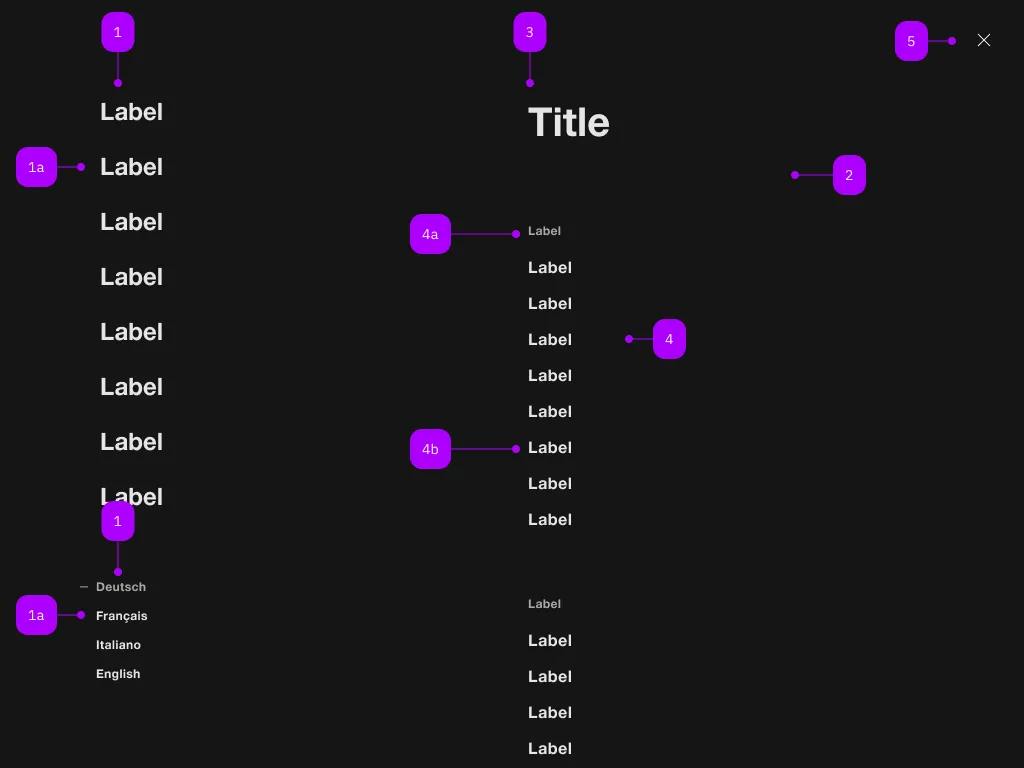
| Number | Type | Description | Optional | Info |
|---|---|---|---|---|
| 1 | Component | sbb-navigation-marker | No | |
| 1a | Component | sbb-navigation-link oder sbb-navigation-button | No | |
| 2 | Component | sbb-navigation-section | No | |
| 3 | Text | Label | No | |
| 4 | Component | sbb-navigation-list | No | |
| 4a | Text | Label | No | |
| 4b | Component | sbb-navigation-link oder sbb-navigation-button | No | |
| 5 | Component | sbb-transparent-button | No |
The sbb-navigation-link component is an action element contained by
a sbb-navigation-list component
or a sbb-navigation-marker component.
Link properties
The component is internally rendered as a link,
accepting its associated properties (href, target, rel and download).
<sbb-navigation-link href="#info" target="_blank">Link</sbb-navigation-link>
State
The navigation button can have an initial active state which can be set by using the class .sbb-active.
<sbb-navigation-link class="sbb-active" href="#info" target="_blank">Link</sbb-navigation-link>
Style
The component has three different sizes, which can be changed using the size property (l, which is the default, m and s).
<sbb-navigation-link href="#info" size="m">Link</sbb-navigation-link>
Properties
| Name | Attribute | Privacy | Type | Default | Description |
|---|---|---|---|---|---|
accessibilityCurrent | accessibility-current | public | string | '' | This will be forwarded as aria-current to the inner anchor element. |
accessibilityLabel | accessibility-label | public | string | '' | This will be forwarded as aria-label to the inner anchor element. |
connectedSection | - | public | SbbNavigationSectionElement | undefined | The section that is being controlled by the action, if any. | |
download | download | public | boolean | false | Whether the browser will show the download dialog on click. |
href | href | public | string | '' | The href value you want to link to. |
marker | - | public | SbbNavigationMarkerElement | null | The navigation marker in which the action is nested. | |
rel | rel | public | string | '' | The relationship of the linked URL as space-separated link types. |
section | - | public | SbbNavigationSectionElement | null | The section in which the action is nested. | |
size | size | public | SbbNavigationActionSize | 'l' / 's' (lean) | Action size variant, either s, m or l. |
target | target | public | LinkTargetType | string | '' | Where to display the linked URL. |
Slots
| Name | Description |
|---|---|
Use the unnamed slot to add content to the sbb-navigation-link. |