What does the component do?
It is part of the menu component.
When should the component be used?
- Only within the menu component.
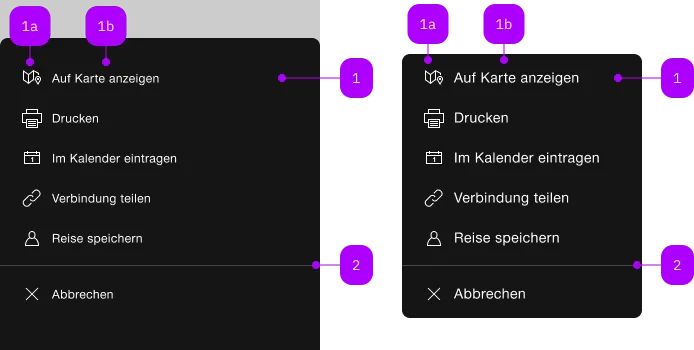
| Number | Type | Description | Optional | Info |
|---|---|---|---|---|
| 1 | Component | sbb-menu-button oder sbb-menu-link | No | |
| 1a | Component | sbb-icon | No | |
| 1b | Text | Label | Yes | |
| 2 | Component | sbb-divider | Yes |
The component represents a link element contained by the sbb-menu component.
Slots
It is possible to provide a label via an unnamed slot; the component can optionally display a sbb-icon
at the component start using the iconName property or via custom content using the icon slot.
<sbb-menu-link href="#">Text</sbb-menu-link>

<sbb-menu-link href="#" icon-name="pie-small">Another text</sbb-menu-link>
Badge
A badge can be rendered on the icon as white text in a red circle via the sbb-badge attribute.
It's recommended to hide the badge when the menu link is disabled.
It's mandatory to provide the badge information for screen readers either with the accessibility-label attribute
or a hidden text (<sbb-screen-reader-only> for example).
<sbb-menu-link
  href="#"
  sbb-badge="2"
  accessibility-label="Show messages, 2 new messages available"
  icon-name="pie-small"
>
  Messages
</sbb-menu-link>
Link properties
The component is internally rendered as a link,
accepting its associated properties (href, target, rel and download).
<sbb-menu-link href="#info" target="_blank">Link</sbb-menu-link>
Properties
| Name | Attribute | Privacy | Type | Default | Description |
|---|---|---|---|---|---|
accessibilityCurrent | accessibility-current | public | string | '' | This will be forwarded as aria-current to the inner anchor element. |
accessibilityLabel | accessibility-label | public | string | '' | This will be forwarded as aria-label to the inner anchor element. |
disabled | disabled | public | boolean | false | Whether the component is disabled. |
disabledInteractive | disabled-interactive | public | boolean | false | Whether the button should be aria-disabled but stay interactive. |
download | download | public | boolean | false | Whether the browser will show the download dialog on click. |
href | href | public | string | '' | The href value you want to link to. |
iconName | icon-name | public | string | '' | The icon name we want to use, choose from the small icon variants from the ui-icons category from here https://icons.app.sbb.ch. |
rel | rel | public | string | '' | The relationship of the linked URL as space-separated link types. |
target | target | public | LinkTargetType | string | '' | Where to display the linked URL. |
CSS Properties
| Name | Default | Description |
|---|---|---|
--sbb-menu-action-outer-horizontal-padding | var(--sbb-spacing-fixed-3x) | Can be used to modify horizontal padding. |
Slots
| Name | Description |
|---|---|
Use the unnamed slot to add content to the sbb-menu-link. | |
icon | Use this slot to provide an icon. If icon-name is set, a sbb-icon will be used. |