What does the component do?
It is part of the header component.
When should the component be used?
- Only within the header component.
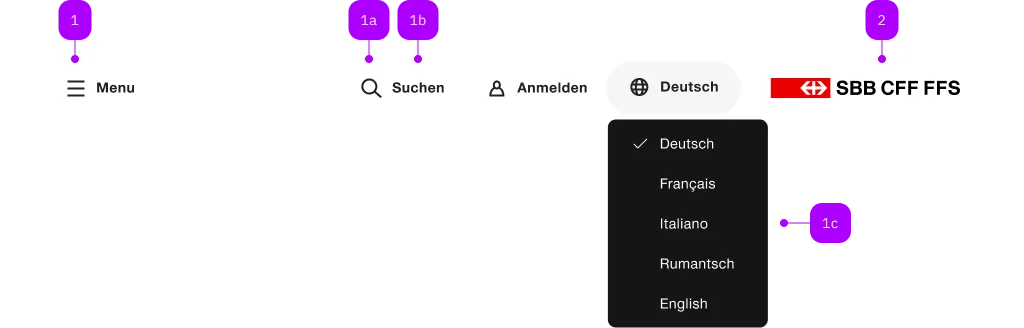
| Number | Type | Description | Optional | Info |
|---|---|---|---|---|
| 1 | Component | sbb-header-button oder sbb-header-link | No | |
| 1a | Component | sbb-icon | No | |
| 1b | Text | Label | Yes | |
| 1c | Component | sbb-menu | Yes | |
| 2 | Component | sbb-logo | Yes |
Playground
The component represents a link element contained by the sbb-header component.
Slots
It is possible to provide a label via an unnamed slot; the component can optionally display a sbb-icon
at the component start using the iconName property or via custom content using the icon slot.
<sbb-header-link href="#">Text</sbb-header-link>

<sbb-header-link href="#" icon-name="pie-small">Another text</sbb-header-link>
If the component's icon is set, the property expandFrom can be used to define the minimum breakpoint
from which the label is displayed; below that, only the icon is visible.
Without an icon, the label is always displayed.
<sbb-header-link href="#" expand-from="large">Text</sbb-header-link>
Avatar image
By slotting an img or a sbb-image into the icon-slot, an avatar style icon will be displayed,
and it's possible to place a sbb-badge on it. However, for the img-elements it's not possible to directly
place a sbb-badge on it. In this case, use a wrapping <figure> element.
<figure sbb-badge="5" class="sbb-figure" slot="icon">
  <img
    src="..."
    alt="Avatar Icon"
    class="sbb-image-border-radius-round"
    style="width: var(--sbb-size-icon-ui-small); height: var(--sbb-size-icon-ui-small);"
  />
</figure>
Style
To indicate an active state, the CSS class sbb-active should be set.
From accessibility perspective accessibility-current="page" should be set whenever the CSS class sbb-active is set.
<sbb-header-link
  icon-name="magnifying-glass-small"
  href="#"
  class="sbb-active"
  accessibility-current="page"
>
  Overview
</sbb-header-link>
Link properties
The component is internally rendered as a link,
accepting its associated properties (href, target, rel and download).
<sbb-header-link href="#info" target="_blank">Link</sbb-header-link>
Properties
| Name | Attribute | Privacy | Type | Default | Description |
|---|---|---|---|---|---|
accessibilityCurrent | accessibility-current | public | string | '' | This will be forwarded as aria-current to the inner anchor element. |
accessibilityLabel | accessibility-label | public | string | '' | This will be forwarded as aria-label to the inner anchor element. |
download | download | public | boolean | false | Whether the browser will show the download dialog on click. |
expandFrom | expand-from | public | SbbHorizontalFrom | 'large' | Used to set the minimum breakpoint from which the text is displayed. E.g. if set to 'large', the text will be visible for breakpoints large and ultra, and hidden for all the others. Ignored if no icon is set. |
href | href | public | string | '' | The href value you want to link to. |
iconName | icon-name | public | string | '' | The icon name we want to use, choose from the small icon variants from the ui-icons category from here https://icons.app.sbb.ch. |
rel | rel | public | string | '' | The relationship of the linked URL as space-separated link types. |
target | target | public | LinkTargetType | string | '' | Where to display the linked URL. |
Slots
| Name | Description |
|---|---|
Use the unnamed slot to add content to the sbb-header-link. | |
icon | Slot used to render the link icon. |