What does the component do?
It provides the layout and animation of the alert component when one or more alert components are used.
When should the component be used?
- Only in combination with the Alert component.
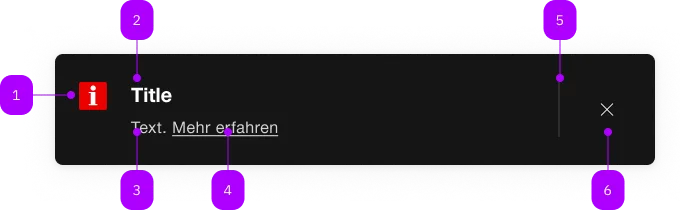
| Number | Type | Description | Optional | Info |
|---|---|---|---|---|
| 1 | Component | sbb-icon | No | |
| 2 | Component | sbb-title | No | |
| 3 | Text | No | ||
| 4 | Component | sbb-link | Yes | |
| 5 | Component | sbb-divider | - | Erscheint bei readonly="false" |
| 6 | Component | sbb-transparent-button | - | Erscheint bei readonly="false" |
The sbb-alert-group manages the accessibility of one or multiple
sbb-alert and also its visual gap between each other.
<sbb-alert-group accessibility-title="Disruptions" accessibility-level="2">
  <sbb-alert size="l">
    <sbb-title level="3">Interruption between Genève and Lausanne</sbb-title>
    The rail traffic between Allaman and Morges is interrupted. All trains are cancelled.
    <sbb-link href="https://www.sbb.ch">Find out more</sbb-link>
  </sbb-alert>
  <sbb-alert>
    <sbb-title level="3">Interruption between Berne and Olten</sbb-title>
    Between Berne and Olten from 03.11.2021 to 05.12.2022 each time from 22:30 to 06:00 o'clock
    construction work will take place. You have to expect changed travel times and changed
    connections. <sbb-link href="https://www.sbb.ch">Find out more</sbb-link>
  </sbb-alert>
</sbb-alert-group>
Interactions
If all the sbb-alerts are dismissed, it's recommended to completely remove the sbb-alert-group from DOM.
You can catch this moment by listening to empty event and react accordingly.
Accessibility
By specifying the accessibility-title it's possible to add a hidden title to the sbb-alert-group.
The heading level can be set via accessibility-title-level.
By default, the sbb-alert-group has the role status which means that if a new alert arrives,
it will be read out as soon as the user is idle
(equal to aria-live="polite").
You can change the role or aria-live attributes to fit your needs.
For example, you can set the role to alert which implicitly sets aria-live to assertive
and therefore interrupts screen reader flow, to immediately read out the alert content.
Note that with role alert, in some combinations of screen readers and browsers not every part of the alert is fully read.
Properties
| Name | Attribute | Privacy | Type | Default | Description |
|---|---|---|---|---|---|
accessibilityTitle | accessibility-title | public | string | '' | Title for this alert group which is only visible for screen reader users. |
accessibilityTitleLevel | accessibility-title-level | public | SbbTitleLevel | '2' | Level of the accessibility title, will be rendered as heading tag (e.g. h2). Defaults to level 2. |
role | role | public | 'alert' | 'status' | string | 'status' | The role attribute defines how to announce alerts to the user. 'status': sets aria-live to polite and aria-atomic to true. 'alert': sets aria-live to assertive and aria-atomic to true. |
Events
| Name | Type | Description | Inherited From |
|---|---|---|---|
empty | Event | Emits when sbb-alert-group becomes empty. |
Slots
| Name | Description |
|---|---|
Use the unnamed slot to add sbb-alert elements to the sbb-alert-group. | |
accessibility-title | title for this sbb-alert-group which is only visible for screen reader users. |