Was macht die Komponente?
Sie ist Teil der Accordion-Komponente.
Wann soll die Komponente eingesetzt werden?
- Nur innerhalb der Accordion-Komponente.
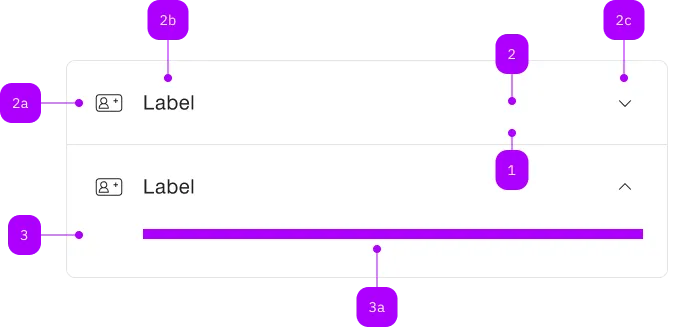
| Nummer | Typ | Beschreibung | Optional | Hinweis |
|---|---|---|---|---|
| 1 | Komponente | sbb-extension-panel | Nein | |
| 2 | Komponente | sbb-expansion-panel-header | Nein | |
| 2a | Komponente | sbb-icon | Ja | |
| 2b | Text | Label | Nein | |
| 2c | Komponente | sbb-icon | Nein | Zeigt den Zustand an |
| 3 | Komponente | sbb-expansion-panel-content | Nein | |
| 3a | Slot | Beliebiger Inhalt erlaubt | Nein |
Spielwiese
The <sbb-expansion-panel> is a component which acts as an expandable summary-details widget.
It can be used standalone or inside an sbb-accordion.
In order to correctly display the component, it must be used together with
the <sbb-expansion-panel-header> and <sbb-expansion-panel-content> components.
The header will work as a state controller, the content will act as the expandable content.
<sbb-expansion-panel>
  <sbb-expansion-panel-header>This is the header.</sbb-expansion-panel-header>
  <sbb-expansion-panel-content>This is the content.</sbb-expansion-panel-content>
</sbb-expansion-panel>
The <sbb-expansion-panel-header> component is internally rendered as a button, and it is possible to
provide text via an unnamed slot.
On the left side, a toggle icon is displayed; it flips based on the host's aria-expanded property.
The component can optionally display a <sbb-icon> at the component start using the iconName
property or via custom content using the icon slot.
If using the SBB icons, the icon should be a medium size icon.
<sbb-expansion-panel-header icon-name="swisspass-medium">Header</sbb-expansion-panel-header>
States
The visibility of the content is controlled by the value of the expanded property.
<sbb-expansion-panel expanded> ... </sbb-expansion-panel>
The disabled state can be set using the self-named variable. In this state, the component can not be collapsed or expanded.
<sbb-expansion-panel disabled> ... </sbb-expansion-panel>
Events
The <sbb-expansion-panel-header> element dispatches the toggleexpanded event when clicked.
Style
The component has two background options (milk and white, which is the default) that can be set using the color variable.
<sbb-expansion-panel color="milk"> ... </sbb-expansion-panel>
The component has two different sizes, l (default) and s, which can be changed using the size property.
The property is overridden when the component is used within a <sbb-accordion>.
<sbb-expansion-panel size="s"> ... </sbb-expansion-panel>
It's also possible to display the <sbb-expansion-panel> without border by setting the borderless variable.
<sbb-expansion-panel borderless> ... </sbb-expansion-panel>
Using the titleLevel variable, it's possible to wrap the <sbb-expansion-panel-header> in a heading tag;
if it's unset, a <div> is used as a wrapper.
<sbb-expansion-panel level="4">
  <sbb-expansion-panel-header
    >This is the header, and it will be wrapped in a h4 tag.</sbb-expansion-panel-header
  >
  <sbb-expansion-panel-content>This is the content.</sbb-expansion-panel-content>
</sbb-expansion-panel>
Accessibility
The <sbb-expansion-panel-header> and <sbb-expansion-panel-content> are automatically connected
via aria-controls and aria-labelledby when placed inside an <sbb-expansion-panel>.
The expanded attribute is used to correctly set the aria-expanded attribute on the header
and the aria-hidden attribute on the content.
API Documentation
class: SbbExpansionPanelContentElement, sbb-expansion-panel-content
Slots
| Name | Description |
|---|---|
Use the unnamed slot to add content to the sbb-expansion-panel. |
class: SbbExpansionPanelElement, sbb-expansion-panel
Properties
| Name | Attribute | Privacy | Type | Default | Description |
|---|---|---|---|---|---|
borderless | borderless | public | boolean | false | Whether the panel has no border. |
color | color | public | 'white' | 'milk' | 'white' | The background color of the panel. |
disabled | disabled | public | boolean | false | Whether the panel is disabled, so its expanded state can't be changed. |
expanded | expanded | public | boolean | false | Whether the panel is expanded. |
size | size | public | 's' | 'l' | 'l' / 's' (lean) | Size variant, either l or s. |
titleLevel | title-level | public | SbbTitleLevel | null | null | Heading level; if unset, a div will be rendered. |
Events
| Name | Type | Description | Inherited From |
|---|---|---|---|
beforeclose | Event | Emits whenever the sbb-expansion-panel begins the closing transition. | |
beforeopen | Event | Emits whenever the sbb-expansion-panel starts the opening transition. | |
close | Event | Emits whenever the sbb-expansion-panel is closed. | |
open | Event | Emits whenever the sbb-expansion-panel is opened. |
Slots
| Name | Description |
|---|---|
Use the unnamed slot to add a sbb-expansion-panel-header and a sbb-expansion-panel-content element. |
class: SbbExpansionPanelHeaderElement, sbb-expansion-panel-header
Properties
| Name | Attribute | Privacy | Type | Default | Description |
|---|---|---|---|---|---|
disabled | disabled | public | boolean | false | Whether the component is disabled. |
disabledInteractive | disabled-interactive | public | boolean | false | Whether the button should be aria-disabled but stay interactive. |
form | form | public | HTMLFormElement | null | The <form> element to associate the button with. | |
iconName | icon-name | public | string | '' | The icon name we want to use, choose from the small icon variants from the ui-icons category from here https://icons.app.sbb.ch. |
name | name | public | string | Name of the form element. Will be read from name attribute. | |
type | type | public | SbbButtonType | 'button' | The type attribute to use for the button. |
validationMessage | - | public | string | Returns the current error message, if available, which corresponds to the current validation state. Please note that only one message is returned at a time (e.g. if multiple validity states are invalid, only the chronologically first one is returned until it is fixed, at which point the next message might be returned, if it is still applicable). Also, a custom validity message (see below) has precedence over native validation messages. | |
validity | - | public | ValidityState | Returns the ValidityState object for this element. | |
value | value | public | string | '' | Value of the form element. |
willValidate | - | public | boolean | Returns true if this element will be validated when the form is submitted; false otherwise. |
Methods
| Name | Privacy | Description | Parameters | Return | Inherited From |
|---|---|---|---|---|---|
checkValidity | public | Returns true if this element has no validity problems; false otherwise. Fires an invalid event at the element in the latter case. | boolean | SbbFormAssociatedMixin | |
reportValidity | public | Returns true if this element has no validity problems; otherwise, returns false, fires an invalid event at the element, and (if the event isn't canceled) reports the problem to the user. | boolean | SbbFormAssociatedMixin | |
setCustomValidity | public | Sets the custom validity message for this element. Use the empty string to indicate that the element does not have a custom validity error. | message: string | void | SbbFormAssociatedMixin |
Events
| Name | Type | Description | Inherited From |
|---|---|---|---|
toggleexpanded | Event | Notifies that the sbb-expansion-panel is about to expand/shrink. |
Slots
| Name | Description |
|---|---|
Use the unnamed slot to add content to the sbb-expansion-panel-header. | |
icon | Slot used to render the sbb-expansion-panel-header icon. |